|
Caution: |
The AG 2000-BRI board is shipped in a protective anti-static container. Leave the board in its container until you are ready to install it. Handle the board carefully and hold it only by its edges. We recommend that you wear an anti-static wrist strap connected to a good earth ground whenever you handle the board. Take care not to touch the gold fingers that plug into the PCI bus connectors. |
This topic describes:
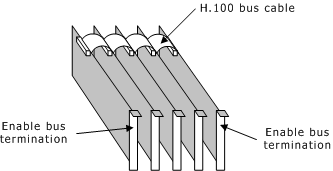
In your system, the H.100 boards are connected to one another with an H.100 bus cable. The two boards located at the end of the H.100 bus must have bus termination enabled, as shown in the following illustration. Bus termination is controlled by a DIP switch.
H.100 bus configuration
The AG 2000-BRI DIP switch block is located on the component side of the board.
DIP switch block S1 (shown in the following illustration) controls the H.100 bus termination. By default, all S1 switches are set to OFF (H.100 bus termination disabled). Setting all switches to ON enables H.100 bus termination. Set these switches to ON for the boards that are on the ends of the H.100 bus.
DIP switch S1 should be set to either all ON or all OFF.
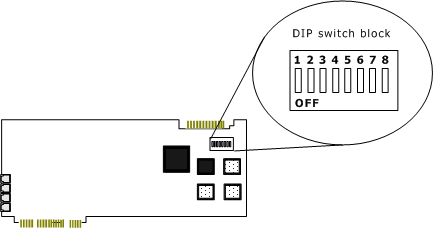
DIP switch block on the AG 2000-BRI board
If your installation does not provide bus termination, you can set up bus termination on the AG 2000-BRI board. Generally, if several terminals are connected to a BRI trunk, only one network termination must be set on at the end of the bus.
Note: Contact your telephone company to get information about your wiring configuration.
The AG 2000-BRI board allows you to set up one network termination per trunk. In the case of point-to-multipoint configuration, only the trunk connected at the far end of the S-bus must be configured with network termination ON. Otherwise, if each trunk of the AG 2000-BRI board is connected in a point-to-point configuration, you must configure all the trunks with network termination ON. If you configure one of the AG 2000-BRI trunks as the last device on the S-bus, you must configure the corresponding trunk with the network termination, as shown in the following illustration:
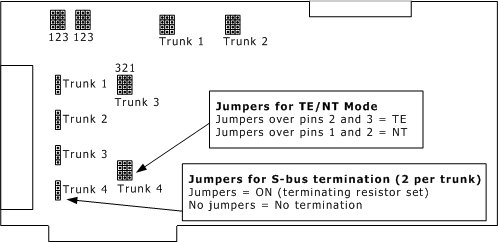
S-bus termination
Termination jumpers are arranged on the board in groups of two sets of two pins per trunk. To terminate the end trunk, set jumpers over both sets of two pins for that trunk.
For more information, refer to Connecting to the telephone network.
The AG 2000-BRI board is shipped configured for TE mode for all trunks. For each trunk, the gang jumper is set over the four pins in positions 2 and 3 to set TE mode. The gang jumper placed over positions 1 and 2 sets the board for NT mode. There are four groups of conversion jumpers, one group per trunk.
The AG 2000-BRI board does not provide a power supply to the terminals. When the terminals are not self-powered, supply power by using an external power source directly on the S-bus. NT power jumpers on the board are reserved for future use.