Connecting to the telephone network
This topic provides instructions for connecting to the telephone network.
|
Warning:

|
Important safety notes for telephony connections
Allow only
qualified technical personnel to install this board and associated telephone
wiring. Make sure
the PC chassis is grounded through the power cord or by other means before
connecting the telephone line. Never install
telephone wiring during a lightning storm. Never install
telephone jacks in wet locations. Telephone
companies provide primary lightning protection for their telephone lines.
However, if a site connects to private lines that leave the building,
make sure that external protection is provided. |
As shown in the following illustration, the end bracket on the AG 2000C
rear I/O transition board has an RJ-21 connector. The connector has 25-pair
interfaces:
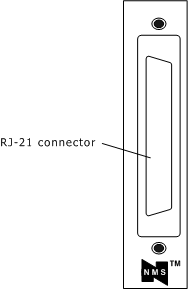
RJ-21 connector
The connector is designed to accommodate a 25-pair cable. As shown in
the following illustration, this cable is commonly wired to a punch-down
block or breakout box.
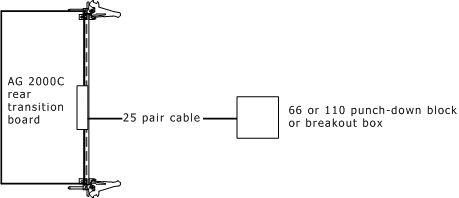
Connecting the board
The RJ-21 connector on the cable must be the 180-degree design. The
common 90-degree RJ-21 connector is not compatible with the AG 2000C board.
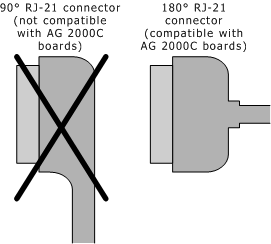
90-degree versus 180-degree RJ-21 connector
The following illustration shows the pin locations for the RJ-21 connector
on an AG 2000C rear I/O transition board:
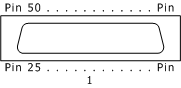
Connector pinout
The following table describes the pinouts for the RJ-21 connector:
|
Trunk |
Ring pin |
Tip pin |
|
Trunk |
Ring pin |
Tip pin |
|
1 |
1 |
26 |
|
13 |
13 |
38 |
|
2 |
2 |
27 |
|
14 |
14 |
39 |
|
3 |
3 |
28 |
|
15 |
15 |
40 |
|
4 |
4 |
29 |
|
16 |
16 |
41 |
|
5 |
5 |
30 |
|
17 |
17 |
42 |
|
6 |
6 |
31 |
|
18 |
18 |
43 |
|
7 |
7 |
32 |
|
19 |
19 |
44 |
|
8 |
8 |
33 |
|
20 |
20 |
45 |
|
9 |
9 |
34 |
|
21 |
21 |
46 |
|
10 |
10 |
35 |
|
22 |
22 |
47 |
|
11 |
11 |
36 |
|
23 |
23 |
48 |
|
12 |
12 |
37 |
|
24 |
24 |
49 |
Note: Pins 25 and 50 are
not used.
Ferrite block
The AG 2000C board is shipped with a ferrite block (P/N 33210). Attach
the ferrite block to the RJ-21 cable with one loop as shown in the following
illustration. The AG 2000C board passes FCC Part 15, Class A without this
ferrite block.
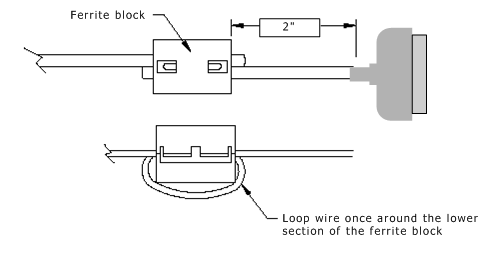
Ferrite block
Developer's cable kit
To help you get started, NMS provides an optional developer's cable
kit (P/N 80659). The kit contains two 10-foot RJ-21 cables and two breakout
boxes. Each breakout box connects one RJ-21 to 24 standard RJ-11 (POTS)
jacks for individual phones. You can use the cables to connect to the
breakout boxes or to standard 66 or 110 blocks.
All components of the developer's cable kit sold by NMS are also commercially
available from telephone product distributors such as Graybar and Anixter.
These distributors can provide variations in cable lengths.