|
Caution: |
The AG 2000 board is shipped in a protective anti-static container. Leave the board in its container until you are ready to install it. Handle the board carefully and hold it only by its edges. NMS recommends that you wear an anti-static wrist strap connected to a good earth ground whenever you handle the board. Take care not to touch the gold fingers that plug into the PCI bus connectors. |
This topic describes:
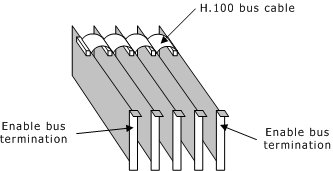
H.100 boards are connected to one another with an H.100 bus cable. The two boards located at the end of the H.100 bus must have bus termination enabled, as shown in the following illustration. Bus termination is controlled by a DIP switch.
If your system contains MVIP-90 boards, connect one of the AG 2000 boards to the H.100 bus and to the MVIP-90 bus using the MVIP bus adapter. Terminate the two ends of the H.100 bus. The two ends of the MVIP-90 bus must not be terminated. The AG 2000 board does not terminate the MVIP-90 bus.
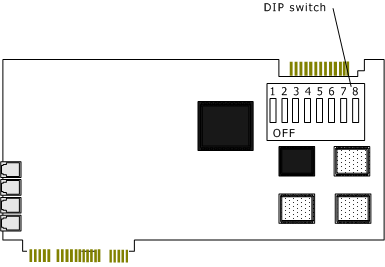
The AG 2000 DIP switch is located on the component side of the board.
DIP switch S1 controls the H.100 bus termination. By default, all S1 switches are set to OFF (H.100 bus termination disabled). Setting switch S1 to ON enables H.100 bus termination. Set switch S1 to ON only for the boards that are on the ends of the H.100 bus.
DIP switch S1 should be set to either all ON or all OFF.