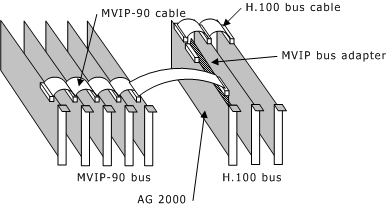
The MVIP bus adapter connects the H.100 bus to the MVIP-90 bus. This connection enables boards connected to the H.100 bus to access the MVIP-90 bus, and enables MVIP-90 boards to access the first 16 streams of the H.100 bus. When connecting to the MVIP bus adapter, the first 16 streams of the H.100 bus must be configured to run in MVIP-90 mode (clocked at 2 MHz).
If your system contains an AG 2000 and MVIP-90 boards, you must use the MVIP bus adapter. The MVIP bus adapter connects the MVIP-90 bus to the H.100 bus as shown in the following illustration. Only one MVIP bus adapter is required in a system.
|
Warning: |
The MVIP bus adapter is incompatible with the DID internal power cable or the subscriber loop internal power cable. |
Complete the following steps to connect the MVIP bus adapter to an AG 2000 board:
|
Step |
Action |
|
1 |
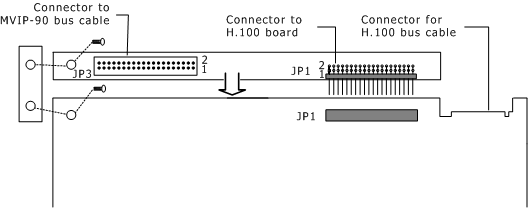
Connect the right angle connector (JP1) on the MVIP bus adapter to the connector (JP1) on the AG 2000 board. |
|
2 |
Support the MVIP bus adapter by connecting the threaded mounting piece to the MVIP bus adapter and the AG 2000 board using two #4 screws. |
|
3 |
If you have multiple H.100 boards, connect the H.100 bus cable to the AG 2000 board and to each of the other H.100 boards. |
|
4 |
Connect the MVIP-90 bus cable to the connector on the MVIP bus adapter. |
The MVIP bus adapter extends the length of the bus and can reduce the total number of boards supported on the MVIP-90/H.100 bus. The following illustration shows the MVIP bus adapter assembly: