Connecting to the telephone network

This topic provides instructions for connecting to the telephone network.

Warning:

Important safety notes for telephony connections

  • Allow only qualified technical personnel to install this board and associated telephone wiring.

  • Make sure the PC chassis is grounded through the power cord or by other means before connecting the telephone line.

  • If your system requires an external power supply (AG 2000 subscriber loop boards and AG 2000 DID boards), make sure the power supply is grounded through the power cord or by other means.

  • Never install telephone wiring during a lightning storm.

  • Never install telephone jacks in wet locations.

  • Telephone companies provide primary lightning protection for their telephone lines. However, if a site connects to private lines that leave the building, make sure that external protection is provided.
Using two wire interfaces

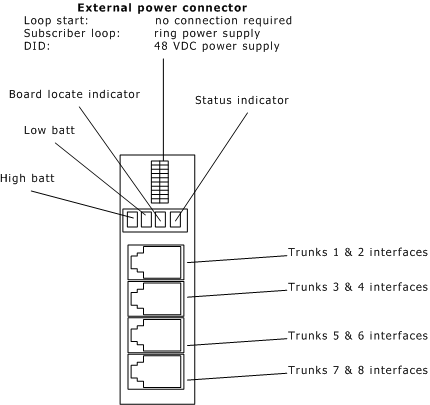
As shown in the following illustration, AG 2000 boards have four RJ-14 connectors at the end bracket:

For the AG 2000 mixed signaling modules, the trunk connectors are used as shown in the following table:

Trunks...

Are used for...

1 & 2 and 3 & 4

Loop start on any of the AG 2000 mixed signaling modules.

5 & 6 and 7 & 8

Either subscriber loop or DID depending upon the AG 2000 mixed signaling module.


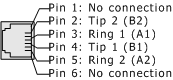
Each RJ-14 connector has the pinouts shown in the following illustration:

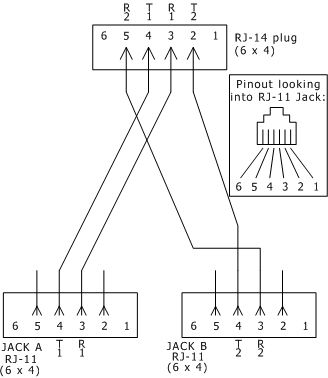
In countries where the AG 2000 board has obtained pan-European approval, a line splitter cable is available that separates the lines that go into each network connection. Refer to the following illustration if your country requires a splitter cable to connect to the network. Failure to use this cable will negate compliance with the country's regulatory authorities.