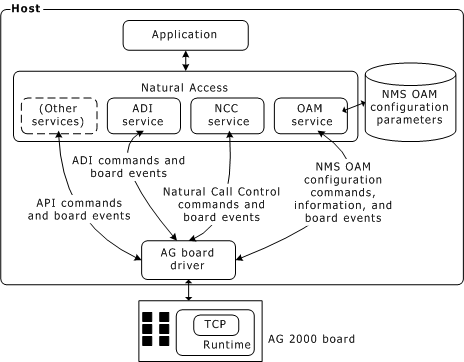
AG 2000 boards require the following software components:
Natural Access development environment that provides services for call control, voice store and forward, and other functions.
NMS OAM (Operations, Administration, and Maintenance) software and related utilities.
Configuration files that describe how the board is set up and initialized.
Runtime software that controls the AG 2000 board.
One or more trunk control programs (TCPs) that enable applications to communicate with the telephone network using the signaling schemes (protocols) used on the trunk.
The following illustration shows how these software components relate to one another:
Natural Access is a complete software development environment for voice applications. It provides a standard set of functions grouped into logical services. Each service has a standard programming interface. For more information about standard and optional Natural Access services, refer to the Natural Access Developer's Reference Manual.
NMS OAM manages and maintains telephony resources in a system. These resources include hardware components (including AG boards) and low-level board management software modules (such as clock management).
Using NMS OAM, you can:
Create, delete, and query the configuration of a component
Start, stop, and test a component
Receive notifications from components
NMS OAM maintains a database containing records of configuration information for each component as shown in the following illustration. This information consists of parameters and values.
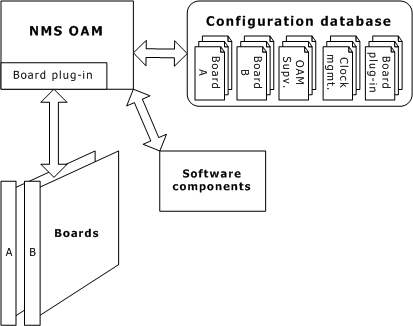
Each parameter and value is expressed as a keyword name and value pair (for example, AutoStart = NO). You can query the NMS OAM database for keyword values for any component. Keywords and values can be added, modified, or deleted.
To use NMS OAM or any related utility, ensure that the Natural Access Server (ctdaemon) is running. For more information about ctdaemon, refer to the Natural Access Developer's Reference Manual. For more information about NMS OAM, refer to the NMS OAM System User's Manual.
NMS OAM uses the AG board plug-in software module to communicate with AG boards. The name of the AG plug-in is agplugin.bpi. This file must reside in the \nms\bin directory (or /opt/nms/lib for UNIX) for NMS OAM to load it when it starts up.
NMS OAM uses two types of configuration files:
|
File type |
Description |
|
System configuration |
Contains a list of boards in the system and the name of one or more board keyword files for each board. |
|
Board keyword |
Contains parameters to configure the board. These settings are expressed as keyword name and value pairs. |
Several sample board keyword files are installed with Natural Access. Each of these files configures the board to use a different protocol (for example, Wink Start or Off-Premises Station). You can reference these files in your system configuration file or modify them.
When you run the NMS OAM oamsys utility, it creates NMS OAM database records based on the contents of the specified system configuration file and board keyword files. oamsys directs NMS OAM to start the boards and configure them according to the specified parameters. For more information, refer to Configuring and starting the system with oamsys.
The runtime software consists of runfiles and DSP files. The runfile is the basic low-level software that an AG board requires to operate. DSP files enable the AG on-board digital signal processors to perform certain tasks, such as DTMF signaling, voice recording, and playback.
Several runfiles and DSP program files are installed with Natural Access. Specify the files to use for your configuration in the board keyword file. Refer to Using board keyword files for more information. When NMS OAM boots a board, the runfiles and DSP program files are transferred from the host into on-board memory. For more information about the DSP files shipped with Natural Access, refer to the ADI Service Developer's Reference Manual.
AG 2000 boards are compatible with a variety of signaling schemes called protocols. To program an AG board for a specific protocol, a trunk control program (TCP) is loaded on the board. The TCP performs all of the signaling tasks to interface with the protocol used on the line.
Several different protocol standards are used throughout the world. These standards differ considerably from country to country. For these reasons, different TCPs are supplied with Natural Access for various protocols and country-specific variations.
You can load more than one TCP at a time for applications that support multiple protocols simultaneously. TCPs are specified in the configuration file and are downloaded to the board by oamsys. TCPs run on the board, relieving the host computer from the task of processing the protocol directly. For more information about TCPs, refer to the NMS CAS for Natural Call Control Developer's Manual.