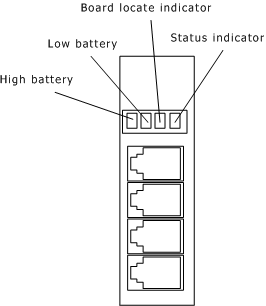
The AG 2000 board has four LED indicators on the end bracket of the board and 14 LED indicators on the component side of the board.
The following illustration shows the four LED indicators on the end bracket of the AG 2000 board:
The board locate indicator identifies the board using the software. The status indicator remains on after the board is booted.
The following table present the settings for high battery and low battery:
|
|
High battery |
Low battery |
|---|---|---|
|
Loop start |
N/A |
N/A |
|
Subscriber loop |
On |
On |
|
DID |
On |
N/A |
On indicates that the LED must be lit for proper operation. N/A indicates that it is not required for the LED to be lit.
Note: It is not required to have a low battery on the subscriber loop. If a single voltage is used, it must connect to high battery. If the loop cable is less than 2000 feet, -24 VDC should be used. If the loop cable is greater than 2000 feet, -48 VDC should be used.
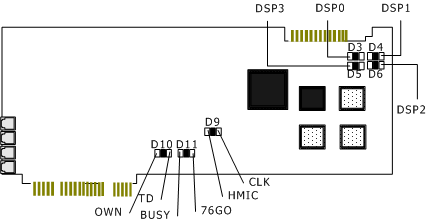
The location of the 14 LEDs (7 pairs) on the component side of the AG 2000 board is shown in the following illustration:
|
LED |
Purpose |
Description |
|---|---|---|
|
D3 - D6 |
DSPx_RST (4 red LEDs) |
The corresponding DSP is communicating with the NS486. Red = Problem |
|
D9 |
HMIC (green) |
Lit = No problem with the HMIC. Not lit = Problem with the HMIC. |
|
D9 |
CLK (red) |
Lit = No problem with the clock section of the HMIC. Not lit = Problem with the clock section of the HMIC. |
|
D10 |
OWN (green) |
Owner of SRAM. Lit = Idle of host. Not lit = Coprocessor. |
|
D10 |
TD (red) |
Transfer direction bit. Lit = Host access to SRAM. Not lit = 486 access to SRAM. |
|
D11 |
BUSY (green) |
Lit = SRAM is idle. Not lit = SRAM is in use. |
|
D11 |
76GO (red) |
NS486 out of reset. |