Keying the chassis
A CG 6060C has several mechanical interlocks, called keys, that prevent
the board from being inserted in an incompatible chassis. Keying protects
the board and other devices in the chassis from damage.
Before you install CG 6060C boards, configure the keying of your chassis
to be compatible with the CG 6060C keying. This keying helps ensure that
you will not accidentally insert an incompatible board in the chassis.
This topic describes how to key the slots in your chassis for CG 6060C
boards. For detailed information on CompactPCI chassis keying, refer to
the CompactPCI Computer Telephony Specification
PICMG 2.5 R1.0 and to the IEEE
1101.10.
Warning:
 |
To
protect yourself and your equipment, allow only qualified personnel
to install keying. The personnel must be familiar with the CompactPCI
Computer Telephony Specification PICMG 2.5, R1.0 document. Dialogic
is not responsible if you install a board and chassis keying has
not been properly configured. |
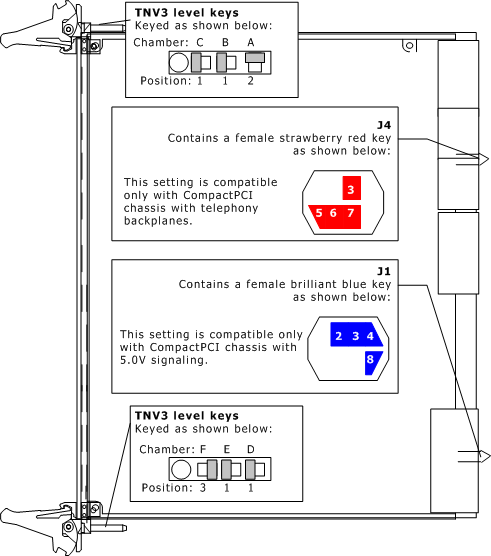
The following illustration shows how the CG 6060C board keys are configured:
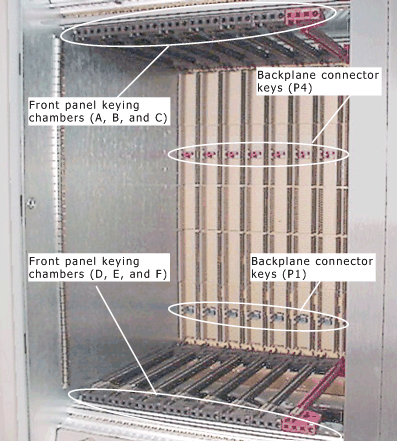
The following illustration shows some of the keying chambers in a CompactPCI
chassis that you must configure for a CG 6060C. You must also key rear
keying chambers A through F that are not shown.
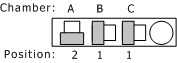
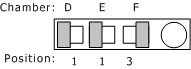
Configure keying in the chassis as described in the following table:
Keying chambers on chassis |
Board configuration |
Rear transition board configuration |
A, B, and C
(Front and rear) |
Configure as shown:
|
|
D, E, and F
(Front and rear) |
Configure as shown:
|
|
P1 |
Verify that the male brilliant blue key is
configured as shown:

|
|
P4 |
Verify that the male strawberry red key is
configured as shown:

|
|