To supply talk battery power to the station phones and to power ringing (if necessary), an external power supply is required.
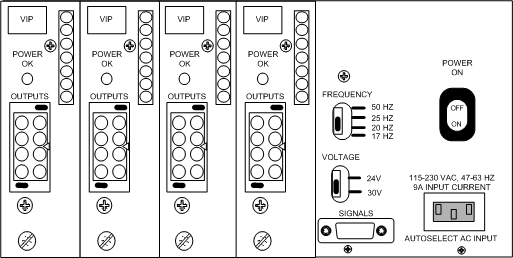
NMS supplies a rack mount power supply chassis that can contain up to four interchangeable supply modules. Each module can power up to two CX 2000C boards. Four modules produce a total combined output of 8.8 A for -48 V and -30 V/-24 V. The ring output total is 0.68 A. The supply outputs are isolated from ground and rely on the CX 2000C board to ground the return line. This provides the best EMI performance. The following illustration shows a rack mount power supply chassis with four modules:
The power supply autoranges for global power standards and can be configured for local ring frequency standards to satisfy global deployment requirements.
The following table indicates the required number of power supply chassis and modules, based upon the number of CX 2000C boards in your system. The table assumes a normal configuration, in which all stations are active on each board. Sufficient ring signal is supplied so that for short (not continuous) peak demand periods, more than 20 telephones rated at 1.0 REN can ring simultaneously.
|
Number of CX boards |
Power supply chassis required (Each chassis includes one power supply module) |
Expansion modules required |
|---|---|---|
|
1 |
1 |
0 |
|
2 |
1 |
0 |
|
3 |
1 |
1 |
|
4 |
1 |
1 |
|
5 |
1 |
2 |
|
6 |
1 |
2 |
|
7 |
1 |
3 |
|
8 |
1 |
3 |
To provide redundancy, or to supply additional ring power to your system, install one more power supply module then you need. The module-to-board connectors on all modules are wired in parallel, so if one module fails, another module supplies power to the first module's board connector. This helps ensure uninterrupted power to any connected boards in the unlikely event that a module fails.
If you connect the power supply to a UPS, the contribution of a fully populated power supply chassis is 1.8 kW.
The following table indicates the required number of power supply chassis and modules, in a configuration in which an extra power supply module is installed:
|
Number of CX boards |
Power supply chassis required (Each chassis includes one power supply module) |
Expansion modules required |
|---|---|---|
|
1 |
1 |
1 |
|
2 |
1 |
1 |
|
3 |
1 |
2 |
|
4 |
1 |
2 |
|
5 |
1 |
3 |
|
6 |
1 |
3 |
|
7 |
N/A |
N/A |
|
8 |
N/A |
N/A |
In a system containing seven or eight CX boards, there is a maximum of four modules per chassis.
Consider the following items when installing a power supply in a rack:
Do not block the power supply vents, or otherwise restrict airflow when installing the unit into a rack.
Ensure that the rack is properly secured, so the rack is stable and cannot easily tip.
Ensure that the electrical requirements of the system do not exceed the capacity of the electrical circuit.
If an uninterrupted power supply is used to back up the rack mount supply, it should be rated for at least 1.8 kW.
Note: In the unlikely event that the power supply current exceeds the current rating, the power supply output clamps to zero to protect the supply. The power supply may need to be turned off momentarily and then turned back on to restore normal operation.
You can connect power supply modules directly to CX 2000C boards. Alternately, if you are using a CompactPCI chassis whose backplane has a telecom power bus, you can use a single cable to connect one of the modules to the bus. Since the modules are wired in parallel, all power will reach the bus regardless of which module you physically connect.
NMS supplies two cables for these connections:
Shipped with the module - a cable with a male 8-pin Positronic connector on one end (to connect to the module), and two 10-pin MOLEX mini junior connectors on the other end to connect to the TELCO POWER connectors on CX 2000C boards.
Can be ordered separately - a cable with a male 8-pin Positronic connector on one end (to connect to the module), and #8 spade lugs on the other end to connect to the chassis telecom power bus.
To connect the NMS power supply directly to each board:
On the power supply chassis, set the VOLTAGE switch to 30 V.
On the power supply, set the FREQUENCY switch to a ringing frequency (default = 20 Hz).
The default ringing frequency setting (20 Hz) operates correctly for most applications. However, you can change this setting if a station does not ring when directed, or to change the sound of the ringer to match that of other devices in the target country or region.
|
Warning: |
Do not change the frequency or voltage while the power supply is operating. |
Plug the Y end of the cable into the TELCO POWER connectors on the CX 2000C boards. This connector is located on the rear transition board.
Plug the other end of the cable into the power supply.
When you have finished configuring the power supply, plug it into a power source.
If your CompactPCI chassis contains busses to distribute power from the ringing power supply to the boards, you can connect the NMS power supply directly to the chassis instead of to each board. This reduces the amount of cabling required.
Six distribution busses across the backplane are needed: Vbat, VbatRtn, SELVbat, SELVbatRtn, VRG, and VRGRtn. These busses must be rated for a minimum of 1 A per CX 2000C board. The cable interface to the bus should be lugs on the bus.
Use the cable, which can be ordered separately, to connect the NMS power supply to the chassis:
On the power supply, set the VOLTAGE switch to 30 V.
Note: You can set the voltage to 24 V if the length of the 24 AWG cable between the system and each station is 2000 feet or less, with a total resistive load of 600 Ohms or less.
On the power supply, set the FREQUENCY switch to a ringing frequency (default = 20 Hz).
The default ringing frequency setting (20 Hz) operates correctly for most applications. However, you can change this setting if a station does not ring when directed, or to change the sound of the ringer to match that of other devices in the target country or region.
|
Warning: |
Do not change the frequency or voltage while the power supply is operating. |
Connect one end of the cable to the OUTPUTS connector on any module in the power supply chassis.
At the other end of the cable, connect each wire as described in the following table:
|
Power supply output |
Chassis connection |
Chassis backplane current per board |
|---|---|---|
|
-48 |
-V bat |
1 A |
|
-48 return |
V bat Rtn |
1 A |
|
-30 |
SELVbat |
1 A |
|
-30 return |
SELVbatRtn |
1 A |
|
Ring |
VRG |
.250 A |
|
Ring return |
VRGRtn |
.250 A |
|
Chassis ground |
Frame ground |
When you have finished configuring the power supply, plug it into a power source.
The NMS rack mount power supply has a DB9 connector on the rear panel that can be used to indicate an alarm condition. The following table lists the pinouts of this connector:
|
Pin |
Description |
|---|---|
|
1 |
Chassis ground |
|
2 |
1.5K resistor to +12 V DC |
|
3 |
4.7K resistor to +5 V DC |
|
4 |
Alarm signal output. This is an open collector NPN transistor with the emitter connected to COMMON. The transistor is normally on. It is turned off for an alarm condition. The transistor is rated for 20 V DC and 5 mA. The 4.7K resistor on pin 3 or pin 7 can provide pull-up to +5 V DC. |
|
5 |
Optional signal |
|
6 |
+5 V DC @ 3 mA |
|
7 |
4.7 K resistor to +5 V DC |
|
8 |
COMMON |
|
9 |
COMMON |
To power up the supply, turn on the POWER ON switch located on the rear panel of the unit. When the unit is operating properly, the green POWER ON indicator on the front panel glows. In addition, the POWER ON indicator on each module glows (visible on the rear panel of the unit).
