cdicc
Demonstrates a call center application using the CDI service with mixed board support in a single application.
cdicc [options]
where options include:
|
Option |
Description |
|---|---|
|
-B [sw:]dev |
T1 board [PPX switch number:] and board device number (oamsys.cfg board number). Default = 0:0. |
|
-b [sw:]dev |
CX 2000 or CX 2000C board [PPX switch number:] and board device number (oamsys.cfg board number). Default = 1:0. |
|
-T n |
T1 trunk or span number. Default = 1. The values are one-based. |
|
-C n |
T1 channel or slot number on trunk or span. Default = 0. Value is zero based. |
|
-c n |
CX 2000 or CX 2000C board channel or slot number. Default = 0. Value is zero based. |
|
-o n |
0 = Inbound call center demonstration. 1 = Outbound call center demonstration (default). |
|
-d n |
Number to dial for outbound demonstration. Default = 5551212. |
For example, for the outbound demonstration, enter:
cdicc -B0:0 -b1:1 -C0 -c0 -T1 -o1 -d2711100
For the inbound demonstration, enter:
cdicc -B0:0 -b1:1 -C0 -c0 -T1 -o0
Note: The demonstration uses the wnk0 protocol.
cdiDisableBattery, cdiEnableBattery, cdiStartSignalDetector, cdiStartTimer, cdiStartTones, cdiStopSignalDetector, cdiStopTimer, cdiStopTones
cdicc performs the functions of a simple call center with two call center application modes: inbound and outbound. Depending on the -o command line flag, the demonstration program does the following:
If the demonstration is in inbound mode, the program waits for an incoming call on the specified T1 port. When an incoming call is offered, the call is answered. Call center queue prompts play requesting an account number and asking the caller to hold for the next available agent. The prompts continue to play until the agent handset connected to the CX board is taken off-hook. When the agent is off-hook and a prompt sequence concludes, the caller is provided ring-back tone and the agent is provided headset ring tone prior to call connection.
If the demonstration is in outbound mode, the demonstration program waits for the agent handset connected to the CX board to be taken off-hook. When the agent is off-hook, the demonstration program dials the telephone number specified in the command line. The agent hears ringing and then holds for the subscriber at the end of the T1 line to answer the call.
The demonstration program performs all initial switching to voice and signaling DSPs, switching of caller and agent, and subsequent reconnection of DSPs using the Point-to-Point Switching Service (PPX).
The following procedure assumes that you are using an AG 4000 board and a CX 2000 or CX 2000C board with a 2500-type telephone connected to one of the lines. You can run cdicc with the cdipbx demonstration program to provide the function of the PSTN. Both demonstration programs can share one pair of AG 4000/C or AG 4040/C and CX 2000/C boards.
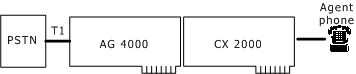
The demonstration configuration is as follows:
cdicc demonstration program configuration
To run cdicc:
Configure the boards as described in Preparing to run the demonstration programs.
Boot the boards as described in Booting the system.
Connect a 24-port cable to the top 24-port connector on rear I/O connector of the CX 2000 or CX 2000C board and to a 24-port telephone jack breakout box.
Plug a telephone into port 1 of the breakout box and another telephone into port 11 of the breakout box.
Place a T1 loopback cable into the T1 and T2 lines of the AG board.
Inbound procedure
Navigate to the following directory:
\nms\ctaccess\demos\cdicc (Windows)
opt/nms/ctaccess/demos/cdicc (UNIX)
Start cdicc by entering the following command:
cdicc -B0:0 -b1:1 -T2 -C0 -c10 -o0
The application automatically detects the T1 board type and sets stream values accordingly. The call center agent telephone connected to port 11 (-c10) does not have a dial tone.
In another command prompt window, navigate to the following directory:
\nms\ctaccess\demos\cdipbx (Windows)
opt/nms/ctaccess/demos/cdipbx (UNIX)
Start cdipbx by entering the following command:
cdipbx -B0:0 -b1:1 -T1 -C0 -c0 -N1 -n1 -x101
The customer telephone connected to port 1 (-c0) has a dial tone.
Take the customer handset attached to the cdipbx demonstration (station in port 1) off-hook and dial a 7-digit number to access the T1 line of the cdicc demonstration.
You hear a prompt welcoming you to the CX 2000 Call Center, and you are prompted for a 4-digit account number.
Key in any four digits on the telephone's DTMF keypad.
You then hear three additional prompts asking you to hold, to continue to hold, and providing a short description of the CX 2000 or CX 2000C board.
If the agent handset remains on-hook, these three prompts continue playing over and over as a set.
Take the agent handset off-hook.
When the customer hears a complete prompt set, the agent handset hears a call indication tone and the customer hears a ring-back tone.
Immediately after the tones are played, the customer and the agent are connected and can begin to talk.
Hang up each handset.
Outbound procedure
Navigate to the following directory:
\nms\ctaccess\demos\cdicc (Windows)
opt/nms/ctaccess/demos/cdicc (UNIX)
Start cdicc by entering the following command:
cdicc -B0:0 -b1:1 -T2 -C0 -c10 -o1 -d2711101
The application automatically detects the T1 board type and sets stream values accordingly. The call center agent telephone connected to port 11 (-c10) does not have a dial tone.
In another command prompt window, navigate to the following directory:
\nms\ctaccess\demos\cdipbx (Windows)
opt/nms/ctaccess/demos/cdipbx (UNIX)
Start cdipbx by entering the following command:
cdipbx -B0:0 -b1:1 -T1 -C0 -c0 -N1 -n1 -x101
The customer telephone connected to port 1 (-c0) has a dial tone.
After starting both instances of the demonstration programs, pick up the agent telephone attached to the CX 2000 or CX 2000C board.
The predictive dialer function in the demonstration program automatically dials the phone number indicated in the -d option on the specified T1 channel.
The agent handset hears a call indication tone and the customer telephone rings.
When the customer answers, the agent and the customer are connected and can begin to talk.
Hang up each handset.