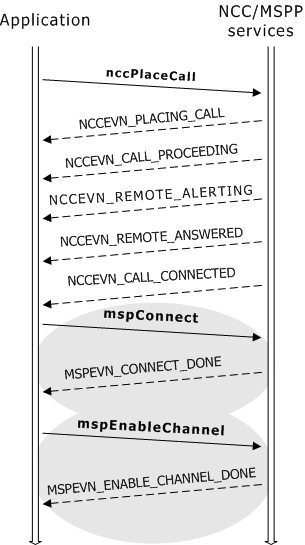
When placing outbound calls, applications use nccPlaceCall to place calls to external PSTN networks. Fusion applications wait for the NCCEVN_CALL_CONNECTED event (returned by nccPlaceCall) before connecting MSPP endpoints and channels with mspConnect.
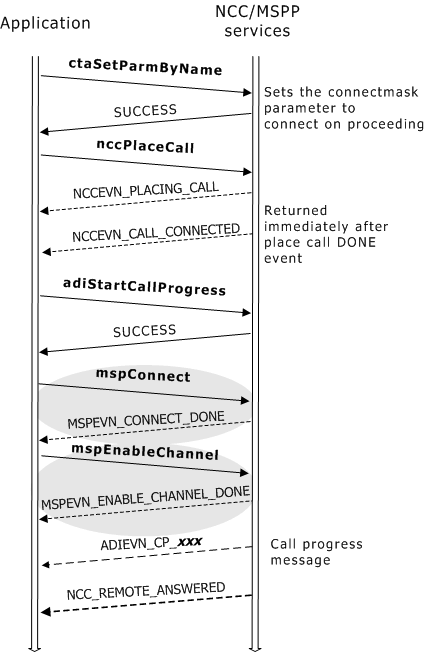
While waiting for the PSTN to connect the call, the NCC service returns several call progress events that indicate the call's status until the call is answered. The Fusion application placing the outbound call can initiate an MSPP connection during this period in order to play ring back across the IP network that alert the calling party of the status of the call. In this case, the application uses ADI service call progress functions to monitor the call.
To place an outbound call and to monitor call progress (even after initiating an MSPP connection):
|
Step |
Action |
|
1 |
Invoke adiStartCallProgress to initiate call progress monitoring by the ADI service. |
|
2 |
Invoke ctaSetParmByName to set the NCC.X.ADI_PLACECALL.CONNECTMASK parameter to NCC_CON_ON_PROCEEDING. This parameter setting tells the NCC service to return an NCCEVN_CALL_CONNECTED event immediately after it returns an NCCEVN_PLACING_CALL event. |
|
3 |
Connect an MSPP channel with two MSPP endpoints by invoking mspConnect. |
The following illustrations show two sequences for placing outbound calls from a Fusion gateway. In the first sequence, the application does not track the call's progress after the MSPP connection is initiated. The illustrations do not show specific call progress events returned by the ADI service, or other ADI functions called by the application (for example, to play ring back).
The following illustration shows the call setup function sequence as the application monitors call progress from the time the MSPP connection is initiated until the call is answered:
For more information about NCC call control, refer to the Dialogic® NaturalAccess™ NaturalCallControl™ API Developer’s Manual.