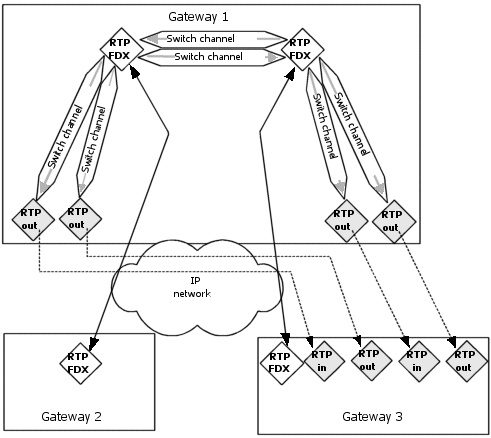
The RTP Switch sample program (rtpswitchsamp) creates a switching or forking bridge that consists of two full duplex connections switched together and an arbitrary number of monitoring parties attached to each end as described in Details. Switching from RTP IPv4 endpoints to RTP IPv6 endpoint (and vice versa) is not supported.
This sample program demonstrates RTP switching capability in Fusion.
sw.cmd
mspCreateEndpoint, mspCreateChannel, mspConnect, mspEnableChannel, mspDisableChannel, mspDisconnect
Before running the sample program:
Edit one of the sample Fusion CG board keyword files so that it contains configuration information appropriate for the system.
Edit the fusion_oamsys.cfg file so that it specifies the following information for the system:
|
Entry |
Description |
|
Bus |
Bus number of the CG board. |
|
Slot |
Slot number of the CG board. |
|
File name |
File name of the CG board keyword file. |
Edit the sw.cmd file to specify the following information:
|
Entry |
Description |
Allowed values |
|
-l localIPaddress |
Local IPv4 or IPv6 address of the CG board Ethernet interface (for example, IP address of Gateway 1 in the following illustration). |
IPv4 or IPv6 address. |
|
-d destIPaddress1 |
Destination IPv4 or IPv6 address of the gateway where the voice data will be transmitted (for example, IP address of Gateway 2 in the following illustration. |
IPv4 or IPv6 address. |
|
-E |
Disables echo cancellation processes performed on board DSPs. Set this option when using hardware echo cancellation on CG 6565 and CG 6565C boards. |
N/A |
|
-r destIPaddress2 |
Destination IPv4 or IPv6 address of the gateway where the voice data will be transmitted (for example, IP address of Gateway 3 in the following illustration). |
IPv4 or IPv6 address. |
|
-6 |
Specifies to create RTP IPv6 endpoints (the default is RTP IPv4 endpoints). |
|
|
-u udpportnum |
UDP port to use as a base for the first channel. Default is 5004. |
UDP port number. |
|
-m udpportmon |
UDP port to use as a base for the first monitoring channel. Default is 5040). |
UDP port number. |
|
-n numfork |
Number of forking bridges to be created. Default is 1. |
1 - 11. |
|
-b boardnum |
CG board number. Default is 0. |
Not applicable. |
The following command creates two forking bridges on the board. rtpswitchsamp creates, connects, and enables the RTP IPv4 endpoints required to create the bridges. It then waits for the user to press a key and then disables and destroys the bridge.
Rtpswitchsamp -l 198.62.150.1 -d 198.62.150.2 -r 198.62.150.3 -u 5004 -m 5040 -n 2 -b 0
After initializing the system hardware with oamsys, run rtpswitchsamp to verify that the system supports switching between RTP connections.
As shown in the following illustration, the RTP Switch sample program creates a switching or forking bridge that consists of two full duplex connections switched together, and fifteen monitoring parties attached to each end:
In this configuration, RTP out endpoints on Gateway 1 act as monitoring endpoints that direct intercepted voice data to Gateway 3.