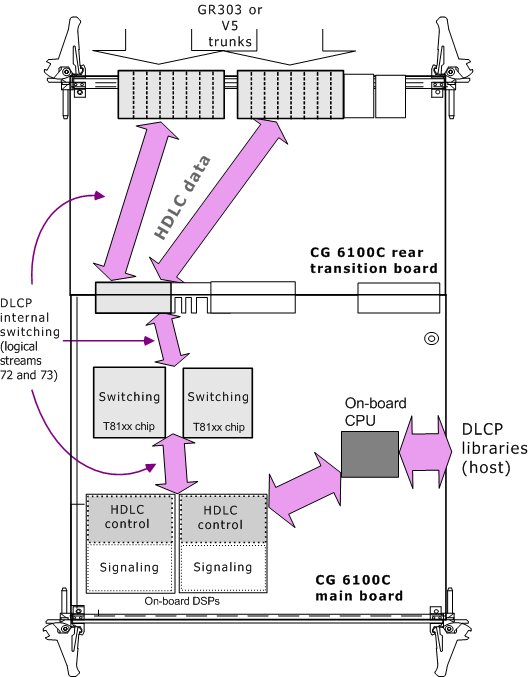
On CG 6100C and CG 6500C boards, HDLC processing is performed through the on-board DSP cores. The application must configure in advance any DSP resources necessary for HDLC processing. The NMS GR303 and V5 libraries automatically perform any necessary switching between associated T1/E1 interfaces and DSP cores to set up HDLC channels. When an application creates an HDLC channel for a particular T1 or E1 link, the NMS GR303 library or NMS V5 library switches the HDLC data from a line interface to an assigned DSP core for processing. When the application destroys the HDLC channel, the associated switch connections are restored to their initial state.
The following illustration shows switching performed internally by the NMS GR303 library to support up to 16 T1 trunks on a CG 6100C board with four DSP cores. In the example, the trunks can support up to 32 HDLC channels of data. Because each DSP core can process up to 16 channels of data, two on-board DSP cores are required to process the HDLC data.
|
Caution: |
Once the application has provisioned at least one HDLC channel, it should not reset the CG 6100C switch block until all channels are destroyed. If the application resets the board switch block while any HDLC channels are active, any associated HDLC channel connections are destroyed. |
Use the showcx95 utility to verify internal switch connections set up by the NMS GR303 or NMS V5 libraries.
When configuring the CG 6100C or CG 6500C board, configure DSP resources to support the maximum number of HDLC channels that your application requires. Consider the following information when you set up the board:
Each DSP core can handle up to 16 HDLC channels.
DSP cores configured for HDLC data processing cannot be used for any other kind of data processing. That is, any DSP core used for processing HDLC channels must be dedicated to that task.
Before configuring the CG 6100C boards, determine the number of DSP cores you need to provide HDLC processing resources and which on-board DSPs you will use. For example, if your application requires up to 48 HDLC channels, you must configure at least three DSP cores (48/16 = 3) to provide HDLC resources.
To configure the DSP HDLC processing resources, use the board keywords described in the sections that follow.
Note: The keywords described in the following sections are mandatory for any CG 6100C or CG 6500C board that performs HDLC processing.
Include the following board keywords in every CG 6100C or CG 6500C board keyword file that will provide DSP resources for HDLC data processing:
|
Keyword |
Description |
|
DSP.HDLC.Enable |
Enables the stream for HDLC running on the DSPs. Set this keyword to YES to run DLCP on the CG 6100C board. When set to YES, the CG 6100C switch model supports two additional streams, 72 and 73, for full-duplex DSP-based HDLC control. |
|
DSP.C5x[x].CmdQStart = 0xEA00 DSP.C5x[x].CmdQSize = 0x00fe DSP.C5x[x].DataInQStart = 0xEB00 DSP.C5x[x].DataInQSize = 0xA00 DSP.C5x[x].DspOutQStart = 0xF500 DSP.C5x[x].DspOutQSize = 0xA80 |
Changes the memory map of the specified DSP(s). You can modify the DSP range to indicate the appropriate DSP core, but you cannot change the HDLC values provided in the sample board keyword files. Note: Without these keywords, a DSP core cannot process more than four channels of HDLC. |
|
DSP.C5x[x].XLaw = compand |
Enables or disables companding on the specified DSP cores. Disable companding for any DSP cores dedicated to the HDLC processing. Specify the range of DSPs you want to dedicate to HDLC processing. For example, to configure DSP cores three, four, and five for HDLC companding, specify the following (this (disables companding): DSP.C5x[3..5].Xlaw = NO_LAW |
|
DSP.C5x[x].Files = DPMfile |
Specifies digital signal processor function modules (DPMs) loaded to CG board DSPs. For example: DSP.c5x[x].Files = hdlc |
|
DSP.c5x[x].Libs = libfile |
Specifies which TCP(s) to load to the CG onboard processors. For example: DSP.c5x[x].Libs = cg6klibu hdlc_lib |
|
DLMFiles[0] = dlmfile |
Specifies an optional runtime component (modular extension to the core file) to be transferred to the board by the configuration file. For example: DLMFiles[0] = cg6krun |
For all applicable keywords, x is a zero-based range of DSP numbers. That is, 0 is associated with the first physical on-board DSP.
|
Caution: |
The DSP keyword values shown are specifically required for configuring the CG 6100C and CG 6500C DSP resources needed for HDLC processing. Use only the allowed values shown for these keywords. |
For more information about setting up DSP resources for other processing tasks (for example, signaling, echo cancellation, or IVR functions), refer to the board's installation and developer's manual or to the NMS OAM System User's Manual.
On CG 6100C and CG 6500C boards, you must also specify an appropriate call trunk control program (TCP) to run on the board. If the application does not want to perform on-board call control, it should set the TCPFiles keyword to nocc. This setting specifies that the board does not reserve DSP resources for performing call control.
Refer to and CG 6100C board keyword files and CG 6500C board keyword files for examples of board keywords used to configure these boards for NMS GR303 and NMS V5.