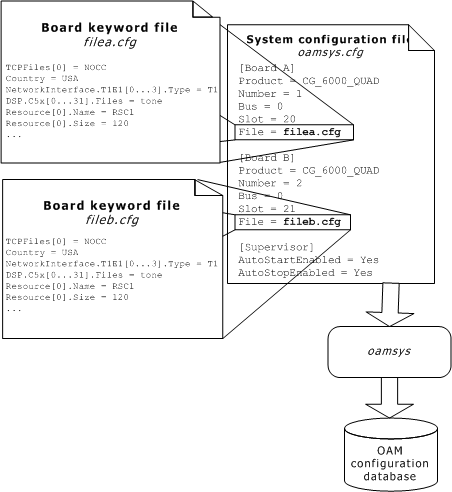
To configure and start the boards, specify configuration parameters in the board keyword file. Then reference the board keyword file for each board in another file, the system configuration file. When you run oamsys, it creates a record for each board in the OAM database and stores the parameters and values of the board. oamsys then starts the board, configured as described in the database.
The following illustration shows the relationship between the board keyword files and the system configuration file:
The DLCP software provides several sample board keyword files that demonstrate how to use NMS OAM board keywords for particular types of system configurations. Edit a sample board keyword file to specify appropriate configuration information for your system, including the line interface type. For detailed information about customizing CG board keyword files, refer to the board's hardware documentation. The following table lists the DLCP sample board keyword files:
|
Board keyword file |
Board type |
Description |
|
cg6gr303.cfg |
CG 6000 or CG 6000C |
Configuration file for T1 interfaces used on GR303 systems. |
|
cg6v5.cfg |
CG 6000 or CG 6000C |
Configuration file for E1 interfaces used in V5.2 systems. |
|
cg61gr303.cfg |
CG 6100C |
Configuration file for T1 interfaces used on GR303 systems. |
|
cg61v5.cfg |
CG 6100C |
Configuration file for E1 interfaces used in V5.2 systems. |
|
cg65gr303.cfg |
CG 6500C |
Configuration file for T1 interfaces used on GR303 systems. |
|
cg65v5.cfg |
CG 6500C |
Configuration file for E1 interfaces used in V5.2 systems. |
CG board settings specified in the board configuration files include:
Line interface type (T1/E1)
Board clocking configuration
On-board resource management
Downloadable software modules
To configure the T1 (for GR303) or E1 (for V5) interfaces, ensure that the following keywords display in the board keyword file:
|
OAM keyword |
GR303 (T1) values |
V5.2 (E1) values |
Specifies... |
|
NetworkInterface.T1E1[x].Type |
T1 |
E1 |
Trunk type for each trunk on the board. |
|
NetworkInterface.T1E1[x].Impedance |
DSX1 |
G703_120_OHM | G703_75_OHM |
Type of cable connecting a CG board to the telephone network. |
|
NetworkInterface.T1E1[x].LineCode |
AMI | B8ZS | AMI_ZCS | AMI_BELL |AMI_DDS| AMI_GTE |
HDB3 | AMI |
Ones density maintenance method used on the trunk line to maintain a clear channel transmission. |
|
NetworkInterface.T1E1[x].FrameType |
ESF |
CEPT |
T1 or E1 trunk framing format for the current board(s) or current trunk(s). |
|
NetworkInterface.T1E1[x].SignalingType |
CAS |
RAW |
How voice and signaling information is routed to and from the E1 or T1 trunk and DSP resources. |
For all keywords in the table, x is a 0-based trunk number or range of trunk numbers as defined by NMS OAM. For CG 6000 or CG 6000C boards, x can be an integer between zero and three. For CG 6100C or CG 6500C boards, x can be an integer between zero and 15.
Note: When setting the NetworkInterface.T1E1[x].Type keyword, you must specify all trunks as either T1 trunks or E1 trunks. Do not specify more than one trunk type.
For more information, refer to the T1 and E1 trunk channels section in this manual.
When your board keyword file(s) are complete, create a system configuration file that describes the overall configuration of your system and references the board keyword file for each board. The system configuration file is typically named oamsys.cfg. Refer to the NMS OAM System User's Manual for information on the syntax and structure of oamsys.cfg.
Note: You can use the oamgen utility (included with the NMS OAM software) to create a sample system configuration file for your system. The system configuration file created by oamgen may not be appropriate for your configuration. You may need to make further modifications to the file before running oamsys to configure your boards based on the file. For more information about oamgen, refer to the NMS OAM System User's Manual.
When necessary, you can modify the CG board bus and slot number to include multiple boards in a system. Each board entry in the system configuration file must contain the following keywords:
|
Keyword |
Description |
|
Product |
Board product type |
|
Number |
Logical board number |
|
Bus |
PCI Bus number of the CG board |
|
Slot |
PCI Slot number of the CG board |
To obtain CG board bus and slot numbers, run the pciscan utility. For more information about pciscan, refer to the NMS OAM Service System Users's Manual.
After you customize the individual board keyword files and create the system configuration file, run the oamsys utility to configure the boards as specified in the configuration files. When you run the oamsys utility, it creates NMS OAM database records based on the contents of the specified system configuration file and board keyword files. It then directs NMS OAM to start the boards and configure them according to the specified parameters.