This topic presents the following information:
When the GR303 system starts up, invoke NMS_GR303Initialize to load the NMS GR303 library, start the library's internal processing tasks, and initialize its internal software structures.
Invoke NMS_GR303SetTrace any time after loading the physical library. Arguments for NMS_GR303SetTrace specify the level of tracing performed by the library, and whether the library returns tracing information to the application or logs the information in a file.
After initializing the NMS GR303 library, call NMS_GR303ProvisionInterface to specify the hardware-specific HDLC channel locations, configure HDLC data processing function callbacks, and allocate memory for receiving data from the physical layer. The NMS GR303 library:
Configures and resets HDLC channels on the board.
Begins monitoring DS1 links associated with HDLC channels.
Resets any internal statistics structures.
Automatically sets the signaling mode to RAW for timeslots occupied by the HDLC channels.
Start the provisioned interface to enable data to flow through HDLC channels. The NMS GR303 library starts to monitor DS1 links as soon as the links are provisioned. Therefore, applications can call NMS_GR303GetDS1Status and NMS_GR303ResetDS1Status to obtain DS1 link status information or reset the status of existing DS1 links.
NMS recommends that applications provision and start the upper layers of the GR303 protocol after starting the NMS GR303 physical layer interface with NMS_GR303StartInterface. In some cases, the upper layers of the stack can expect incoming HDLC traffic after the interfaces are provisioned but before they are started.
GR303 applications must establish a mapping between the physical layer structures for hardware-specific HDLC device locations and upper layer GR303 protocol related structures. Because the physical layer is not aware of the protocol association for each hardware resource (for example, whether the DS1 link is active or standby mode, or whether a DS0 link is carrying EOC or TMC data) the application should map this information for the upper layers of the GR303 protocol stack.
After provisioning the NMS GR303 interface, invoke NMS_GR303StartInterface to start each interface. When the application starts the interface, the HDLC channels provisioned on the interface become operational and data begins to flow through the associated T1 links. When the IDT on the local exchange side of the interface is connected and started, the application can expect LAPD data. Invoke the NMS_GR303PhSendData to transfer data from the upper layers of the GR303 stack to the physical layer. When the application invokes NMS_GR303PhSendData, the NMS GR303 library layer then sends the data to the specified HDLC channel.
Invoke NMS_GR303GetDS1Status and NMS_GR303ResetDS1Status to obtain or reset status information associated with DS1 links, and NMS_GR303GetChannelStatistics and NMS_GR303ResetChannelStatistics to access or reset statistical information associated with HDLC channels.
The NMS GR303 library allows the application to add or modify HDLC channel locations on the interface at the physical layer without stopping and re-provisioning the interface. Use NMS_GR303ModifyChannelLocation to change the location of any provisioned HDLC channel or to add HDLC data links to a provisioned interface (when there are less than four existing provisioned channels).
Applications cannot remove existing channels from a provisioned interface. To reduce the number of HDLC channels at the physical layer, the application must destroy the existing interface, and then re-provision the interface with a smaller number of channels.
Perform the following steps to re-provision an interface:
|
Step |
Action |
|
1 |
Stop the interface (if it is started) with NMS_GR303StopInterface. |
|
2 |
Destroy the current interface with NMS_GR303DestroyInterface. |
|
3 |
Re-provision the interface with NMS_GR303ProvisionInterface. |
|
4 |
Start the interface with NMS_GR303StartInterface. |
Whenever possible, it is simpler to modify an interface with NMS_GR303ModifyChannelLocation than to destroy it and re-provision a new one.
After starting an interface, invoke NMS_GR303PhSendData to asynchronously send data to a specific HDLC channel. The NMS GR303 library returns transfer request results to the application as soon as the data transfer is complete. If necessary, it also performs any buffering needed to transfer the data.
If the outgoing message queue overflows, the NMS GR303 library returns an EVENT_TX_QUEUE_FULL notification error. The library uses an application-defined callback function to transfer the HDLC error message data from the physical layer to the application. The library copies the data into memory that was allocated when the application provisioned the interface.
As soon as an application provisions an interface, the NMS GR303 library begins to monitor any DS1 links that carry provisioned HDLC channels, and to maintain channel statistics for the channels.
To query link status and channel statistic information, invoke NMS_GR303GetChannelStatistics and NMS_GR303GetDS1Status. NMS_GR303GetDS1Status returns current DS1 link alarm status information and error information collected over a specified period of time. NMS_GR303GetChannelStatistics reports success and error information for receive and transmit operations on a specified HDLC channel.
To reset DS1 link status information or HDLC channel statistics, invoke NMS_GR303ResetChannelStatistics or NMS_GR303ResetDS1Status.
Call NMS_GR303StopInterface to stop an existing interface. When the interface stops, all HDLC data transfer through the interface ceases, and the interface remains provisioned but not operational.
The NMS GR303 library continues to monitor DS1 links on stopped interfaces, and the library does not automatically reset HDLC channel statistics for these links. Therefore, applications can still access or reset DS1 link statistics for stopped interfaces by invoking NMS_GR303GetChannelStatistics or NMS_GR303ResetChannelStatistics.
To restart a stopped interface, call NMS_GR303StartInterface.
Invoke NMS_GR303DestroyInterface to destroy an existing interface. When an application destroys an interface, the HDLC flow of data ceases, provision information is destroyed, and the NMS GR303 library stops maintaining statistics information for any DS1 links and HDLC channels associated with the interface.
NMS_GR303DestroyInterface also resets the signaling mode of timeslots formerly occupied by the HDLC channels to CAS mode.
To exit the RDT system, call NMS_GR303Exit. When an application calls NMS_GR303Exit, the NMS GR303 library:
Stops all provisioned HDLC and framer instances.
Configures the signaling mode of any timeslots associated with HDLC channels back to CAS.
Destroys all existing interfaces.
Exiting the GR303 application gracefully (that is, invoking NMS_GR303StopInterface and NMS_GR303DestroyInterface before invoking NMS_GR303Exit) brings the board to a known state and allows you to restart without rebooting the board.
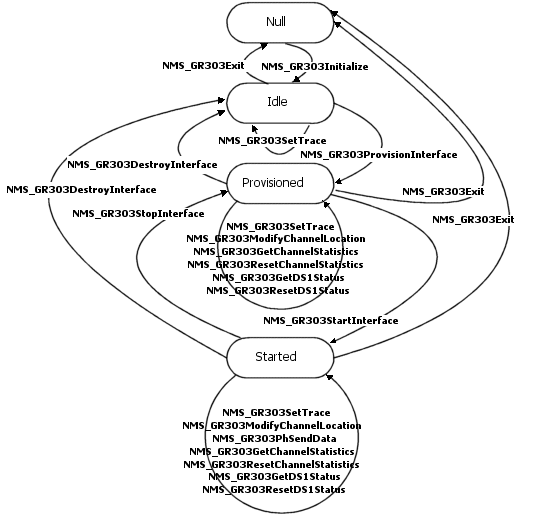
The following illustration shows state transitions for interfaces controlled by the NMS GR303 library. You must comply with the illustrated conditions when integrating NMS GR303 library functions into GR303 applications.
The following table describes the NMS GR303 library interface states:
|
State |
Description |
|
Null |
The board is booted, configured, and initialized, but the NMS GR303 library is not loaded. |
|
Idle |
The NMS GR303 physical library is initialized. No communication link is established between the GR303 application and the boards. Library tracing can be configured. |
|
Provisioned |
The interface is provisioned on the physical layer. All necessary connections are made between the application and HDLC/framer instances on the boards. HDLC channels are configured, reset, and initialized, but disabled for transmit and receive operations. DS0 timeslots assigned to HDLC channels are internally set to RAW mode. All other DS0 timeslots remain in CAS mode. Applications can query the status of HDLC channels and DS1 links, modify provisioned interface configurations, and modify the tracing configuration. |
|
Started |
The HDLC channels are enabled for transmit and receive operations. Applications can query the status of HDLC channels and DS1 links, modify provisioned interface configurations, and modify the tracing configuration. |