This topic presents the following information:
When the AN system starts up, invoke NMS_V5Initialize. to load the NMS V5 library, start the library's internal processing tasks, and initialize its internal software structures.
Invoke NMS_V5SetTrace any time after loading the NMS V5 library. Arguments for NMS_V5SetTrace specify the level of tracing performed by the library, and whether the library returns tracing information to the application or logs the information in a file.
Before data can flow through HDLC channels and the NMS V5 library can return E1 status reports, applications must start V5.2 interfaces. After initializing the V5.2 physical layer software (the NMS V5 library), call NMS_V5ProvisionInterface to provision V5.2 interfaces. When invoking NMS_V5ProvisionInterface:
Provide hardware-specific HDLC channel and E1 link location information.
Define callback functions for processing HDLC data and E1 reports.
Allocate memory for receiving data from the physical layer.
The NMS V5 library configures and resets the HDLC channels on the board, starts monitoring the provisioned E1 links, and resets its internal statistics structures. By default, the SA7 framing bit is set to 1 for newly provisioned E1 links.
The NMS V5 library begins to monitor E1 links after the application provisions the interfaces. Applications can then invoke NMS_V5GetE1Status and NMS_V5ResetE1Status to obtain or reset E1 link status information for the E1 links.
Note: NMS recommends that applications provision and start the upper layers of the V5.2 protocol stack after they start the physical layer with NMS_V5StartInterface. In some cases, the provisioned interfaces can expect incoming HDLC traffic before the application starts them.
Applications must establish a mapping between the physical layer HDLC channel and E1 link locations (which are NMS hardware-specific) and the upper layer V5.2 protocol structures. The physical layer does not track protocol information for the hardware resource assignments (for example, whether an E1 link is in active or standby mode, or what C-channel assignments apply to a particular timeslot). This information is out of scope of the physical layer and should be controlled by the upper layers of the V5.2 protocol software and by the application.
To start NMS V5 interfaces, call NMS_V5StartInterface for each interface you want to start. After the application starts an interface, the HDLC channels provisioned on the interface become operational and data begins to flow across the E1 links. In addition, the NMS V5 library begins to report E1 alarms and remote SA7 framing bit value changes to the application.
If the local exchange is connected and active on the other side of the interface, the application can expect to receive LAPV messages though the E1 connections.
After starting the interface, you can invoke the following functions:
|
Function |
Description |
|
Passes data received from the upper layers of the V5.2 stack to the physical layer. The physical layer then sends the data to the appropriate HDLC channel. | |
|
Retrieves information about an E1 link. | |
|
Resets the status of an E1 link. | |
|
Accesses HDLC channel statistics. | |
|
Resets HDLC channel statistics. | |
|
Adds an E1 link (associated with voice channels) to a provisioned active variant on a specified interface. | |
|
Deletes an E1 link from an active variant of a provisioned interface. | |
|
Adds an HDLC channel (usually associated with an ISDN data channel) to a provisioned active variant on a specified interface. | |
|
Removes an HDLC channel from a provisioned active variant on a specified interface. |
Applications can add or delete E1 links associated with voice and HDLC data without stopping and re-provisioning the active variant of a provisioned interface by calling NMS_V5AddE1 or NMS_V5DeleteE1. If the application invokes NMS_V5AddE1 for a started interface, the NMS V5 library automatically begins to monitor the new E1 link.
Later the application can add HDLC channels to an existing E1 link by calling NMS_V5AddChannel, or delete an HDLC channel from an existing (or already deleted E1 link) by calling NMS_V5DeleteChannel. The application cannot remove a provisioned E1 link if this link still has HDLC channels provisioned on it.
The NMS DLCP software provides NMS V5 library support for ISDN through the V5.2 protocol. Supporting ISDN on V5.2 interfaces requires that applications be able to dynamically add and remove ISDN channel locations to provisioned interfaces.
Access network (AN) applications use the following functions to dynamically add or delete HDLC channels that carry ISDN traffic over V5.2 interfaces:
|
Function |
Description |
|
Adds an HDLC link (usually associated with ISDN data channel over V5.2 interface) to an active provisioned interface variant. | |
|
Deletes an HDLC link (usually associated with ISDN data channel over V5.2 interface) from an active provisioned interface variant. |
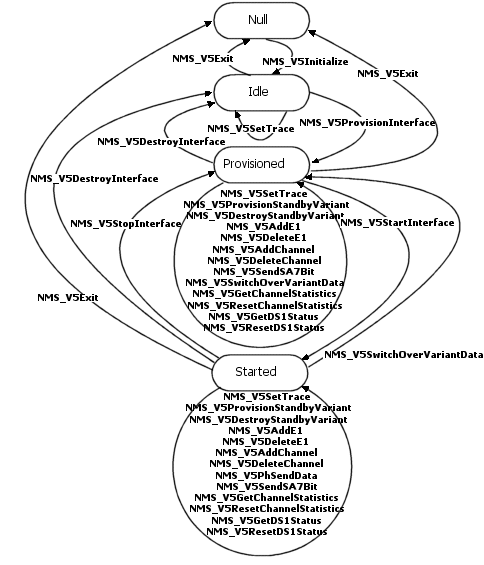
Call NMS_V5AddChannel or NMS_V5DeleteChannel when in the provisioned and started state as shown in the NMS V5 library state model.
Invoke NMS_V5AddChannel or NMS_V5DeleteChannel only for HDLC channels associated with a provisioned E1 link on a provisioned interface. When the application invokes NMS_V5AddChannel for a started interface, the NMS V5 library automatically starts the new HDLC link. After the new HDLC channel is added, the application can control the channel as if it had been provisioned with NMS_V5ProvisionInterface. Applications do not need to stop provisioned interfaces before invoking NMS_V5DeleteChannel.
Applications cannot use NMS_V5AddChannel or NMS_V5DeleteChannel to add or delete HDLC channels associated with the standby interface variants. To add or delete HDLC channels associated with the standby interface variants, invoke NMS_V5DestroyStandByVariant and then re-provision the interface with NMS_V5ProvisionStandByVariant.
Invoke NMS_V5ProvisionStandByVariant to configure a standby variant for any provisioned interface. HDLC channel and E1 link locations on standby variants can overlap with channel and link locations configured for active variants. The NMS V5 library saves the standby variant configuration but does not validate it.
To switch from the active NMS V5 interface to a standby variant, invoke NMS_V5SwitchOverVariantData. NMS_V5SwitchOverVariantData stops the active variant, destroys any associated provision information, and activates the provision for the standby variant. If the re-provisioning is successful, the standby variant becomes the provisioned active variant of the interface. However, the application must still call NMS_V5StartInterface to start the interface.
Note: Applications should call NMS_V5SwitchOverVariantData after the upper level of the V5.2 (in this case, the AV5 stack) interface has finished its switchover process.
To add or delete E1 links on a standby variant of an interface, you must first destroy the standby variant with NMS_V5DestroyStandByVariant and then re-provision the variant with NMS_V5ProvisionStandByVariant. If the call to NMS_V5SwitchOverVariantData fails, both the active and the failed standby variants of the existing interface are destroyed. The application must then invoke NMS_V5DestroyInterface and NMS_V5ProvisionInterface to re-provision the interface.
Use NMS_V5PhSendData to asynchronously send data to HDLC channels on a started interface.
When the NMS V5 library finishes sending the data, it returns the results of the operation to the application. If necessary, the NMS V5 library performs internal buffering for outgoing messages associated with each HDLC data channel. If the outgoing message queue overflows, the NMS V5 library uses an application-defined callback function to return a notification error. The NMS V5 library uses a callback function to pass the incoming HDLC messages up to the application. The HDLC data is copied into memory that was allocated by the application when it provisioned the interface.
When the interface is provisioned, the NMS V5 library starts monitoring E1 links for alarms and remote SA7 framing bit changes. After the application starts an interface, the library invokes the application-defined callback function to report alarm events (LOS, LOF, AIS, RAI, normal frames, SA7 framing bit value updates). The first report on the current E1 state is sent to the application immediately when it starts. After that, the NMS V5 library only sends status when the E1 links change their state.
Use NMS_V5GetE1Status to query the NMS V5 library for E1 link state information any time after the interface has been provisioned. When the interface is destroyed, the NMS V5 library stops monitoring any E1 links associated with the interface. You can also use NMS_V5ResetE1Status to reset the status information associated with an E1 link.
According to the link ID check procedure defined by the V5.2 protocol, the V5.2 protocol stack must be able to control the SA7 E1 framing bit. When an application provisions an interface, destroys an interface, or exits the NMS V5 library, the library automatically sets the SA7 bit to 1 on any associated E1 links. NMS_V5SendSA7Bit enables applications to set the SA7 bit value to 0 or 1 for a specified E1 link.
When an application provisions an interface, the board automatically starts to monitor any provisioned E1 links. When the application starts the interface, the NMS V5 library begins to collect statistics for provisioned HDLC channels. Invoke NMS_V5GetE1Status to query E1 status information or invoke NMS_V5GetChannelStatistics to retrieve HDLC channel statistics for a particular HDLC channel.
NMS_V5GetE1Status returns current E1 link status and error history information (collected over an elapsed period of time). NMS_V5GetChannelStatistics reports success and error history information for both receive and transmit directions on a specified HDLC channel.
To reset the HDLC channel statistics or E1 link status, call NMS_V5ResetChannelStatistics or NMS_V5ResetE1Status.
To re-provision an existing interface with NMS V5 library functions, perform the following steps:
|
Step |
Action |
|
1 |
Stop the interface (if the interface is started) with NMS_V5StopInterface. |
|
2 |
Destroy the current interface with NMS_V5DestroyInterface. This function destroys both the active and standby variants of the interface. Destroyed E1 links have the SA7 framing bit set to 1. |
|
3 |
Re-provision the interface by invoking NMS_V5ProvisionInterface. Provisioned E1 links have the SA7 framing bit set to 1. |
|
4 |
Start the new interface with NMS_V5StartInterface. |
Invoke NMS_V5StopInterface to stop an existing interface. When the application stops an interface, the interface remains provisioned but not operational. The flow of HDLC data through the interface stops and the NMS V5 library no longer returns E1 link alarm reports. However, the NMS V5 library continues to monitor E1 links and to maintain channel statistics.
Applications can still query E1 link status information and reset the status of E1 links associated with stopped interfaces. In addition, the NMS V5 library does not automatically reset HDLC channel statistics when the application stops an interface. The application can retrieve HDLC channel statistics or reset these statistics.
To restart a stopped interface, invoke NMS_V5StartInterface.
Invoke NMS_V5DestroyInterface to destroy an interface. When the interface is destroyed, the flow of HDLC data stops, and the NMS V5 library stops monitoring E1 links associated with the interface. The NMS V5 library destroys any provision information for the active and standby variants of the interface. Destroyed E1 links have SA7 framing bit set to 1.
To destroy only the standby variant of an existing interface, invoke NMS_V5DestroyStandByVariant.
To exit the AN system, call NMS_V5Exit. When an application calls NMS_V5Exit, the NMS V5 library:
Stops all provisioned HDLC channels.
Disables E1 link monitoring.
Resets the SA7 framing bit to 1 on all E1 links.
Destroys all provisioned interfaces.
Exiting the AN application gracefully (that is, invoking NMS_V5StopInterface and NMS_V5DestroyInterface before invoking NMS_V5Exit) brings the boards to a known state, and allows you to restart the application without rebooting the boards.
The following illustration shows state transitions for interfaces controlled through the NMS V5 library. You must comply with the illustrated conditions when integrating NMS V5 library functions into AN applications.
The following table describes the NMS V5 library interface states:
|
State |
Description |
|
Null |
The board is booted and initialized with the user configuration, but the NMS V5 physical library is not loaded. |
|
Idle |
The NMS V5 library is initialized. No communication link is established between the application and the boards. Library tracing can be configured. |
|
Provisioned |
The interface is provisioned on the physical layer. All necessary connections are made between the application and HDLC/framer instances on the boards. HDLC channels are configured, reset, and initialized, but disabled for receive and transmit operations. By default, the SA7 framing bit is set to 1 for provisioned E1 links. The application can query status of HDLC channels and DS1 links, modify provisioned configurations, and configure library tracing. |
|
Started |
The HDLC channels are enabled for transmit and receive operations. Applications can provision or destroy a standby variant, add or delete E1 links to an active interface variant, toggle the SA7 bit for provisioned E1 links, and query HDLC channel and E1 link status. Applications can also switch the interface to a standby variant and configure library tracing. |