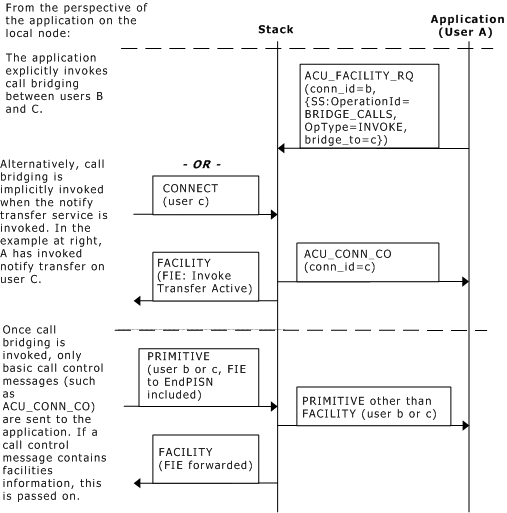
To explicitly invoke the bridge calls service, send an acu_ss_bridge_calls_invoke extended data structure to the stack in an ACU request message, invoking the invoke bridge calls operation.
Use the ID of one of the calls as the connection ID. Specify the connection ID of the other call in the bridge_to field in the acu_ss_bridge_calls_invoke supplementary service structure. Only one invocation is required to bridge both connections.
Note: In order for the bridge calls supplementary service to operate properly, the NS_IE_RELAY_BEHAVIOUR bit must be set to its default setting (in the ns_behavior substructure referenced in the call to isdnStartProtocol). For more information, see the Dialogic® NaturalAccess™ ISDN Messaging API Developer's Manual.
The bridge calls service can also be invoked implicitly when the application performs a transfer-by-join operation (see Call transfer and Q.SIG).
If the bridge calls invocation is successful, both remote parties receive an acu_ss_bridge_calls_ret_result extended data structure in an ACU confirmation or indication message, indicating that the calls have been bridged.
Once the bridge calls service is invoked, it cannot be disabled. When either of the calls is cleared, the service ends.
The bridge calls invocation operation is rejected in the following situations:
One of the connections is not Q.SIG. Bridging between the Q.SIG variant and other variants is not supported.
The NAIs for the two involved connections are on different boards. Bridging between boards is not supported. In these cases, the application layer must provide the bridging function.
One or both of the calls is already bridged.
The connection ID specified in the bridge_to field is not found.
If the bridge calls invocation operation is rejected, an acu_ss_reject extended data structure is sent to the application.