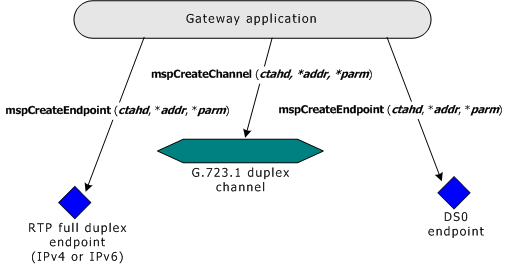
Applications use mspConnect to join MSPP channels with pairs of MSPP endpoints to create simplex or duplex media paths through the system. These end-to-end gateway media paths are called MSPP connections. When invoking mspConnect, applications specify two endpoint handles (returned by mspCreateEndpoint) and a channel handle (returned by mspCreateChannel). These handles identify the endpoints through which the data flows, and the processing that takes place (such as, encoding and decoding) as data flows through a channel.
The following table shows the types of MSPP endpoints that can be connected to particular MSPP channels. The first endpoint listed in each endpoint combination-pair is always ephd1, and the second endpoint listed is ephd2:
|
Channel type |
Endpoint combinations (ephd1/ephd2) |
|
Voice duplex |
|
|
Voice encoder |
|
|
Voice decoder |
|
|
Record |
RTP and MSP_NO_CONNECT |
|
RTP switching |
RTP and RTP |
|
T.38 fax |
T38UDP and DS0 |
When applications use mspConnect, the order in which they specify endpoint handles is significant. For voice channels, application must specify an RTP endpoint handle (ephd1) first, a voice channel handle (chnhd2), and then a DS0 endpoint handle (ephd2). The following example shows an application using mspCreateChannel and mspCreateEndpoint to create a G.723.1 channel, an RTP endpoint, and a DS0 endpoint:
The following example shows the application using mspConnect to connect the RTP endpoint with the DS0 endpoint by means of the G.723.1 channel, thus creating a G.723.1 duplex connection:
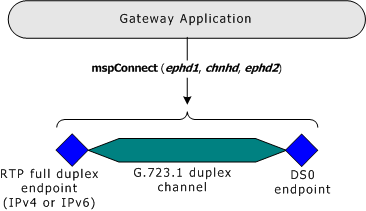
Once the application establishes the connection, the connection begins processing data as soon as the application completes the following tasks:
Enables the channel.
Connects data to one of the endpoints that make up the connection.
By default, MSPP endpoints are enabled when created, while MSPP channels are disabled when created. For this reason, channels have to be enabled to transfer data, while endpoints (unless explicitly disabled) automatically transfer any data connected to them.
To create a native record channel that doesn't implement inband silence detection or DTMF detection, the application specifies an RTP endpoint, a record channel (that consists of a single jitter filter) and specifies MSP_NO_CONNECT instead of a second endpoint handle. The resulting connection consists of a record channel and one endpoint. Applications can use record connections to transfer un-decoded audio data directly from an RTP endpoint to an ADI port. The following illustration shows a native record connection without voice decoding:

For more information about implementing Dialogic play and record, refer to the Dialogic® NaturalAccess™ Fusion VoIP API Developer's Manual.