Applications create end-to-end media channels by joining pairs of endpoints with simplex channels or duplex channels to the same endpoint. You can configure the flow of data through a connection in the following ways:
|
Connection |
Description |
|
Simplex |
Create simplex connections by creating simplex channels (encode or decode) and connect them with the appropriate endpoints. The connection carries data in a single direction. |
|
Symmetrical duplex |
Create duplex connections by creating duplex channels of the same type (encode and decode) and connect them with the appropriate endpoints. The connection carries data in two directions. |
|
Asymmetrical duplex |
Create a simplex encode channel of one type (for example, G.711 or G.723), a decode channel of another type (for example G.729A or G.726), and connect them both to the same endpoints. Each connection carries data in a different direction (and possibly encoded according to a different algorithm), but together the connections make up a full duplex data path. |
|
RTP multiple unicast |
Create a series of RTP simplex send endpoints (up to eight) and connect all of the these RTP endpoints to a DS0 endpoint through a voice encoder channel. |
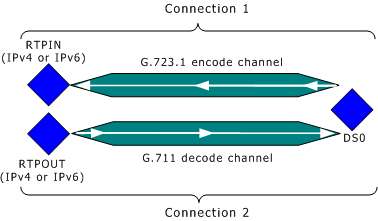
For example, in the following illustration the application creates an asymmetric duplex connection between RTP simplex endpoints (IPv4 or IPv6) and a DS0 endpoint by creating a simplex G.723.1 encode connection in one direction, and a simplex G.711 decode connection in the opposite direction. Since both connections share the same endpoints, data flowing across the channel is encoded and/or decoded according to a different algorithm, depending on the direction in which it flows. The following illustration shows a pair of asymmetrical MSPP simplex connections: