Natural Access provides a mechanism to log warning, error, and information messages (trace records) to a central location. These trace records are grouped into trace record categories.
A tracemask is used to determine which trace record categories are active (that is, which messages should be logged). Tracemasks are set by the application using ctaSetTraceLevel and by ctdaemon. See the Natural Access Developer's Reference Manual for more information on setting tracemasks.
The Natural Access dispatcher automatically generates trace records for the following trace record categories:
Service API calls invoked by an application.
Service SPI calls invoked by another service.
Events generated by a Natural Access service and destined for the calling application.
Events generated by a Natural Access service and destined for the calling service.
This topic presents:
For service-specific trace record categories, the service must explicitly generate the trace records. There are three service-specific trace record categories explicitly defined by Natural Access. They are:
Commands issued by the service to a low level driver (or another process).
Events received from the low level driver (or another process).
Internal service errors.
There are four other service-specific categories (debug categories) that can be used for any remaining trace records that are deemed appropriate for your service and do not fit into the explicitly defined categories.
To support service-specific trace categories, a service must:
Define trace tags to represent the trace records.
Check if appropriate tracemasks are set and call the trace logging function (dispLogTrace).
Create binding functions to set local tracemasks (xxxSetTraceLevel) and generate trace records (xxxFormatTraceBuffer).
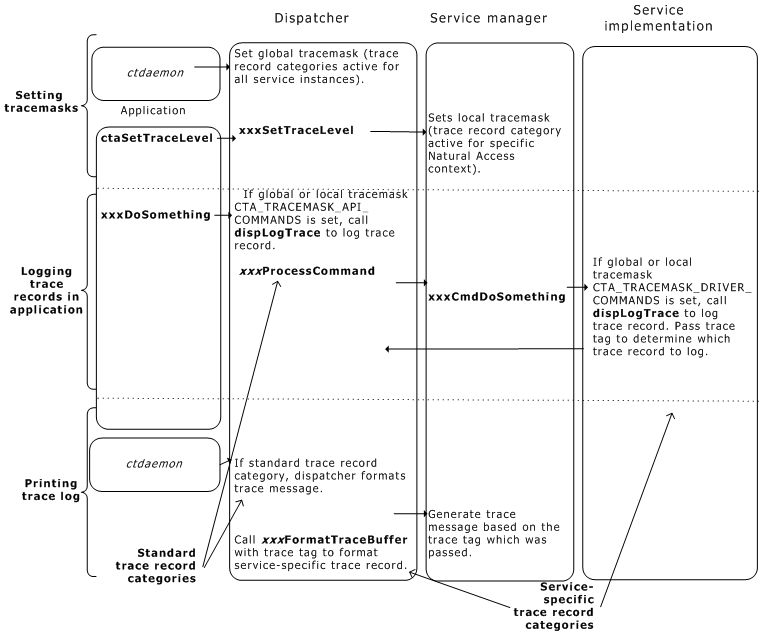
As shown in the following illustration, the application determines which trace record categories are logged. The dispatcher handles standard trace record categories (for example, logging service API function calls). Service-specific trace record categories (for example, logging driver calls) must be checked and generated by the service.
Tracing overview
For each service, decide which service-specific trace record categories to implement. For each category, define a set of one or more trace tags. The trace tag is used by the service to uniquely identify the trace record.
Although you are not required to define and implement service-specific trace records, it is strongly recommended that you do so. Similarly, it is not required to implement trace records for each of the explicitly defined service-specific trace categories.
 tik service
The tik service supports service-specific trace processing. For the tik service, there are no trace records for the internal service error category. Also, there is only one trace record per category.
The specific tracing to be done is:
|
Category |
Associated trace mask |
tik-specific trace tags |
|
Driver commands |
CTA_TRACEMASK_DRIVER_COMMANDS |
TIK_TRACETAG_CMD - Log messages sent from tik service to tik server. |
|
Driver events |
CTA_TRACEMASK_DRIVER_EVENTS |
TIK_TRACETAG_RSP - Log events received from tik server. |
|
Service errors |
CTA_TRACEMASK_SVC_ERRORS |
None needed. |
|
Debug 1 |
CTA_TRACEMASK_DEBUG_BIT0 |
TIK_TRACETAG_BIT0 - Log internal state transitions. |
|
Debug 2 |
CTA_TRACEMASK_DEBUG_BIT1 |
None needed. |
|
Debug 3 |
CTA_TRACEMASK_DEBUG_BIT2 |
None needed. |
|
Debug 4 |
CTA_TRACEMASK_DEBUG_BIT3 |
None needed. |