Step
Action
1
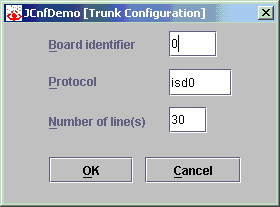
Click Configuration > Board Configuration. The JCnfDemo [Trunk Configuration] dialog box displays:
2
Complete the fields as described in the following table:
|
Field |
Enter the... |
|---|---|
|
Board identifier |
Trunk board identifier as defined in the board keyword file. |
|
Protocol |
Line protocol. |
|
Number of line(s) |
Number of lines to start on the trunk interface. |
3
Click OK. The configuration file is updated.
4
Close and restart JCnfDemo to apply the changes.