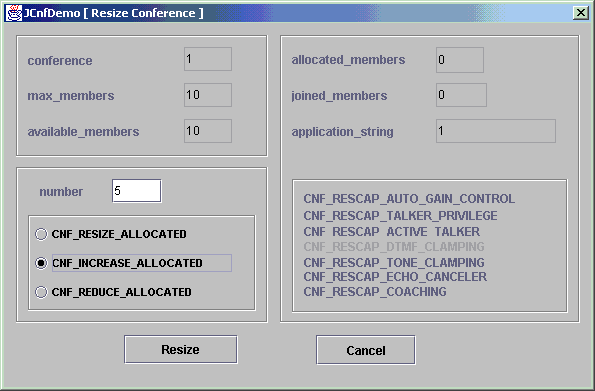
You can adjust the number of members allocated to a conference at any time. To resize a conference:
On the JCnfdemo window, select the conference you want to resize and click Resize Conf. The Resize Conference dialog box displays:
The following information displays in the dialog box:
|
Section |
Description |
|---|---|
|
Resource |
Displays information about the resource, such as the number of conferences running on the resource, the maximum number of members the resource supports, and the number of available members. |
|
Conference |
Displays current conference parameters, such as the number of members allocated and the number of members attending. |
|
Resize Parameters |
Enables you to resize the conference. |
|
Capabilities |
Displays the capabilities available for this conference. |
Use the Resize Parameters section to change the number of members allocated to the conference:
|
To... |
Enter the number in the Number field and select... |
|---|---|
|
Reduce the number of allocated members by a specific number |
CNF_REDUCE_ALLOCATED |
|
Increase the number of allocated members by a specific number |
CNF_INCREASE_ALLOCATED |
|
Resize the conference to a specific number |
CNF_RESIZE_ALLOCATED |
Click Resize to resize the conference.