To start JCnfDemo, enter the following command:
java -jar JCnfDemo.jar
The configuration file (JCnfDemo.ini under Windows, .jcnfdemorc under UNIX) is placed in the home directory (c:\documents and c:\settings\user under Windows, ~home under UNIX).
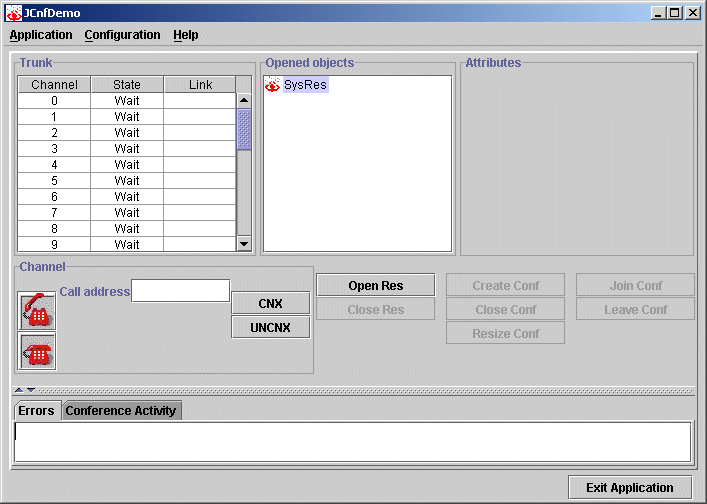
The following image shows the JCnfDemo main window:
The JCnfDemo main window contains four main sections:
|
Use this section... |
To... |
|---|---|
|
Trunk |
Manage calls. |
|
Opened Objects |
View the open resources, the conferences running on each resource, and the members attending each conference. |
|
Attributes |
View and change the capabilities of the selected conference or member. View information for the selected resource, conference, or member. |
|
Errors/Conference Activity |
View error events and the activity in a selected conference. View and set the coaching. |
The following table describes the buttons on the JCnfDemo window:
|
Use this button... |
To... |
|---|---|
|
Exit Application |
Close JCnfDemo. |
|
Open Res |
Open a resource. |
|
Close Res |
Close the selected resource. |
|
Create Conf |
Create a conference on the selected resource. |
|
Close Conf |
Close the selected conference. |
|
Resize Conf |
Adjust the number of members allocated to the selected conference. |
|
Join Conf |
Add members to the selected conference. |
|
Leave Conf |
Remove members from the selected conference. |
|
CNX |
Connect a channel and a member. |
|
UNCNX |
Disconnect a channel and a member. |
|
Phone (calling) |
Perform a call from a channel. |
|
Phone (released) |
Release a call from a channel. |
The following table describes the menu selections available on the JCnfDemo window:
|
Use this menu item... |
To... |
|---|---|
|
Configuration > Board Configuration |
Open the Trunk Configuration dialog box to view or modify your current configuration. |
|
Application > Exit |
Exit JCnfDemo. |
|
Help > About |
View the current version. |