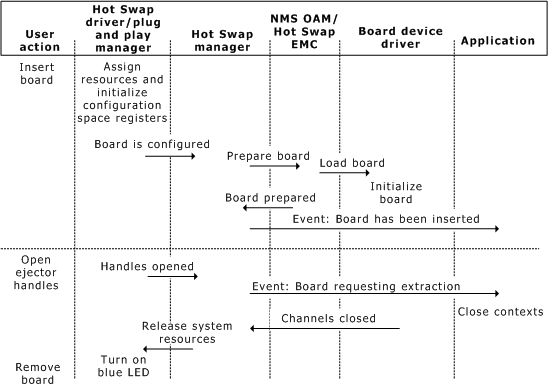
The NMS OAM service receives event notification for board insertion or impending board extraction of all Hot Swap boards in the chassis. All Hot Swap events are sent to the queues on which the NMS OAM service is opened.
Note: Under Windows, the NMS Hot Swap kit (HSK) must be installed for Hot Swap to operate correctly. The HSK is included with Natural Access, but is not installed automatically. For more information, refer to the Natural Access installation booklet.
This topic describes:
What happens when you insert Hot Swap compatible boards
What happens when you remove a Hot Swap compatible board
Closing resources after extracting the board
For more information about the NMS implementation of Hot Swap and NMS Hot Swap utilities, refer to the NMS OAM System User's Manual.
When you insert a Hot Swap compatible board:
The Hot Swap driver software assigns resources to the board and initializes the configuration space registers.
Once the Hot Swap driver successfully configures the board, it sends notification to the Hot Swap manager.
The Hot Swap manager notifies the Hot Swap EMC to prepare the board.
The Hot Swap EMC directs the NMS OAM service to initialize the board.
The Hot Swap EMC notifies the Hot Swap manager that the board is prepared.
Once board initialization is complete, the Hot Swap manager sends an event through the Hot Swap EMC to Natural Access applications, indicating that the board is ready for use by Natural Access applications.
When you open the ejector handles before removing a Hot Swap compatible board:
The Hot Swap driver notifies the Hot Swap manager.
The Hot Swap manager sends an event through the Hot Swap EMC to Natural Access applications, indicating that the board is requesting extraction.
Applications must close all contexts associated with the board. For more information, see Closing resources.
The board device driver notifies the Hot Swap manager when all channels are closed.
The Hot Swap manager notifies the Hot Swap driver to release system resources allocated to the board (such as address space).
The Hot Swap driver de-configures the board and turns on the Hot Swap LED to inform the operator that the board can be safely removed.
The following illustration shows the Natural Access Hot Swap operation:
The following table lists the actions required by specific Natural Access services to close resources to a board requesting removal:
|
For this service... |
To release board resources, you must... |
|
ADI |
Close the service. |
|
Digital Trunk Monitor (DTM) |
Stop monitoring all trunks on the board. |
|
ISDN |
Close the service. |
|
Natural Call Control (NCC) |
Close the service. |
|
NaturalConference (CNF) |
Close the service |
|
NaturalFax (NFX) |
Close the service. |
|
Switching (SWI) |
Close the switch handle. |
|
Voice Message (VCE) |
Close the service. |
There are no timeouts or other time-related limitations for releasing resources. However, release resources as soon as possible since some operators remove boards within a few seconds of opening the ejector handles.
Once all resources for the board have been released, the Hot Swap LED on the board indicates that the board can be removed.