This topic describes Hot Swap states and how to determine the current Hot Swap state.
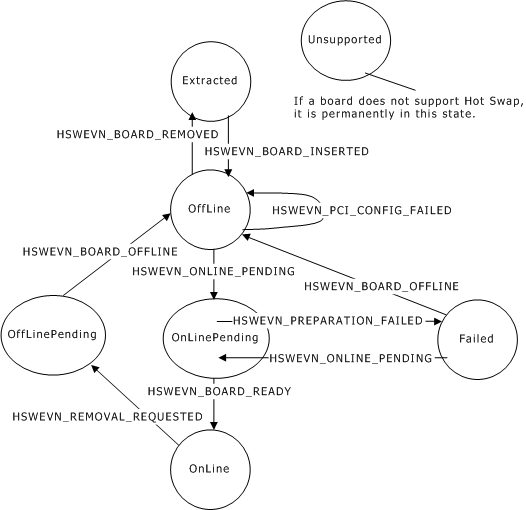
A managed board can be in any of the following Hot Swap states:
|
State |
Description |
|---|---|
|
Extracted |
Board is not present in the chassis. |
|
OffLine |
Board is present, but is not yet configured on the PCI bus. |
|
OnLinePending |
Board is being started. |
|
Failed |
Board start attempt failed. |
|
OnLine |
Board start attempt succeeded. The board can now support normal operation. |
|
OffLinePending |
Board ejector handles were opened, and the resource host is preparing to allow the board to be extracted. |
|
Unsupported |
Board does not support Hot Swap. |
The following illustration shows the Hot Swap state machine:
To determine the current Hot Swap state of a board:
Open the Hot Swap EMC managed object using oamOpenObject. The managed object name is hotswap.emc.
Use oamGetKeyword to get the value of the Board.boardname.State keyword, where boardname is the board name of the board (for example, Board.MyBoard.State). The value is a string containing one of the state names (for example, OnLine).
If a board does not support Hot Swap, the returned state is always Unsupported.
For details on Hot Swap EMC managed object keywords, refer to Hot Swap EMC keyword summary.