This topic describes the following elements of NMS OAM multiple-host configuration:
If your resources are distributed over several systems (multiple CPUs, chassis, or both) that are linked over an IP network, you can set up a multiple-host configuration of NMS OAM. This configuration enables an application running on one system to access and manage resources on other systems.
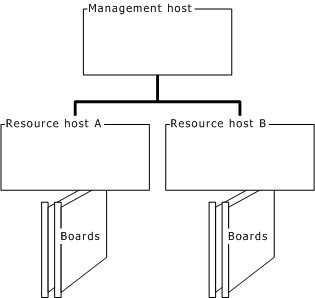
A multiple-host NMS OAM configuration consists of several hosts (CPUs). The management host configures and manages the resources (such as boards) on the other hosts. These hosts are called resource hosts as shown in the following illustration:
Each resource host runs an instance of the Natural Access Server (ctdaemon), including NMS OAM. Each resource host has its own set of managed objects for its components, including boards, plug-ins, and EMCs. Each resource host also has its own NMS OAM database containing data for the components on that host only.
The Supervisor component on a resource host manages only the resources locally present on the host.
Management applications and utilities such as the NMS OAM utilities reside on the management host. The configuration text files also reside on the management host:
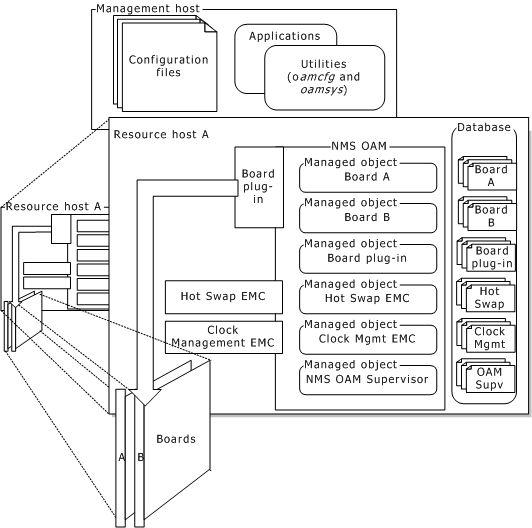
If a management host includes resources that require management, it can also serve as a resource host. When acting as a resource host, the management host must also run an instance of the Natural Access Server (ctdaemon), including NMS OAM. The database on this host contains information about the local resources only, even if the management host is also managing other resource hosts.
Configuration of remote resources is performed from the management host using NMS utilities or other applications based upon the NMS OAM service, as shown in the following illustration:
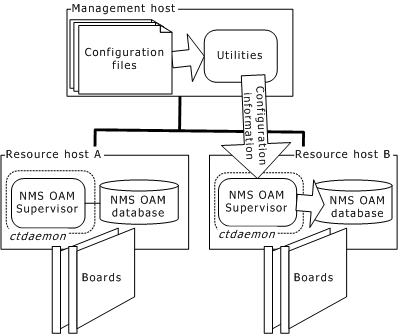
Applications on the management host can use NMS OAM on a resource host to configure, start, and manage its resources based on the NMS OAM database on that host.
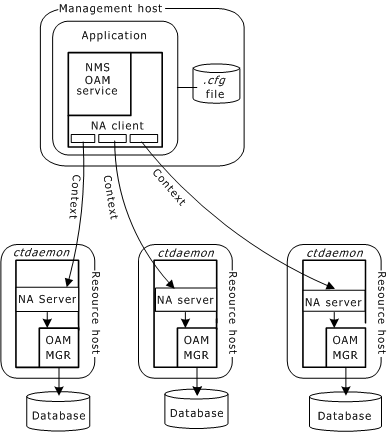
To specify the resource host to perform an operation on, an application running on the host opens a context on the resource host. An application can open as many contexts to as many resource hosts as needed.
The following illustration shows contexts in multiple-server configurations: