ppx.cfg specifies the switch configuration for the PPX service, including the following information:
Telephony buses connected to each board
Each board's switch definition
Any nailed up switch connections in the system
The PPX service is shipped with a template configuration file (ppx_tmpl.cfg) that contains examples for the various NMS board types. Copy this template to the default configuration file (ppx.cfg) and modify it to represent your system. You can also modify the file, give it a unique name, and specify the name when you start the PPX server using -f option.
The PPX service reads ppx.cfg into an internal switch connection database. When switch connections are requested, the PPX service accesses the connection database to determine how to make the desired connection.
Note: The service does not run if it cannot locate a configuration file.
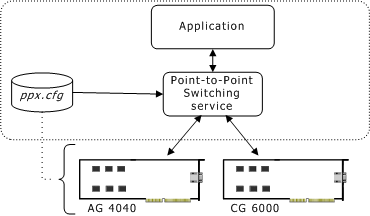
The following illustration shows:
An application requesting a connection between a DSP resource on an AG 4040 board and a line interface on an CG 6000 board.
The PPX service accessing the connection database to determine how a connection can be made (for example, both boards are connected to the H.100 bus).
The PPX service sending the appropriate switch commands to the boards to make the connections.
The active region of the PPX configuration file begins with the string [PPX] on a line by itself and ends at the end of the file or at another word or phrase in square brackets on a line by itself. Any text outside that region is ignored by the PPX service.
White space, such as indentation and space around an equals sign, is ignored but is useful for clarity. Case is ignored. The number sign (#) and semicolon (;) are comment delimiters. The PPX service ignores any text that follows a comment delimiter character on the same line.
In the PPX configuration file, the switch fabric defines the topology of boards that are connected by telephony buses. Each computer chassis contains one switch fabric.