Once the MOF files are successfully compiled and inserted, test your setup using one of the SNMP enumeration example programs provided with the NMS WBEM software:
Program |
Description |
|---|---|
JScript program that enumerates SNMP objects in the system. |
|
HTML file containing an embedded JScript program that enumerates SNMP objects in the system. |
Both programs can be found in \nms\ctaccess\demo\snmp\wbem.
Note: The console mode WSH interpreter is faster than using the Windows WSH interpreter or the embedded Jscript.
Use one of the following methods to launch enumsnmp.js:
Double-click on the file enumsnmp.js in a Windows Explorer window.
This action launches the script with wscript.exe, the default WSH (Windows Scripting Host) interpreter. If enumsnmp.js is launched this way, a dialog box displays for each SNMP object found through WBEM and for each property/value pair.
Open an MS DOS console window, and enter:
cscript enumsnmp.js
If enumsnmp.js is launched this way, the console mode WSH interpreter (cscript.exe) is used instead of wscript.exe, and the entire list of SNMP objects, properties, and values in the system displays in the console window.
The following example shows partial output of enumsnmp.js when launched with cscript:
C:\NMS\CTAccess\Demos\snmp\wbem>cscript enumsnmp.js
Microsoft (R) Windows Script Host Version 5.1 for Windows
Copyright (C) Microsoft Corporation 1996-1999. All rights reserved.
Object of class : SNMP_OAMDATABASE_MIB_oamCreateBoard : 4 propertie(s)
Property : applyBoardCommand Value : donothing
Property : boardName Value :
Property : boardNumber Value : -1
Property : productName Value :
Object of class : SNMP_OAMDATABASE_MIB_emcTable : 8 propertie(s)
Property : emcIndex Value : 1
Property : emckeywordName Value : Name
Property : emckwAllowedRange Value : <no range>
Property : emckwDescription Value : <none>
Property : emcKwIndex Value : 1
Property : emckwMode Value : readOnly
Property : emckwType Value : Object
Property : emckwValue Value : clkmgr.emc
Object of class : SNMP_OAMDATABASE_MIB_oamEventsTraps : 1 propertie(s)
Property : oamEventDescription Value :
Object of class : SNMP_OAMDATABASE_MIB_boardPluginTable : 8 propertie(s)
Property : boardPluginIndex Value : 1
Property : boardPluginKwIndex Value : 1
Property : bpikeywordName Value : BootDiagnosticLevel
Property : bpikwAllowedRange Value : Base 10: 0 <> 3
Property : bpikwDescription Value : <none>
Property : bpikwMode Value : readWrite
Property : bpikwType Value : Integer
Property : bpikwValue Value : 0
Object of class : SNMP_OAMDATABASE_MIB_oamBoards : 2 propertie(s)
Property : createdBoardCount Value : 0
Property : detectedBoardCount Value : 0
Object of class : SNMP_OAMDATABASE_MIB_oamSupervisor : 3 propertie(s)
Property : oamAlertRegister Value : disable
Property : oamEventMask Value : -1
Property : oamStartStop Value : oamStop
Object of class : SNMP_OAMDATABASE_MIB_supervisorTable : 7 propertie(s)
Property : keywordName Value : ExtendedManagementComponents[0]
.
.
.
To launch enumsnmp.htm, launch Internet Explorer and open the file.
Note: If you already have an Internet Explorer window opened, you can simply drag and drop enumsnmp.htm into the Internet Explorer window.
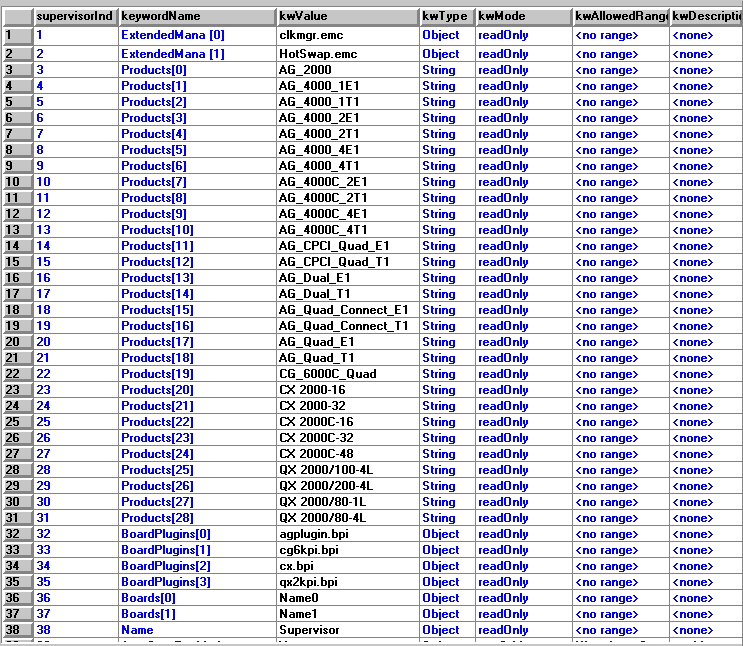
The following illustration shows sample results returned by enumsnmp.htm when opened in Internet Explorer: