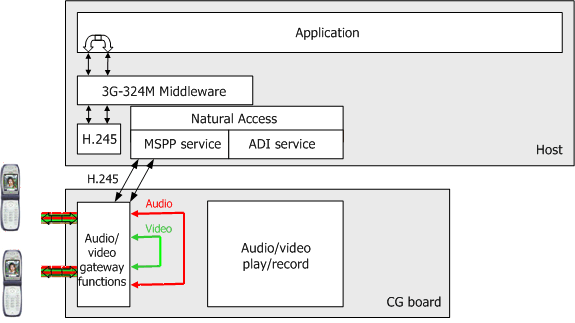
Video tromboning can be used by a variety of service applications to interconnect two RTP streams originating from 3G-324M terminals that have similar audio and video characteristics. Supported characteristics include:
Characteristic |
Description |
Video |
H.263 baseline level 10 |
Audio |
AMR |
General |
Bit rates consistent with the 3G-324M Interface specification |
This topic describes the typical API call flows required to trombone together two 3G-324M calls.
vmsamp demonstrates how to perform the following tasks:
Trombone together two calls handled by vmsamp.
Switch back to video messaging functions applied to both calls.
The following illustration shows the video tromboning configuration data flow:
The application is responsible for relaying H.245 messages, such as a FastVideoUpdate message, that are exchanged between both tromboned terminals.
Note: If the H.245 messages sent by the terminal during the initial H.245 negotiation or messaging state are significant for the tromboned terminal (such as a SkewIndication message), it is the application’s responsibility to store and relay these messages to the partner terminal when the tromboning phase is started.
To relay H.245 messages between tromboned ports, the application must use the 3G-324M events and functions.
The following illustration shows the API call flow of a typical H.245 message that can be relayed by the application during the tromboning state:

The application is responsible for performing switching at the RTP level required to bridge together audio and video streams from both ports. The application must control RTP endpoints to select destination, optimize video RTP packetization, and ensure a smooth transition when changing video source.
The following illustration shows the different board components and media flows involved in the switching process:

The MSPP service can reconfigure the gateway RTP endpoint destination at any point during the call, which provides media switching capability between the messaging state and the tromboning state. For more information, refer to the MSPP Service Developer's Reference Manual.
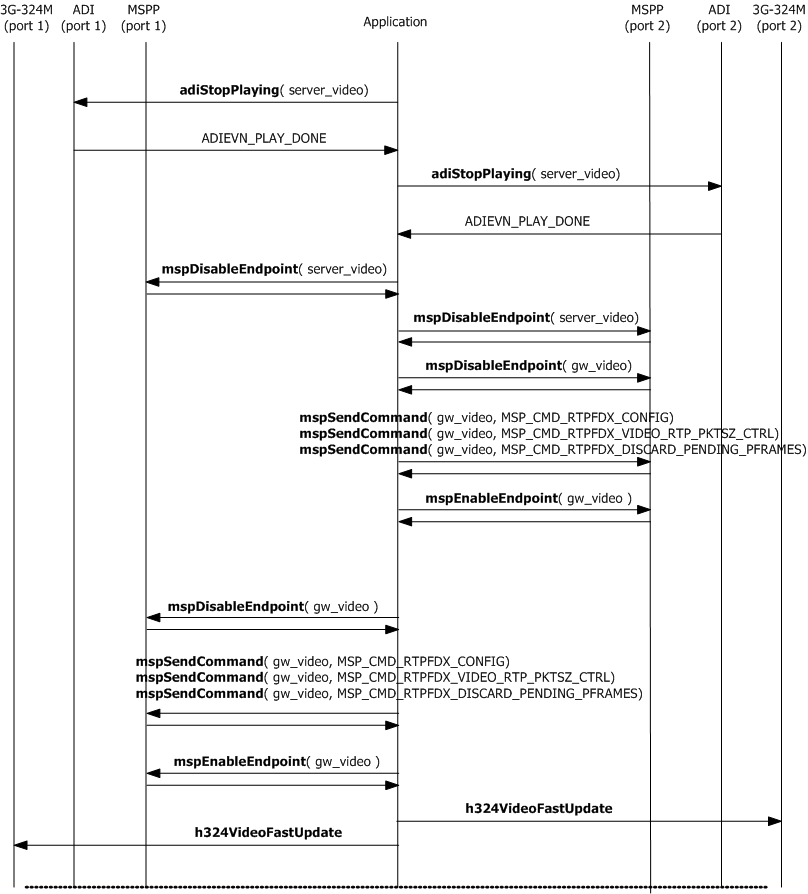
To trombone two calls together follow these steps:
Step |
Action |
1 |
Stop the play video function on both server ports and wait for completion (ADIEVN_PLAY_DONE). |
2 |
Disable both server video endpoints to prevent conflicts with gateway endpoints that have the same destination address. |
3 |
Disable the gateway video RTP endpoint of the two tromboned calls. |
4 |
Set the desired RTPAggregationThreshold and MaxRTPPacketSize on each gateway endpoint. |
5 |
Set the gateway endpoint to drop video until an I-frame is detected. |
6 |
Change the destination IP address and UDP port numbers of both gateway video RTP endpoints to match the tromboned partner gateway video endpoint settings. |
7 |
Enable the gateway video RTP endpoints of the two calls to be tromboned together. |
8 |
Send a FastVideoUpdate to both terminals. |
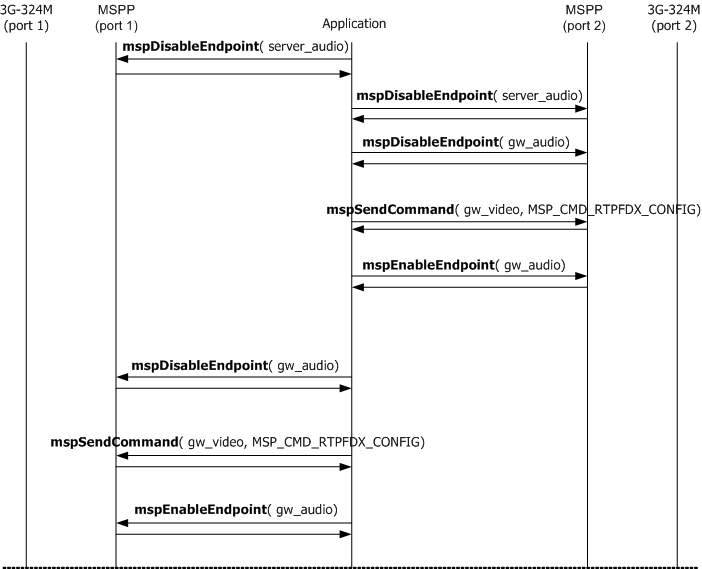
The application must also switch audio RTP endpoint destinations, as follows:
Step |
Action |
1 |
Disable both server audio endpoints to prevent conflicts with gateway endpoints that have the same destination address. |
2 |
Disable the gateway audio RTP endpoint of the two calls to be tromboned together. |
3 |
Change the destination IP address and UDP port numbers of both gateway audio RTP endpoints to match the tromboned partner gateway audio endpoint settings. |
4 |
Enable the gateway audio RTP endpoint of the two calls to be tromboned together. |
The following illustration shows the API call flow required to bridge together video media streams of two different 3G-324M ports:
The following illustration shows the API call flow required to bridge together audio media streams of two different 3G-324M ports:
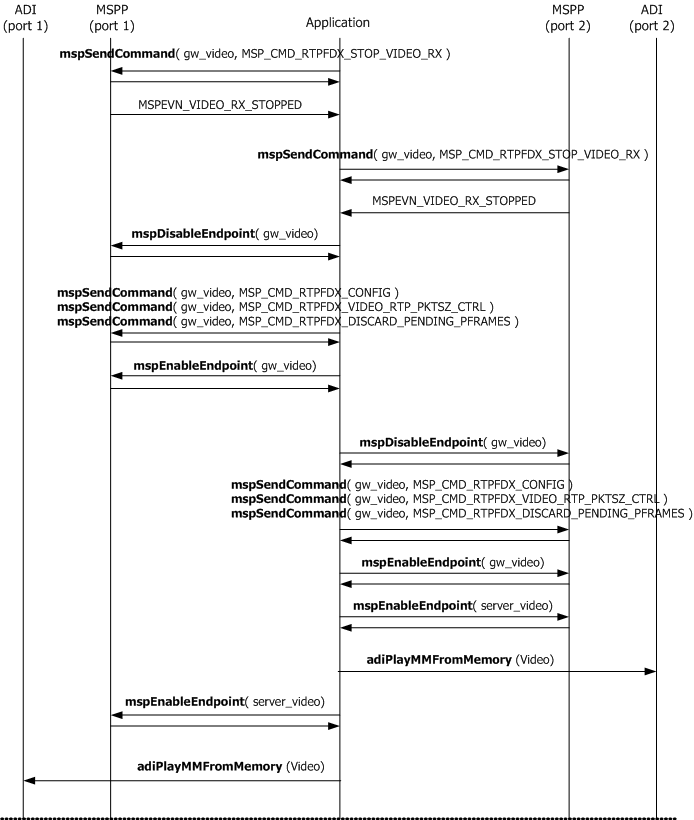
To switch the two tromboned calls back to a messaging configuration, follow these steps:
Step |
Action |
1 |
Request that both video gateway RTP endpoints stop sending video towards the TDM interface after the end of current frame is detected. The application must receive the corresponding unsolicited event (MSPPEVN_VIDEO_RX_STOPPED) from both endpoints before proceeding. |
2 |
Disable the gateway Video RTP endpoint of the two tromboned calls. |
3 |
Set the desired RTPAggregationThreshold and MaxRTPPacketSize on each gateway endpoint. Default values must be used for both parameters. |
4 |
Change each tromboned gateway video RTP endpoint's IP destination address and UDP destination port number to match server endpoint settings. |
5 |
Enable the gateway video RTP endpoint of the two calls. |
6 |
Enable both server video endpoints. |
To switch the audio RTP endpoints back to a messaging configuration, follow these steps:
Step |
Action |
1 |
Disable the gateway audio RTP endpoint of the two tromboned calls. |
2 |
Change each tromboned gateway audio RTP endpoint's IP destination address and UDP destination port number to match server endpoint settings. |
3 |
Enable the gateway audio RTP endpoint of the two calls. |
4 |
Enable both server audio endpoints. |
The following illustration shows the API call flow required to switch back video endpoints to the messaging state:
The following illustration shows the API call flow required to switch back audio endpoints to the messaging state:
