Obtains detailed information about an opened multimedia file.
DWORD mmGetFileInfo ( MMFILE * pMMFile, FILE_INFO_DESC * pFileInfoDesc)
Argument |
Description |
pMMFile |
A pointer to the object that controls the multimedia file. |
pFileInfoDesc |
A pointer to the returned FILE_INFO_DESC data structure that is the descriptor for the multimedia file. The structure definition is: typedef struct For information about the fields in this structure, see FILE_INFO_DESC. |
Return value |
Description |
SUCCESS |
|
MERR_BUFFER_TOO_SMALL |
File information descriptor is too small to receive the minimum data. |
MMERR_FILE_FORMAT |
Error in file format. |
MMERR_FILE_READ_FAILURE |
File read failure. |
MMERR_INCOMP_ACCESS_MODE |
File was not opened for read operation. |
MMERR_INVALID_FILE |
pMMFile is not valid. |
MMERR_INVALID_POINTER |
pFileInfoDesc is NULL. |
mmGetFileInfo supports 3GP files in Basic Profile and Streaming Profile. To use mmGetFileInfo, first invoke mmOpenFile in read mode.
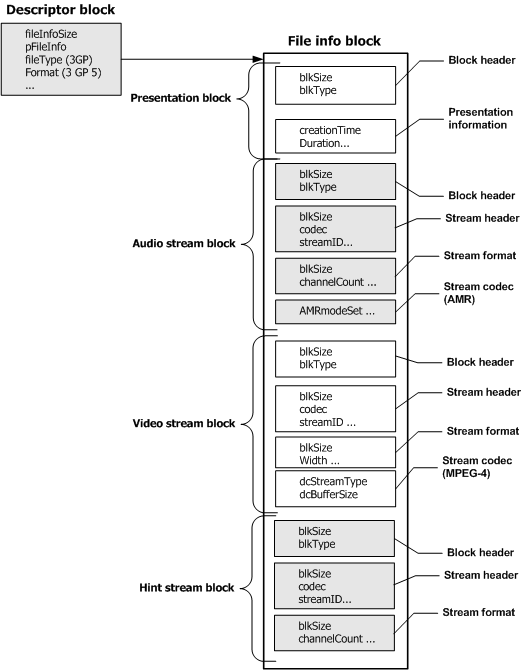
mmGetFileInfo fills in the descriptor block ( FILE_INFO_DESC structure) and initializes the buffer that contains detailed information about the file ( pFileInfo). This block of data is called the file info block. The format of the file info block depends on the type of file indicated in the descriptor block. It consists of one, or more of the following types of information blocks:
Presentation block (always present when mmGetFileInfo returns SUCCESS).
Audio stream block (present if an audio track is in the file).
Video stream block (present if a video track is in the file).
Hint stream block (present if a hint track is in the file. A block is present for each hint track created).
The following illustration shows the layout of the file info block:
Note: If the format of the file is not 3GP-Basic Profile compliant, only the descriptor is initialized.
Parsing a 3GP file
Because information blocks can be different sizes and types, each information block has a header in the beginning of the block that contains size and type information. Parse the header information by using the FILE_INFO_BLOCK_HEADER structure. Parse the remaining part of the block according to the block’s type, which is indicated by the value of the blkType field.
If the block is a presentation block, the value of the blkType field is BLK_TYPE_PRESENTATION.
If the block is a stream block, the value of the blkType field is BLK_TYPE_STREAM.
Parsing a presentation block
To parse a presentation block:
Step |
Action |
1 |
Determine the block size by viewing the blkSize field in the FILE_INFO_BLOCK_HEADER structure. |
2 |
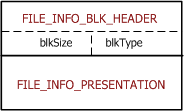
Parse the presentation block information according to the FILE_INFO_PRESENTATION structure. |
The following illustration shows the components of a presentation block:
Parsing a stream block
To parse a stream block:
Step |
Action |
1 |
Determine the block size by viewing the blkSize field in the FILE_INFO_BLOCK_HEADER structure. |
2 |
Parse the FILE_INFO_STREAM_HEADER structure to view stream information that is common to audio and video streams. The value of the streamType field in this structure indicates whether the stream block contains audio stream information (STREAM_TYPE_AUDIO) or video stream information (STREAM_TYPE_VIDEO). The value of the codec field indicates the kind of codec-specific information that the stream block contains. |
3 |
Parse an audio stream according to the FILE_INFO_FORMAT_AUDIO structure, and a video stream according to the FILE_INFO_FORMAT_VIDEO structure. |
4 |
Parse the codec-specific information according to FILE_INFO_CODEC_AMR, FILE_INFO_CODEC_H263, FILE_INFO_CODEC_H264, or FILE_INFO_CODEC_MPEG4. |
FILE_INFO_DESC fileInfoDesc
FILE_INFO_PRESENTATION *pPresentation;
ret = mmGetFileInfo (pMMFile, &fileInfoDesc);
pPresentation = (FILE_INFO_PRESENTATION *)fileInfoDesc.pFileInfo;
blockSize = pPresentation->blockHeader.blkSize;
streamCount = pPresentation -> streamCount;
for (j = 0; j < streamCount; j++)
{
blockSize = ((FILE_INFO_BLOCK_HEADER *)pFileInfo) -> blkSize;
....
pFileInfo = blockSize;
}