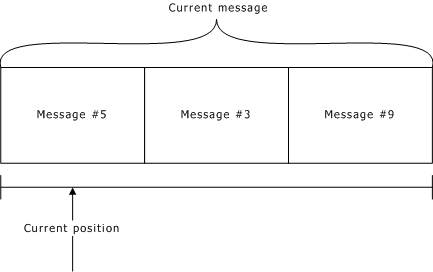
When you play a message or a list of messages, the message or message list becomes the current message for pausing, resuming, and repositioning. The current message is associated with the context handle. The current message has a current position, as illustrated:
|
To... |
Use... |
|
Remove a specified number of milliseconds of data at the current position in the current message |
|
|
Start playing from the current position in the current message |
|
|
Read data at the current position in the current message |
|
|
Start recording at the current position in the current message |
|
|
Set the current position in the current message |
|
|
Write data at the current position in the current message |
|
To... |
Use... |
|
Copy a message from one voice object to another |
|
|
Create or replace a message in a destination object with a copy of a message in a source object |
|
|
Remove an entire message from a specified voice object |
|
|
Play a sequence of messages with no delay between messages |
|
|
Play one message from a specified voice object |
|
|
Copy a message from one voice object to another |
|
|
Define the current message to be a list of messages |
|
|
Define the current message |
If a voice object containing a message in the current message (list) is closed, a current message no longer exists. Play or record is stopped, if it is active.
Note: The current message is not affected when a call hangs up.