The Voice Message service provides two types of recording functions:
The message-oriented function vceRecordMessage operates on a specific message number. This function creates a new message, replacing the existing message, if any.
The position-oriented function vceRecord operates on the current message in the specified context. Recording starts from the current position in the most recently accessed message.
Use the ADI functions adiRecordAsync or adiStartRecording for direct access to buffers. Refer to the ADI Service Developer's Reference Manual for more information on the ADI service.
The vcerec demonstration program demonstrates copying messages from one voice file to another.
Note: Playing and recording are mutually exclusive on a given context. Use the ADI service to perform simultaneous play and record.
This topic presents the following information:
Recording optionally starts with a beep tone. The recording functions have a time limit. Silence detected during recording can optionally abort the recording.
|
To... |
Use... |
|---|---|
|
Start recording at the current position in the current message |
|
|
Record a message into a specified voice object |
The following table lists the Voice Message service reason codes returned when record terminates. The value field of the VCEEVN_RECORD_DONE event states the reason.
Note: If record fails, the value field contains an error code.
|
If... |
The DONE event contains... |
|---|---|
|
The time limit in vceRecord is reached |
CTA_REASON_TIMEOUT |
|
No more space is available in the voice object, or recording in overwrite mode reached the end of the existing message |
CTA_REASON_FINISHED |
|
Silence is detected at the beginning of recording |
CTA_REASON_NO_VOICE |
|
Silence occurs after some energy is recorded |
CTA_REASON_VOICE_END |
|
Record is stopped at any time by calling vceStop |
CTA_REASON_STOPPED |
|
A touch tone digit is received and the corresponding bit in the DTMF abort parameter is set |
CTA_REASON_DIGIT |
|
The call is ended |
CTA_REASON_RELEASED |
|
The attached device service does not support the encoding format of a recording object |
CTAERR_FUNCTION_NOT_AVAIL |
When vceRecordMessage replaces a message, the new message can be larger or smaller than the previous one. The ability to resize a message depends on the object and the position of the message in the object. A message in a VOX file or a message that is located at the end of a flat (unformatted) file can grow without limit until the disk is full. A file can physically shrink if a smaller message replaces the message at the end of the file (the shrinkage occurs when the file is closed). A message in a memory block is limited to the size of the memory specified with vceOpenMemory or vceCreateMemory.
Usually only one message exists in a flat file or a memory block. If more than one message exists in a flat file or memory block and a message in the middle is replaced, the new message cannot be larger than the existing message. vceRecordMessage ends with CTA_REASON_FINISHED when the limit is reached.
The record functions take an optional pointer to a parameter structure for controlling beep tone, silence detection, record gain (including optional automatic gain control), and DTMF abort. If you pass NULL, the parameters take default values. Refer to VCE_RECORD_PARMS for more information about the record parameters.
Note: Automatic gain control is an algorithm applied to incoming speech (recording) before compression and storage that is designed to keep the amplitude of the stored speech at a target level.
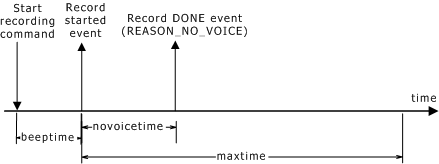
The following illustration shows record termination - no voice:
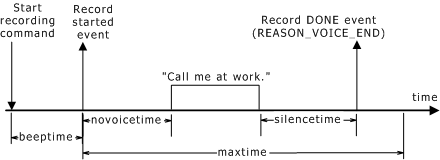
The following illustration shows record termination - voice end:
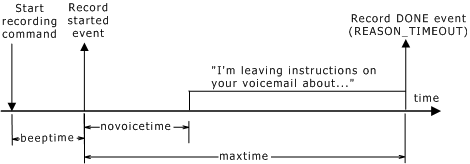
The following illustration shows record termination - timeout: