The Media Resource Control Protocol (MRCP), accessible only through VXML, is used by PowerMedia XMS as an interface to Automatic Speech Recognition (ASR) and Text-to-Speech (TTS) systems. MRCP provides an easy way to build voice user interfaces, allowing a grammar to be built for speech input and providing a way to easily translate text into voice prompts without reading and recording them.
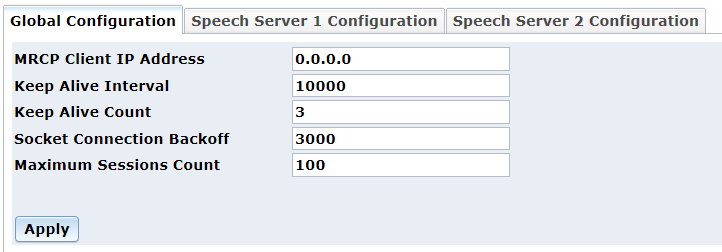
The Global Configuration page is used to configure the MRCP Client.
Proceed as follows to configure the Global Configuration parameters:
In the MRCP Client IP Address field, enter the local IP Address to be used for the MRCP Client.
In the Keep Alive Interval field, enter the keep alive interval for connection with speech server.
In the Keep Alive Count field, enter the keep alive count for connection with speech server.
In the Socket Connection Backoff field, enter the socket connection backoff - delay before TCP reconnection.
In the Maximum Sessions Count
field, enter the maximum number of MRCP sessions supported.
Note: If the MRCP server contracted
by the MRCP client uses both ASR and TTS, then the Maximum Sessions Count
field on the client screen has to be set to two times the number of
desired active sessions. This is because ASR and TTS each consume
a session, even in the same call.
Click Apply to save changes.
The Speech Server 1 Configuration page is used to configure the speech server.
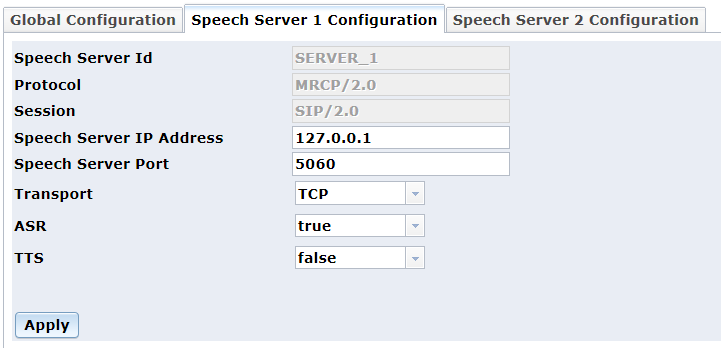
The following fields are non-configurable:
Speech Server Id field shows the speech server identification for MRCP.
Protocol field shows the supported protocol version. (Only MRCP/2.0 is supported)
Session field shows the session type supported to establish the MRCP session. (Only SIP/2.0 is supported)
Proceed as follows to configure the Speech Server 1 Configuration parameters:
In the Speech Server IP Address field, enter the IP address of the MRCP server to connect to.
In the Speech Server Port field, enter the IP port of the MRCP server to connect to.
In the Transport field,
select UDP or TCP from the drop-down list
to indicate the SIP Transport protocol.
Note: For the SIP usage only. Once the
session is established, MRCP uses TCP.
In the ASR field, select true or false from the drop-down list to enable Speech Recognition for this speech server.
In the TTS field, select true or false from the drop-down list to enable Text-to-Speak usage for this speech server.
Click Apply to save changes.
Speech Server 2 is used when customer desires ASR from one speech server and TTS from a different speech server. The Speech Server 2 Configuration page contains the same fields as shown on the Speech Server 1 Configuration page.