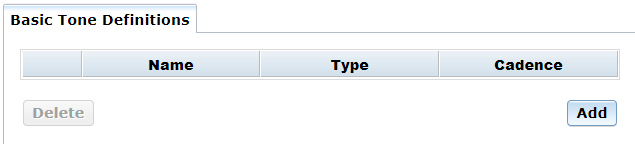
The Tones menu opens to the Basic Tone Definitions page which is used to add, modify, and delete tones.
Note: A services restart is required after adding, modifying, or deleting a tone.
Note: A maximum of 20 tones may be defined.
The following information is provided:
Item |
Description |
Name |
Name of the tone. |
Type |
Specifies whether tone is a single or dual tone. |
Cadence |
Specifies cadence. Valid values are: Yes – Cadence tone |
On the Basic Tone Definitions page, click Add. The following dialog box appears:
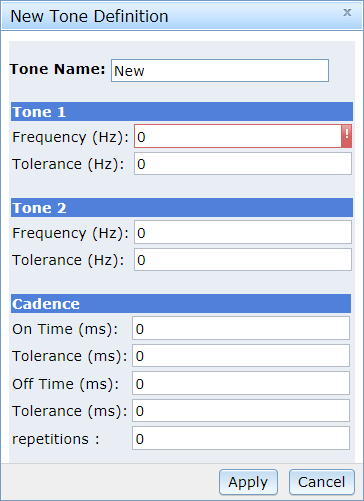
Enter the name of new tone in the Tone Name section.
In the mandatory Tone 1 field, enter the Frequency (Hz). Frequency range is between 300Hz to 3.5kHz.
Enter the Tolerance (Hz). This specifies the deviation in Hz.
Tone 2 field is optional.
If only Tone 1 is defined,
then the tone is a single tone. If both Tone
1 and Tone 2 are defined,
then the tone is a dual tone.
Note:
Dual tones with frequency components closer than approximately 63
Hz cannot be detected. In this case, use a single tone definition.
In the Cadence section,
enter the following in the spaces provided:
On Times (ms) field: tone-on
time in milliseconds (minimum 40 ms). Set to 0 to define a continuous
tone.
Tolerance (ms) field: tone-on
time deviation in milliseconds. Cadence only.
Off Time (ms) field: tone-off
time in milliseconds (minimum 40 ms). Cadence only.
Tolerance (ms) field: tone-off
time deviation in milliseconds. Cadence only.
repetitions field:
When finished, click Apply.
On the Basic Tone Definitions page, click the check box to the left of the tone you wish to modify.
Click on the Tone Name.
Change the desired fields in accordance with steps 3 through 7 as listed in the procedure to add a tone.
On the Basic Tone Definitions page, click the check box to the left of the tone you wish to delete.
Click Delete.