Media Resource Control Protocol (MRCP), accessible only through VXML, is used by PowerMedia XMS as an interface to Automatic Speech Recognition (ASR) and Text-to-Speech (TTS) systems. MRCP provides an easy way to build voice user interfaces, allowing grammar to be built for speech input and providing a way to easily translate text into voice prompts without reading and recording them.
The MRCP interface may be used as part of the VXML Interpreter in PowerMedia XMS Release 2.0. An ASR/TTS system vendor’s MRCP server must first be installed and configured, followed by the MRCP client side being configured on the PowerMedia XMS server.
Note: VXML must also be enabled and configured on PowerMedia XMS. For VXML setup, see the VoiceXML (VXML) section of this guide.
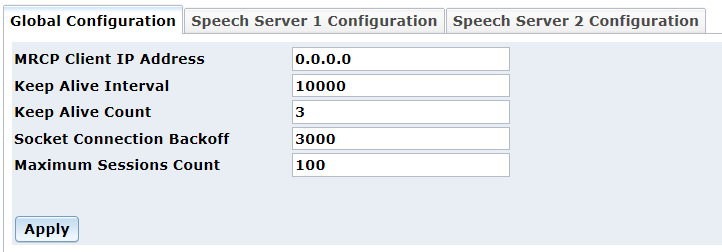
The MRCP Client menu from the Console is used to configure the PowerMedia XMS client side of the MRCP server. Refer to the Dialogic® PowerMedia™ XMS Installation and Configuration Guide for more information.
From the Console, click MRCP Client > Global Configuration page.
Set the MRCP Client IP Address field to the IP address of the PowerMedia XMS.
From the Console, click MRCP Client > Speech Server 1 Configuration page.
Set the Speech Server IP Address field to the IP address of the MRCP server.
Set Speech Server Port field to 5060 unless the MRCP server is set otherwise.
Set Transport field to UDP (TCP is default).
Set ASR and TTS fields to true.
For more information about Speech Servers, refer to the Dialogic® PowerMedia™ XMS Installation and Configuration Guide.