The Call Resource creates and manages the media/signal connection between the remote media endpoint (typically a SIP phone) and the PowerMedia XMS.
The Call Resource has the following types:
Inbound
This call resource is created by the PowerMedia XMS RESTful server
when an incoming call is received. The application is then informed
of the inbound call via the eventhandler resource.
Outbound
This call resource is created by an application that wishes to make
a media stream connection from the PowerMedia XMS RESTful server to
a SIP endpoint.
3PCC
This call resource is requested by the application without requesting
the PowerMedia XMS RESTful server to provide signaling
control. The call resource will be created based on the Session Description
Protocol (SDP) info that is provided by the application.
Media-related properties and actions associated with the media connection are defined in this section. These include play, playcollect, playrecord, overlay, join/unjoin, and stop.
Conference-related actions include add_party, update_party and remove_party.
The following tables show the HTTP methods that can be used with one or more calls.
Note: The payloads shown are examples only as there are many possible variations.
URL: /calls?appid=[appid] |
|
Action |
Create an outbound call. Note: When creating a 3PCC call without SIP call control, the SDP must be specified. |
Request XML Payload Example |
<web_service version="1.0"> |
HTTP Return Code |
Success: 201 CREATED Error: 404 NOT FOUND or 500 INTERNAL SERVER ERROR or 400 BAD REQUEST |
Response XML Payload Example |
<web_service version="1.0"> |
URL: /calls_id?appid=[appid] |
|
Action |
Update a call.
|
Request XML Payload Example |
<web_service version="1.0"> |
HTTP Return Code |
Success: 200 OK Error: 404 NOT FOUND or 500 INTERNAL SERVER ERROR |
Response XML Payload Example |
<web_service version="1.0"> |
The DELETE method has two options – one deletes all calls and the other deletes one call specified by the [call_id].
URL: /calls?appid=[appid] |
|
Action |
Delete all calls. |
Request XML Payload Example |
N/A |
HTTP Return Code |
N/A |
Response XML Payload Example |
N/A |
URL: /calls/[call_id]?appid=[appid] |
|
Action |
Delete a call by call ID. |
Request XML Payload Example |
N/A |
HTTP Return Code |
Success: 204 NO CONTENT Error: 404 NOT FOUND |
Response XML Payload Example |
N/A |
The GET method has two options – one to get all calls and the other to get one call specified by the [call_id].
URL: /calls?appid=[appid] |
|
Action |
Get all calls. |
Request XML Payload Example |
N/A |
HTTP Return Code |
Success: 200 OK Error: 404 NOT FOUND |
Response XML Payload Example |
<web_service version="1.0"> |
URL: /calls/[call_id]?appid=[appid] |
|
Action |
Get a single call by call ID. |
Request XML Payload Example |
N/A |
HTTP Return Code |
Success: 200 OK Error: 404 NOT FOUND |
Response XML Payload Example |
<web_service version="1.0"> |
The following XML schema definitions provide a formal definition of all possible XML payloads that are valid with the Call element.
http post/put request payload
<xs:element name="call">
<xs:complexType>
<xs:sequence>
<xs:element ref="call_action" minOccurs="0" maxOccurs="1" />
</xs:sequence>
<xs:attribute name="answer" type="boolean_type"/>
<xs:attribute name="signaling" type="boolean_type" default="yes" />
<xs:attribute name="media" type="media_type" default="audio"/>
<xs:attribute name="source_uri" type="xs:string" />
<xs:attribute name="destination_uri" type="xs:string" />
<xs:attribute name="display_name" type="xs:string"/>
<xs:attribute name="sdp" type="xs:string"/>
<xs:attribute name="cpa" type="boolean_type" default="no"/>
<xs:attribute name="dtmf_mode" type="dtmf_mode_option" default="rfc2833"/>
<xs:attribute name="async_dtmf" type="boolean_type" />
<xs:attribute name="async_tone" type="boolean_type" />
<xs:attribute name="rx_delta" type="xs:string" />
<xs:attribute name="tx_delta" type="xs:string" />
<xs:attribute name="cleardigits" type="boolean_type" />
<xs:attribute name="info_ack_mode" type="info_ack_mode_option" />
<xs:attribute name="early_media" type="boolean_type" />
<xs:attribute name="accept" type="boolean_type" />
</xs:complexType>
</xs:element>
single call instance response payload
<xs:element name="call_response">
<xs:complexType>
<xs:sequence>
<xs:element ref="call_action" minOccurs="0" />
</xs:sequence>
<xs:attribute name="signaling" type="boolean_type" />
<xs:attribute name="media" type="media_type" />
<xs:attribute name="destination_uri" type="xs:string" />
<xs:attribute name="source_uri" type="xs:string" />
<xs:attribute name="display_name" type="xs:string"/>
<xs:attribute name="call_type" type="call_type_option" />
<xs:attribute name="connected" type="boolean_type" />
<xs:attribute name="sdp" type="xs:string"/>
<xs:attribute name="cpa" type="boolean_type" />
<xs:attribute name="dtmf_mode" type="dtmf_mode_option" />
<xs:attribute name="async_dtmf" type="boolean_type" />
<xs:attribute name="async_tone" type="boolean_type" />
<xs:attribute name="rx_delta" type="volume_range" />
<xs:attribute name="tx_delta" type="volume_range" />
<xs:attribute name="cleardigits" type="boolean_type" />
<xs:attribute name="info_ack_mode" type="info_ack_mode_option" />
<xs:attribute name="early_media" type="boolean_type" />
<xs:attributeGroup ref="response_attrgroup" />
</xs:complexType>
</xs:element>
get all instances response payload
<xs:element name="calls_response">
<xs:complexType>
<xs:sequence>
<xs:element ref="call_response" minOccurs="0" />
</xs:sequence>
<xs:attribute name="size" type="xs:string" use="required" />
</xs:complexType>
</xs:element>
call_action
<xs:element name="call_action">
<xs:complexType>
<xs:choice minOccurs="1" maxOccurs="1">
<xs:element ref="play" />
<xs:element ref="update_play" />
<xs:element ref="playcollect" />
<xs:element ref="playrecord" />
<xs:element ref="overlay" />
<xs:element ref="stop" />
<xs:element ref="join" />
<xs:element ref="unjoin" />
<xs:element ref="add_party" />
<xs:element ref="update_party" />
<xs:element ref="remove_party" />
<xs:element ref="send_dtmf" />
<xs:element ref="send_info" />
<xs:element ref="send_info_ack" />
<xs:element ref="transfer" />
<xs:element ref="redirect" />
<xs:element ref="hangup" />
</xs:choice>
</xs:complexType>
</xs:element>
play
<xs:element name="play">
<xs:complexType>
<xs:sequence>
<xs:element ref="play_source" minOccurs="1" maxOccurs="1" />
<xs:element ref="dvr_setting" minOccurs="0" maxOccurs="1" />
</xs:sequence>
<xs:attribute name="offset" type="xs:string" default="0" />
<xs:attribute name="repeat" type="xs:string" default="0" />
<xs:attribute name="delay" type="time_value" default="1s" />
<xs:attribute name="skip_interval" type="time_value" default="1s" />
<xs:attribute name="max_time" type="time_value" />
<xs:attribute name="terminate_digits" type="digit_value" default="#"/>
<xs:attribute name="transaction_id" type="xs:string" />
</xs:complexType>
</xs:element>
update_play
<xs:element name="update_play">
<xs:complexType>
<xs:attribute name="dvr_action" type="dvr_action_option" />
<xs:attribute name="transaction_id" type="xs:string" />
</xs:complexType>
</xs:element>
playrecord
<xs:element name="playrecord">
<xs:complexType>
<xs:sequence>
<xs:element ref="source" minOccurs="0" maxOccurs="1" />
</xs:sequence>
<xs:attribute name="barge" type="boolean_type" default="yes" />
<xs:attribute name="cleardigits" type="boolean_type" default="no" />
<xs:attribute name="offset" type="xs:string" default="0" />
<xs:attribute name="repeat" type="xs:string" default="0" />
<xs:attribute name="delay" type="xs:string" default="1s" />
<xs:attribute name="recording_uri" type="xs:string" use="required" />
<xs:attribute name="beep" type="boolean_type" default="yes" />
<xs:attribute name="terminate_digits" type="digit_value" default="#"/>
<xs:attribute name="max_time" type="time_value" />
<xs:attribute name="transaction_id" type="xs:string" />
</xs:complexType>
</xs:element>
playcollect
<xs:element name="playcollect">
<xs:complexType>
<xs:sequence>
<xs:element ref="source" minOccurs="0" maxOccurs="1" />
</xs:sequence>
<xs:attribute name="barge" type="boolean_type" default="yes" />
<xs:attribute name="cleardigits" type="boolean_type" default="no" />
<xs:attribute name="offset" type="xs:string" default="0" />
<xs:attribute name="repeat" type="xs:string" default="0" />
<xs:attribute name="delay" type="xs:string" default="1s" />
<xs:attribute name="max_digits" type="xs:string" />
<xs:attribute name="terminate_digits" type="digit_value" default="#"/>
<xs:attribute name="timeout" type="time_value" />
<xs:attribute name="tone_detection" type="boolean_type" default="yes" />
<xs:attribute name="transaction_id" type="xs:string" />
</xs:complexType>
</xs:element>
overlay
<xs:element name="overlay">
<xs:complexType>
<xs:attribute name="uri" type="xs:string" use="required"/>
<xs:attribute name="transaction _id" type="xs:string" />
</xs:complexType>
</xs:element>
stop
<xs:element name="stop">
<xs:complexType>
<xs:attribute name="transaction_id" type="xs:string" use="required"/>
</xs:complexType>
</xs:element>
add_party
<xs:element name="add_party">
<xs:complexType>
<xs:attribute name="conf_id" type="xs:string" use="required" />
<xs:attribute name="audio" type="media_direction" default="recvonly" />
<xs:attribute name="video" type="media_direction" default="recvonly" />
<xs:attribute name="caption" type="xs:string" />
<xs:attribute name="clamp_dtmf" type="boolean_type" default="yes" />
<xs:attribute name="auto_gain_control" type="boolean_type" default="yes" />
<xs:attribute name="echo_cancellation" type="boolean_type" default="yes" />
<xs:attribute name="region" type="xs:string" default="0"/>
</xs:complexType>
</xs:element>
update_party
<xs:element name="update_party">
<xs:complexType>
<xs:attribute name="conf_id" type="xs:string" />
<xs:attribute name="audio" type="media_direction" />
<xs:attribute name="video" type="media_direction" />
<xs:attribute name="caption" type="xs:string" />
<xs:attribute name="region" type="xs:string" />
<xs:attribute name="clamp_dtmf" type="boolean_type" />
<xs:attribute name="auto_gain_control" type="boolean_type"/>
<xs:attribute name="echo_cancellation" type="boolean_type" />
</xs:complexType>
</xs:element>
remove_party
<xs:element name="remove_party">
<xs:complexType>
<xs:attribute name="conf_id" type="xs:string" />
</xs:complexType>
</xs:element>
join
<xs:element name="join">
<xs:complexType>
<xs:attribute name="call_id" type="xs:string" use="required" />
</xs:complexType>
</xs:element>
unjoin
<xs:element name="unjoin">
<xs:complexType>
<xs:attribute name="call_id" type="xs:string" use="required" />
</xs:complexType>
</xs:element>
send_dtmf
<xs:element name="send_dtmf">
<xs:complexType>
<xs:attribute name="digits" type="rfc2833_digit_value" use="required"/>
<xs:attribute name="duration" type="time_value" default="100ms"/>
<xs:attribute name="interval" type="time_value" default="100ms"/>
<xs:attribute name="level" type="dtmf_tone_range" default="-10dB"/>
<xs:attribute name="transaction_id" type="xs:string" />
</xs:complexType>
</xs:element>
send_info
<xs:element name="send_info">
<xs:complexType>
<xs:attribute name="content_type" type="xs:string" />
<xs:attribute name="content" type="xs:string" />
</xs:complexType>
</xs:element>
send_info_ack
<xs:element name="send_info_ack">
<xs:complexType>
<xs:attribute name="content_type" type="xs:string" />
<xs:attribute name="content" type="xs:string" />
</xs:complexType>
</xs:element>
transfer
<xs:element name="transfer">
<xs:complexType>
<xs:attribute name="call_id" type="xs:string" />
<xs:attribute name="uri" type="xs:string" />
</xs:complexType>
</xs:element>
redirect
<xs:element name="redirect">
<xs:complexType>
<xs:attribute name="uri" type="xs:string" use="required"/>
</xs:complexType>
</xs:element>
hangup
<xs:element name="hangup">
<xs:complexType>
<xs:attribute name="content_type" type="xs:string" />
<xs:attribute name="content" type="xs:string" />
</xs:complexType>
</xs:element>
The following table lists all valid parameters, their definitions and their valid and default values that can be used in an XML payload as part of a call. The HTTP method(s) in which they can be used is also provided.
Parameter |
Description |
Values |
HTTP Method |
signaling |
Specifies if signaling is done by PowerMedia XMS or a third party application server. |
yes - for PowerMedia XMS (default) no - for a third party application server |
POST |
sdp |
Specifies the Session Description Protocol data. This attribute is set by the client when it builds the XML payload and used only for 3PCC. |
Valid SDP |
POST/PUT |
media |
Sets the media type supported by the call. Note: For an update call scenario, this attribute will only take effect when answering an inbound call. |
audio (default) audiovideo |
POST/PUT |
dtmf_mode |
Specifies the signaling mode for DTMF digits. Note: For an update call scenario, this attribute will only take effect when answering an inbound call. |
inband outofband rfc2833 (default) |
POST/PUT |
async_dtmf |
Specifies if DTMF digits are reported as events outside of a <playcollect> action. |
yes no |
POST/PUT |
rx_delta |
Used for volume adjustments. |
Between +31dB and -32dB |
POST/PUT |
tx_delta |
Used for volume adjustments. |
Between +31dB and -32dB |
POST/PUT |
async_tone |
Specifies if tones are reported as events outside of a <playcollect> action. |
yes no |
POST/PUT |
cleardigits |
Specifies whether previous buffered digit input should be discarded. Note: This attribute is considered only when async_dtmf is set to Yes. |
yes no |
POST/PUT |
destination_uri |
Specifies the SIP destination (Called) address when creating an outbound SIP call. |
N/A |
POST |
source_uri |
Specifies the SIP source (Caller) address when creating an outbound SIP call. |
N/A |
POST |
cpa |
Specifies if call progress detection is used for an outbound call. |
yes no (default) |
POST |
call_action |
Refer to the <call_action> attributes. |
N/A |
PUT |
display_name |
Specifies the display name when creating an outbound call. |
N/A |
POST |
accept |
Accepts an incoming call. |
N/A |
PUT |
early_media |
Enables early media when accepting an incoming call. |
yes no (default) |
PUT |
info_ack_mode |
Specifies how INFO events are acknowledged. |
automatic (default) manual |
POST/PUT |
The following notes contain details that will help in understanding how the various attributes are used.
Audio tones can be used to both terminate operations and can also be delivered to the application as asynchronous events.
To terminate a playrecord or play operation, set terminate_digits to the desired DTMF digit value (0-9, * and #). If the operation is terminated this way, the end_playrecord or endplay event will reference the digit collected to end the operation.
To have an async DTMF event delivered to your application outside of its use as a play/record termination, async_dtmf=yes should be set for a call resource.
User-defined tone detection is set up using tone templates, which are created in the PowerMedia XMS GUI in the Tones screen (see the Dialogic® PowerMedia™ XMS Installation and Configuration Guide for more information). Set async_tones=yes for a call resource and detection of the defined tones is activated.
DTMF events are delivered as event type "dtmf", with a name of "digits" and a value corresponding to the digit collected.
Async tone events are delivered as event type "tone", with a name of "tone" and a value corresponding to the name assigned when the user-defined tone was created.
A playcollect operation usually is used to collect DTMF tones but may collect user-defined tone as well.
To do this, the attribute tone_detection=yes must be set when the playcollect is initiated. The end_playcollect event will reference the user-defined name of the tone collected and the reason parameter will be set to tone. Duration (in milliseconds) refers to the length of the play operation, not the duration of the tone.
The following table lists all valid parameters and their definitions that may be returned in an XML payload as part of a call_response.
Parameter |
Description |
Values |
identifier |
A unique ID of a call resource. |
N/A |
href |
The http: address of a call resource. |
N/A |
appid |
A unique application ID included in the original HTTP POST creation process that is utilized by the web service such that clients only have access to resources that they created. |
N/A |
call_type |
Indicates the type of call. |
inbound outbound 3pcc |
signaling |
Specifies if signaling is done by PowerMedia XMS or a third-party application server. |
yes - for PowerMedia XMS (default) no - for a third party application server |
sdp |
Returns the Session Description Protocol data. In this case, a valid SDP must be supplied by the application. |
SDP created by PowerMedia XMS for 1PCC SDP that the client sent as part of 3PCC |
media |
Specifies the media type supported by the call. |
audio audiovideo |
destination_uri |
Specifies the SIP destination address for only an outbound SIP call. |
N/A |
source_uri |
Specifies the Caller address. |
N/A |
cpa |
Specifies if call progress detection is used for an outbound call. |
yes no |
display_name |
Specifies the display name when creating an outbound call. |
N/A |
async_dtmf |
Specifies if DTMF digits are reported as events outside of a <playcollect> action. |
yes no |
dtmf_mode |
Specifies the signaling mode for DTMF digits. |
inband outofband rfc2833 |
cleardigits |
Specifies whether previously buffered input should be discarded. Note: This attribute is considered when async_dtmf is set to Yes. |
yes no |
async_tone |
Specifies if tones are reported as events outside of a <playcollect> action. |
yes no |
call_action |
Refer to <call_action> attributes. |
N/A |
| early_media | Enables early media when accepting an incoming call. | yes no (default) |
| info_ack_mode | Specifies how INFO events are acknowledged. | automatic (default) manual |
The following table lists all valid parameters, their definitions and their valid and default values that can be used in an XML payload as part of a call_action.
Parameter |
Description |
Values |
Associated Element |
play_source |
Specifies the file location and file to play. |
Refer to <play_source> properties. |
<play> |
dvr_setting |
Specifies the DVR setting for the play. |
Refer to <dvr_setting> attribute. |
<play> |
offset |
Specifies the time offset from where the play should start (.wav files only). Note: The offset is applied to the initial play only. |
The default is zero (0) seconds. |
<play> |
repeat |
Number of times to repeat the play. Use "infinite" to repeat indefinitely. "file://" URIs only. |
The default is zero (0) seconds. |
<play> |
delay |
Time delay between repeated plays. |
The default is one (1) second. |
<play> |
terminate_digits |
The digit or digits used to terminate the play. |
0-9 * # (default) |
<play> |
max_time |
Specifies the playback time limit. The maximum length of time to record. |
The default value is infinite. |
<play>, <playrecord> |
skip_interval |
Defines the amount of time to skip on the forward and backwards actions. |
The default is one (1) second. |
<play> |
location |
The URL of the content to play in the prompt phase (such as, "file://...", "rtsp://...", "image://"). | N/A | <play_source> |
| forward_key | Defines the DTMF key used to skip forwards. | 0-9 * # The default value is 1. |
<dvr_setting> |
| backward_key | Defines the DTMF key used to skip backwards. | 0-9 * # The default value is 2. |
<dvr_setting> |
| pause_key | Defines the DTMF key used to pause playback. | 0-9 * # The default value is 3. |
<dvr_setting> |
| resume_key | Defines the DTMF key used to resume playback. | 0-9 * # The default value is 4. |
<dvr_setting> |
restart_key |
Defines the DTMF key used to restart playback. |
0-9 *# The default value is 5. |
<dvr_setting> |
dvr_action |
A DVR action performed on the play. |
backward - skip backwards forward - skip forward pause - pause playback restart - jump back to the start resume - resumed paused playback |
<update_play> |
transaction_id |
A unique ID assigned by the PowerMedia XMS RESTful server for the play action. |
N/A |
<update_play> |
play_source |
Specifies the location and name of the file to play. |
N/A |
<play>, <playrecord>, and <playcollect> |
recording_uri |
Specifies the filename "file://..." |
N/A |
<playrecord> |
offset |
Specifies the time offset from where the play should start (.wav files only). Note: Applies only to the initial play. |
N/A |
<play>, <playrecord>, and <playcollect> |
repeat |
Specifies the number of times to repeat the play. |
N/A |
<play>, <playrecord>, and <playcollect> |
delay |
Specifies the time delay between repeated plays. |
The default value is one (1) second. |
<play>, <playrecord>, and <playcollect> |
terminate_digits |
The digit or digits used to terminate the playrecord. |
0-9 *# |
<play>, <playrecord>, and <playcollect> |
beep |
Specifies whether to play a tone when starting to record. |
yes no |
<playrecord> |
barge |
Specifies whether DTMF digit input will barge the prompt and force transition to the record phase. Note: If barge is set to No, the cleardigits attribute implicitly has the value Yes. |
yes no |
<playrecord> and <playcollect> |
cleardigits |
Specifies whether previous input should be considered or ignored for the purpose of barge-in. Note: When set to No with the barge attribute set to Yes, previously buffered digits will result in the recording phase starting immediately, and the prompt will not be played. |
yes - previously buffered digits are discarded no - previously buffered digits are considered |
<playrecord> and <playcollect> |
transaction_id |
A unique ID assigned by PowerMedia XMS RESTful API. |
N/A |
<play>, <playrecord>, <playcollect>, <overlay>, and <send_dtmf> |
max_digits |
Specifies the maximum number of digits to collect. |
N/A |
<playcollect> |
timeout |
Specifies the maximum length of time to wait for the first digit or tone. The time begins when the prompt phase ends. |
The default value is infinite. |
<playcollect> |
interdigit_timeout |
The maximum length of time to wait for subsequent digits. This timeout is reset after each digit is received. |
The value specified by the timeout parameter. |
<playcollect> |
tone_detection |
Enable tone detection. |
yes no (default) |
<playcollect> |
uri |
The template attributes passed to the image builder. image:id=template&a=b... Specifies the uri of the transfer target. |
N/A |
<overlay>, <transfer>, and <redirect> |
duration |
The length of time that the overlay or each digit is shown. |
Use "infinite" to display until the overlay stops. |
<overlay> and <send_dtmf> |
conf_id |
Specifies the conference identifier. |
N/A |
<add_party>, <remove_party>, and <update_party> |
caption |
Specifies text for caption, as in caller name. |
N/A |
<add_party> |
region |
Specifies the video pane used to display this participant's video stream. The current occupant of the region (if any) will be reset to no preference and replaced by this party. |
The value 0 (zero) means no preference. |
<add_party> and <update_party> |
audio |
Sets the conference audio participation. |
inactive - no audio sendonly - only transmit audio recvonly - only receive audio (default) sendrecv - full duplex audio |
<add_party> and <update_party> |
video |
Sets the conference video participation. |
inactive - no video sendonly - only transmit video recvonly - only receive video (default) sendrecv - full duplex video |
<add_party> and <update_party> |
call_id |
Specifies the call identifier on which to perform the action. |
N/A |
<join>, <unjoin>, and <transfer> |
clamp_dtmf |
Determines if DTMF digits are suppressed. |
The value specified in xms_create_conference. yes no |
<add_party> and <update_party> |
auto_gain_control |
Determines if automatic gain control should be used. |
The value specified in xms_create_conference. yes no |
<add_party> and <update_party> |
echo_cancellation |
Determines if echo cancellation should be used. |
The value specified in xms_create_conference. yes no |
<add_party> and <update_party> |
digits |
Specifies the digits to send. |
0-9 * # ABCD |
<send_dtmf> |
interval |
Specifies the length of time of each digit. |
100ms (default) |
<send_dtmf> |
level |
Specifies the amplitude of the DTMF digit tones. |
Between 0 and -40dB -10dB (default) |
<send_dtmf> |
content_type |
Specifies the mime type describing content. |
N/A |
<send_info>, <send_info_ack>, and <hangup> |
content |
Specifies the content data. |
N/A |
<send_info>, <send_info_ack>, and <hangup> |
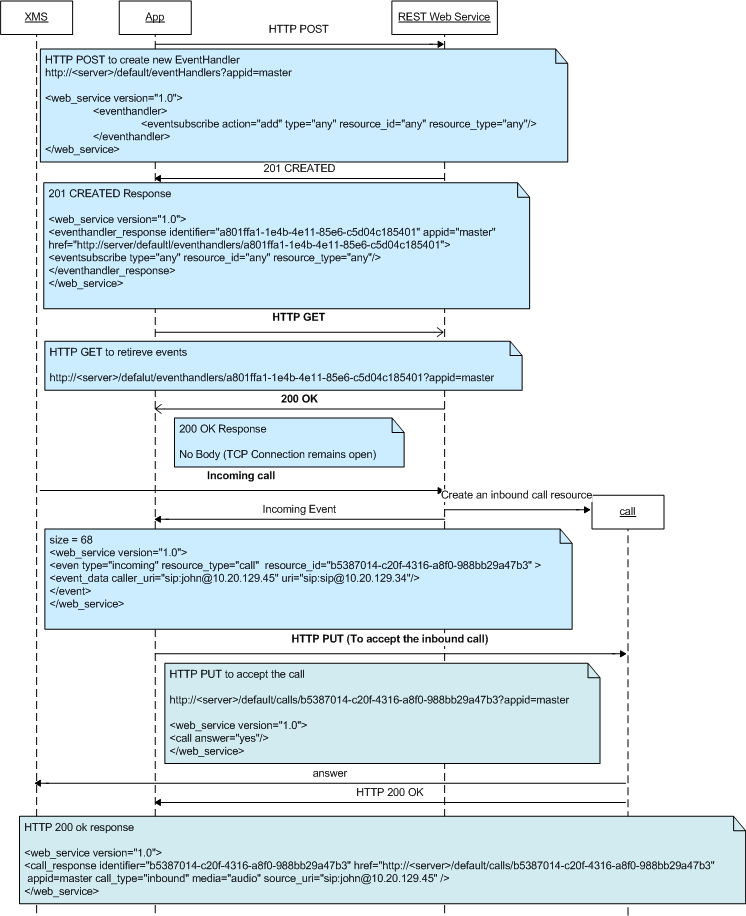
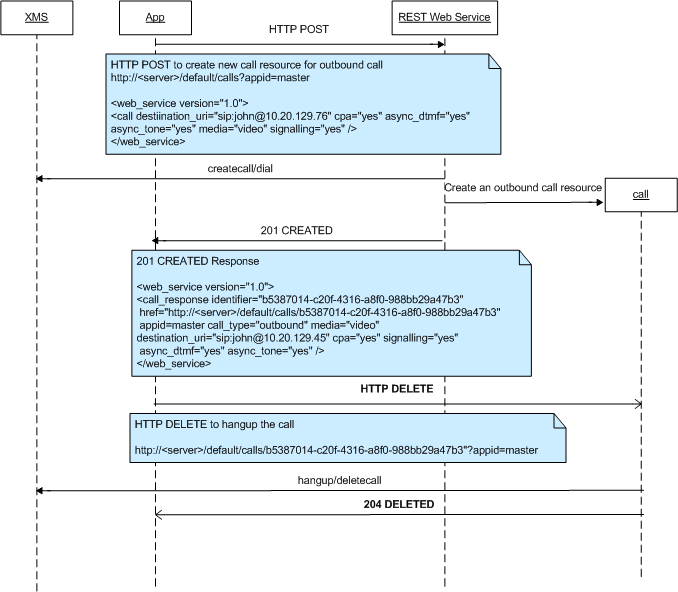
This section provides several diagrams detailing specific call actions.
Answer/Accept an Inbound Call
Create an Outbound Call
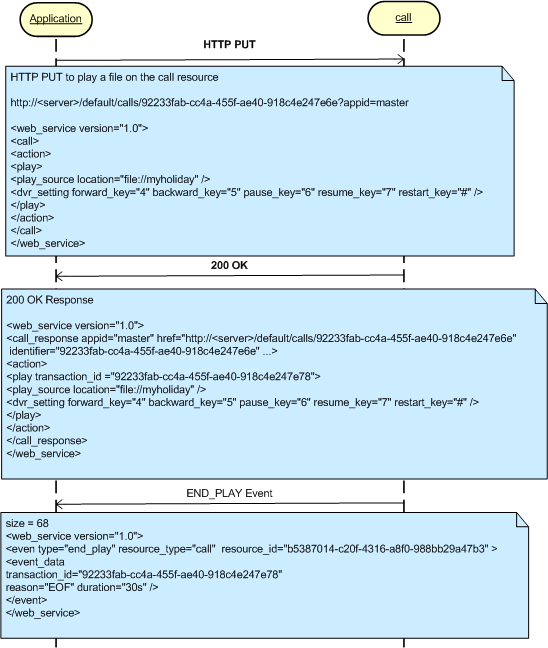
The following diagram illustrates the play action process on a call resource. This scenario assumes a call resource has already been created and the application has an eventhandler resource to monitor the play events.
Note: The process of <playcollect>, <playrecord>, and <overlay> actions are similar to the <play> action.
Play Scenario
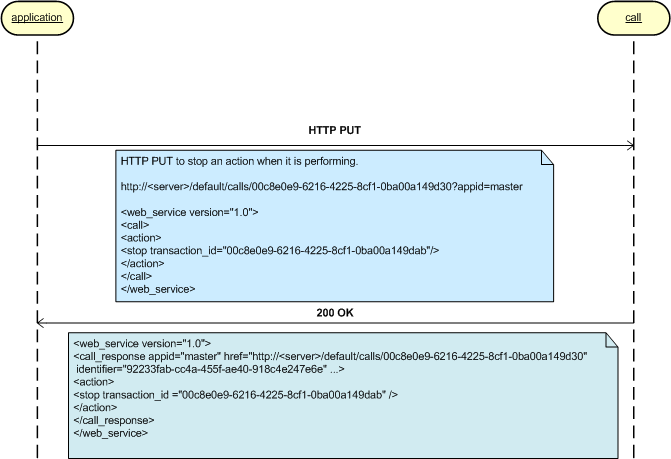
The following diagram illustrates the stop action. A stop action only applies to actions that return a transaction ID in HTTP response payload. These actions include <play>, <playrecord>, <playcollect>, and <overlay>.
Stop Scenario
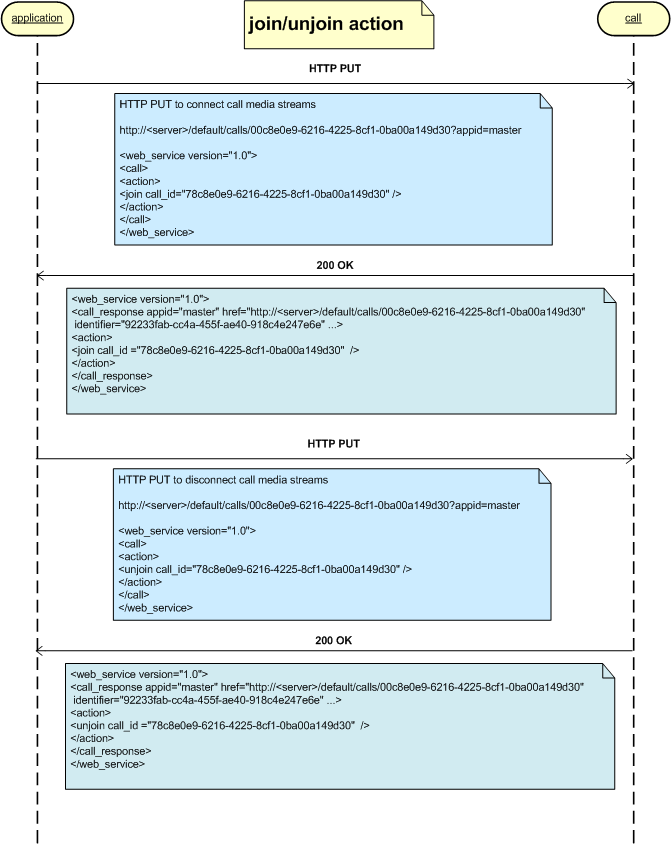
Join/Unjoin Scenario