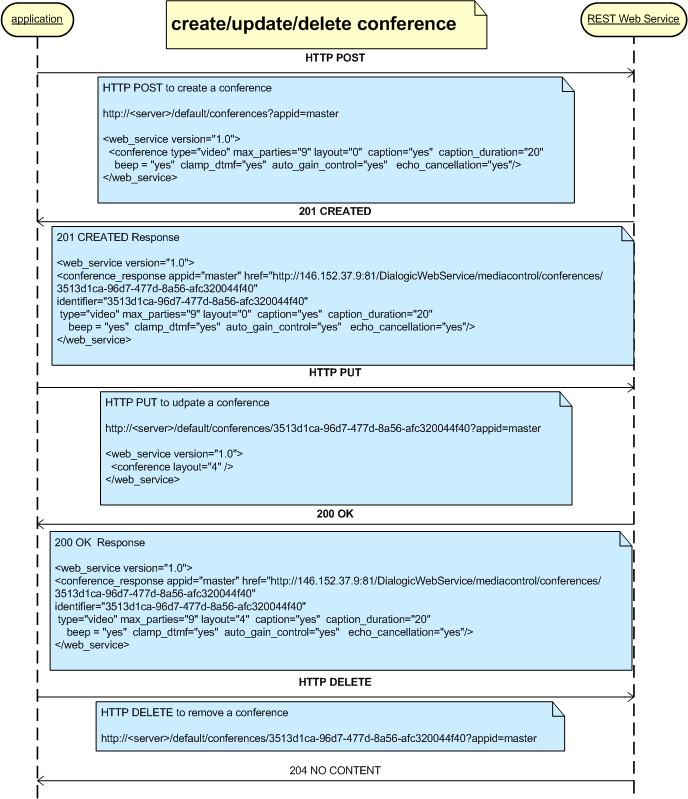
The Conference Resource encapsulates a single instance of a conference resource on PowerMedia XMS. It contains all call resources currently included in the active conference.
Conference-related properties and actions associated with the conference are defined in this section. These include add_party, update_party, remove_party, and playrecord.
The following tables show the HTTP methods that can be used with a conference.
Note: The payloads shown are examples only as there are many possible variations.
URL: /conferences?appid=[appid] |
|
| Action | Create a conference. |
Request XML Payload |
<conference type="audiovideo" max_parties="2" reserve="2" |
HTTP Return Code |
Success: 201 CREATED Error: 404 NOT FOUND or 500 INTERNAL SERVER ERROR or 400 BAD REQUEST |
Response XML Payload |
201 |
URL: /conferences/[conference_id]?appid=[appid] |
|
| Action | Update a conference.
|
Request XML Payload |
<conference> |
HTTP Return Code |
Success: 200 OK Error: 404 NOT FOUND or 500 INTERNAL SERVER ERROR |
Response XML Payload |
200 |
URL: /conferences/[call_id]?appid=[appid] |
|
Action |
Delete a call from a conference. |
Request XML Payload |
N/A |
HTTP Return Code |
Success: 204 NO CONTENT Error: 404 NOT FOUND |
Response XML Payload |
N/A |
The GET method has two options – one gets all conferences and the other gets one conference specified by the [conference_id].
URL: /conferences?appid=[appid] |
|
| Action | Get all conferences. |
Request XML Payload |
N/A |
Response XML Payload |
200 |
HTTP Return Code |
Success: 200 OK Error: 404 NOT FOUND |
URL: /conferences/[conference_id]?appid=[appid] |
|
| Action | Get a conference. |
Request XML Payload |
N/A |
HTTP Return Code |
Success: 200 OK Error: 404 NOT FOUND |
Response XML Payload |
200 |
The following XML schema definitions provide a formal definition of all possible XML payloads that are valid with the Conference element.
request payload
<xs:element name="conference">
<xs:complexType>
<xs:sequence>
<xs:element ref="conf_action" minOccurs="0" maxOccurs="1" />
</xs:sequence>
<xs:attribute name="type" type="media_type" default="audio" />
<xs:attribute name="max_parties" type="xs:string" default="9" />
<xs:attribute name="reserve" type="xs:string" default=”0” />
<xs:attribute name="layout" type="xs:string" >
<xs:attribute name="caption" type="boolean_type" default="yes" />
<xs:attribute name="caption_duration" type="xs:string" default="20s" />
<xs:attribute name="beep" type="boolean_type" default="yes" />
<xs:attribute name="clamp_dtmf" type="boolean_type" default="yes" />
<xs:attribute name="auto_gain_control" type="boolean_type" default="yes" />
<xs:attribute name="echo_cancellation" type="boolean_type" default="yes" />
</xs:complexType>
</xs:element>
single instance response payload
<xs:element name="conference_response">
<xs:complexType>
<xs:sequence>
<xs:element ref="conf_action" minOccurs="0" maxOccurs="1" />
<xs:element ref="conf_participant" minOccurs="0" />
</xs:sequence>
<xs:attribute name="type" type="media_type" />
<xs:attribute name="max_parties" type="xs:string" />
<xs:attribute name="reserve" type="xs:string" />
<xs:attribute name="layout" type="xs:string" />
<xs:attribute name="caption_duration" type="xs:string" />
<xs:attribute name="beep" type="xs:string" default="yes" />
<xs:attribute name="clamp_dtmf" type="xs:string"/>
<xs:attribute name="auto_gain_control" type="xs:string"/>
<xs:attribute name="echo_cancellation" type="xs:string"/>
<xs:attributeGroup ref="response_attrgroup" />
</xs:complexType>
</xs:element>
get all instances response payload
<xs:element name="conferences_response">
<xs:complexType>
<xs:sequence>
<xs:element ref="conference_response" minOccurs="0"/>
</xs:sequence>
<xs:attribute name="size" type="xs:string" use="required" />
</xs:complexType>
</xs:element>
conf_participant
<xs:element name="conf_participant">
<xs:complexType>
<xs:attribute name="call_id" type="xs:string" />
<xs:attribute name="audio" type="media_direction" />
<xs:attribute name="video" type="media_direction" />
<xs:attribute name="caption" type="xs:string" />
<xs:attribute name="region" type="xs:string" />
</xs:complexType>
</xs:element>
conf_action
<xs:element name="conf_action">
<xs:complexType>
<xs:choice minOccurs="1" maxOccurs="1">
<xs:element ref="play" />
<xs:element ref="playrecord" />
<xs:element ref="update_play" />
<xs:element ref="stop" />
</xs:choice>
</xs:complexType>
</xs:element>
playrecord
<xs:element name="playrecord">
<xs:complexType>
<xs:sequence>
<xs:element ref="play_source" minOccurs="0" maxOccurs="1" />
</xs:sequence>
<xs:attribute name="barge" type="boolean_type" default="yes" />
<xs:attribute name="cleardigits" type="boolean_type" default="no" />
<xs:attribute name="offset" type="time_value" default="0s" />
<xs:attribute name="repeat" type="integer_value" default="0" />
<xs:attribute name="delay" type="time_value" default="1s" />
<xs:attribute name="recording_uri" type="xs:string" use="required" />
<xs:attribute name="beep" type="boolean_type" default="yes" />
<xs:attribute name="terminate_digits" type="digit_value" default="#"/>
<xs:attribute name="max_time" type="time_value" default="infinite" />
<xs:attribute name="transaction_id" type="xs:string" />
</xs:complexType>
</xs:element>
The following table lists all valid parameters, their definitions and their valid and default values that can be used in an XML payload as part of a conference. The HTTP method(s) in which they can be used is also provided.
Parameter |
Description |
Values |
HTTP Method |
type |
Sets the media supported by conference. |
audio (default) audiovideo |
POST |
max_parties |
Maximum number of parties in a conference. |
The default is nine (9). |
POST |
reserve |
Number of party resources to reserve for this conference.
Any requests beyond this value are honored on a best-effort basis. |
The default is zero (0). |
POST |
layout |
The number of tiles displayed in the conference output. |
0, 1, 2, 4, 6, or 9. Setting to zero (0) means that the number of tiles displayed is determined by the number of active parties. |
POST/PUT |
caption |
Determines if the caller's ID is overlaid on their image. |
yes (default) no |
POST |
caption_duration |
The length of time that the caption is shown. Use "infinite" (without the quotes) to display the caption for the entire call. |
The default is twenty (20) seconds. |
POST |
beep |
Determines if a tone is played when a party joins/leaves a conference. |
yes (default) no |
POST |
clamp_dtmf |
Determines if DTMF digits are suppressed. |
yes (default) no |
POST |
auto_gain_control |
Determines if automatic gain control should be used. |
yes (default) no |
POST |
echo_cancellation |
Determines if echo cancellation should be used. |
yes (default) no |
POST |
conf_action |
Refer to conf_action attributes. |
N/A |
PUT |
The following table lists all valid parameters, their definitions and valid values that can be returned by PowerMedia XMS in an XML payload as part of the response to a conference POST or PUT.
Parameter |
Description |
Values |
identifier |
A unique ID of a conference resource. |
N/A |
href |
The http: address of a conference resource. |
N/A |
appid |
A unique application ID included in the original HTTP POST creation process that is utilized by the web service such that clients only have access to resources that they created. |
N/A |
type |
Sets the media type supported by the conference. |
audio audiovideo |
max_parties |
Maximum number of parties in a conference. |
N/A |
reserve |
Number of party resources to reserve for this conference. Any requests beyond this value are honored on a best-effort basis. |
N/A |
layout |
The number of tiles displayed in the conference output. |
0, 1, 2, 4, 6, and 9. Zero (0) means that the number of tiles displayed is determined by the number of active presenters. |
caption |
Determines if the caller's ID is overlaid on their image. |
yes no |
caption_duration |
The length of time the caption is shown. Use "infinite" (without the quotes) to display the caption for the entire call. |
N/A |
beep |
Determines if a tone is played when a party joins/leaves a conference. |
yes no |
clamp_dtmf |
Determines if DTMF digits are suppressed. |
yes no |
auto_gain_control |
Determines if automatic gain control should be used. |
yes no |
echo_cancellation |
Determines if echo cancellation should be used. |
yes no |
conf_action |
Refer to conf_action parameters. |
N/A |
size |
Number of conferences. |
N/A |
conference_ response |
Refer to conference_response parameters. |
N/A |
The following table lists all valid parameters, their definitions and their valid and default values that can be used in an XML payload as part of a conference.
Parameters |
Description |
Values |
Associated Element |
play_source |
Specifies the file location and file to play. Refer to <play_source> attributes. |
N/A |
<play> and <playrecord> |
dvr_setting |
Specifies the DVR setting for the play. Refer to <dvr_setting> attributes. |
N/A |
<play> |
beep |
Specifies whether to play a tone when starting to record. |
yes no |
<playrecord> |
barge |
Specifies whether DTMF digit input will barge the prompt and force transition to the record phase. Note: If barge is set to No, the cleardigits attribute implicitly has the value Yes. |
yes no |
<playrecord> |
cleardigits |
Specifies whether previous input should be considered or ignored for the purpose of barge-in. Note: When set to No with the barge attribute set to Yes, previously buffered digits will result in the recording phase starting immediately, and the prompt will not be played. |
yes - previously buffered digits are discarded no - previously buffered digits are considered |
<playrecord> |
offset |
Specifies the time offset from where the play should start (.wav files only). The offset is applied to the initial play only. |
The default is zero (0) seconds. |
<play> and <playrecord> |
repeat |
Number of times to repeat the play. Use "infinite" to repeat indefinitely. "file://" URIs only. |
The default is zero (0) seconds. |
<play> and <playrecord> |
delay |
Time delay between repeated plays. |
The default is one (1) second. |
<play> and <playrecord> |
recording_uri |
Specifies the filename "file://..." |
N/A |
<playrecord> |
terminate_digits |
The digit or digits used to terminate the play. |
0-9 * # (default) |
<play> and <playrecord> |
max_time |
Specifies the playback time limit. |
The default value is infinite. |
<play> and <playrecord> |
skip_interval |
Defines the amount of time to skip on the "forward" and "backwards" actions. |
The default is one (1) second. |
<play> |
region |
Sets the video pane that will display the video media. Conference only. |
The value "0" causes the video to be shown full-screen with the current layout being restored automatically when the play back completes. |
<play> |
location |
The URL of the content to be played in the prompt phase (e.g., "file://...", "rtsp://...", "image:"). |
N/A |
<play_source> |
forward_key |
Defines the DTMF key used to skip forwards. |
0-9 * # The default value is 1. |
<dvr_setting> |
backward_key |
Defines the DTMF key used to skip backwards. |
0-9 * # The default value is 2. |
<dvr_setting> |
pause_key |
Defines the DTMF key used to pause playback. |
0-9 * # The default value is 3. |
<dvr_setting> |
resume_key |
Defines the DTMF key used to resume playback. |
0-9 * # The default value is 4. |
<dvr_setting> |
restart_key |
Defines the DTMF key used to restart playback. |
0-9 * # The default value is 5. |
<dvr_setting> |
dvr_action |
A DVR action performed on the play. It is specified with the transaction ID. |
backward - skip backwards forward - skip forward pause - pause playback restart - jump back to the start resume - resumed paused playback |
<update_play> |
transaction_id |
A unique ID that is assigned by the PowerMedia XMS RESTful server. |
N/A |
<update_play>, <stop>, and <playrecord> |
The figure below shows the creation/updating/deletion process of a conference. The actions performed on a conference resource are similar to the play and playrecord actions on a call resource.