
In RESTful mode, PowerMedia XMS uses ImageMagick libraries (http://www.imagemagick.org) to enable images and captions to be created dynamically by the application. This simplifies the task of building menus and other static images. Instead of having to create every image in advance and maintain them as the application evolves, a template for image creation is used, and text and images plugged into the template. This feature may also be used to create graphics for simple presentations and games.
Images are built from three data sources:
A predefined document template, stored on PowerMedia XMS
A predefined style definition, stored on PowerMedia XMS
Dynamic content data provided by the application, via the PowerMedia XMS RESTful API, at run-time
PowerMedia XMS combines these to create and display a JPEG image at runtime.
Templates are used to define the structural elements that make up the image.
Template files are stored in the directory: /etc/xms/imagemaker.d and have names ending with the extension .conf. PowerMedia XMS will load such named files in this directory at start up. These files use the familiar "ini" file format and may contain multiple template definitions. Each section defines a single template with the name of the section serving as a globally unique name.
Note: The PowerMedia XMS Admin Console cannot be used to modify the .conf files. You will need to SSH into the system to make any modifications ("root" user with password "powermedia").
Below is an example template that defines a basic menu:
;-----------------------------------------------------------------------------
; Example ImageMaker document templates.
; This file should be placed into the imagemaker.d directory.
;-----------------------------------------------------------------------------
;
; Each section defines one document template.
;
; ----------------------------------------------------------------------------
; | Parameter | Value | Description |
; |-----------+-----------+--------------------------------------------------|
; | style | filename | File containing style information for the doc. |
; |-----------+-----------+--------------------------------------------------|
; | text | Unique id | A text element |
; |-----------+-----------+--------------------------------------------------|
; | list | Unique id | A list element (text) |
; |-----------+-----------+--------------------------------------------------|
; | image | Unique id | An image element |
; ----------------------------------------------------------------------------
;
; The following values are reserved and must not be used for
; element ids: id document
;-----------------------------------------------------------------------------
;
; A basic menu. Three elements: A title, list of options and a footer.
[menu]
style = /var/lib/xms/imagemaker/style/menu.style
text = header
list = items
text = footer
; End of template
The appearance of the template's elements is defined using a separate style document, which is located in the directory: /var/lib/xms/imagemaker/style. A single style document may be shared by multiple templates. Style definitions for unknown elements are simply ignored. This behavior allows several templates to use a single style document and provide a common theme.
Rather than simply setting a background color for a style, the style file may specify an image file to be used as the background for the image being generated. This allows a common theme or logo to be included in each.
Below is an example of a CIF resolution JPEG background file:
The image generator supports many image formats including PNG. Using the PNG format allows layering effects to be achieved through the use of transparency in background images.
All image files used to compose the output image are stored in the directory: /var/lib/xms/imagemaker/images.
Below is an example style document used for the menu defined earlier in this section:
; ---------------------------------------------------------------------------
; Style information for a full-screen menu.
;
; This file consists of a section named 'document' that defines the main
; style for the doc. This followed by sections that specify style information
; for the corresponding element in the document that this style is applied ; ; to.
; Colors may be defined as: a css hex value, a css color name or transparent.
; See http://www.w3.org/TR/SVG/types.html#ColorKeywords for color names.
;
; height height of document or element in pixels (CIF is 288).
; width width of document or element in pixels (CIF is 352).
; top offset of top of an element relative to the document.
; left offset of left of an element relative to the document.
; padding offset of the content relative to top and left.
; background-image filename of an optional background image for the
; document.
; background-color color used to fill the document or element background.
; color color used for text.
; border-radius corner radius in pixels.
; border-color color used for element border.
; border-width element border width in pixels.
; text-align justification of the text (left, center, right).
; font-size size of the text font (small, medium, large).
;----------------------------------------------------------------------------
[document]
height = 288
width = 352
background-image = /var/lib/xms/imagemaker/images/dialogic_background.png
background-color = #162660
color = #fff
[header]
height = 36
width = 328
top = 12
left = 12
padding = 4
background-color = aliceblue
color = #003
border-radius = 6
text-align = center
font-size = large
[items]
height = 184
width = 328
top = 60
left = 12
padding = 12
background-color = transparent
color = #fff
text-align = left
font-size = medium
[footer]
height = 20
width = 328
top = 260
left = 12
padding = 2
background-color = transparent
color = #9999a8
text-align = center
font-size = small
; End of style file
; ---------------------------------------------------------------------------
Note: All values given in the style file are in pixels. Different resolutions are made up of a different arrays of pixels (CIF=352x288, VGA=640x480 and 720p=1280x720); therefore, a different style file with different values is required for each resolution. In addition, the aspect ratio (height to width proportion) also differs among resolutions and needs to be considered when defining layout.
A PowerMedia XMS RESTful application is able to use the dynamic image creation feature with the following functions:
play
playcollect
playrecord
overlay
The image contents are specified as a single URI string that is prefixed by "image:", followed by a number of ampersand (&) separated parameters.
Each parameter is defined as a name followed by an equal sign (=) followed by a value. The first parameter uses the reserved name 'id' which specifies the name of the template being used. The remaining parameters specify template element names and their respective contents.
With the exception of the list element type, all elements take only a single value. The list of elements may be defined multiple times in order to define each item.
If a parameter value needs to contain ampersand or equal characters, these must be passed as percent escaped hex values, for example, an ampersand is represented by "%26".
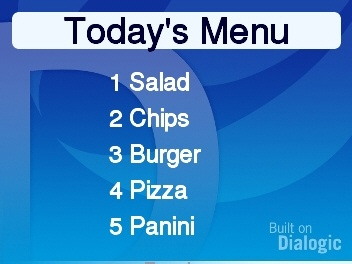
An example of the URI used to create a simple menu is shown below. It contains a header, five (5) items and a footer.
uri="image:id=menu&header=Today’s Menu&items=1 Salad&items=2 Chips&items=3 Burger&items=4
Pizza&items=5 Panini&items=7 Pasta&footer=Tuesday"
When using XMSTool to drive an XMS application, (refer to XMSTool RESTful Utility) the ampersand (&) needs to be specified as "&". This same URI syntax should then appear as follows:
uri="image:id=menu&header=Today’s Menu&items=1 Salad&items=2 Chips&items=3 Burger&items=4
Pizza&items=5 Panini&items=7 Pasta&footer=Tuesday"
Overlay and the play/playcollect/playrecord commands are different in that the overlay command is used to superimpose the image on an existing media stream such as a mixed conference. With play/playcollect/playrecord, the defined image itself is used as basis for the video stream.
Note: Currently, only a single URI can be played for both audio and video. If an "image" URI is played, then any audio meant to accompany it will be lost. This restriction is planned to be lifted in a future release.
Combining the template file, style file, background image, and dynamic text representation results in the following menu:
There are several examples of different images included with PowerMedia XMS. Start with a working image and experiment/adjust until the desired results are obtained.