This section provides information about the PowerMedia XMS RESTful API Interface, including available features and resource-based component definitions.
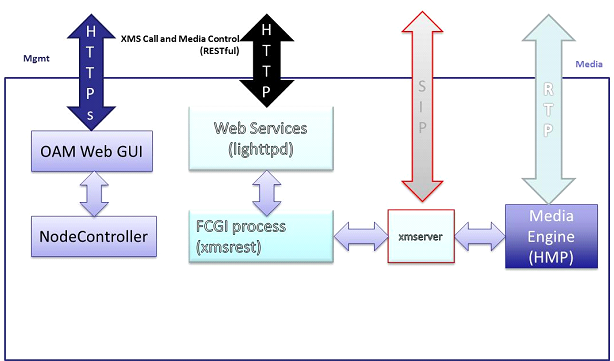
The PowerMedia XMS RESTful API is one of several APIs that can be used to drive the PowerMedia XMS. The architectural diagram below shows how the RESTful interface fits into PowerMedia XMS.
Two web servers are used in PowerMedia XMS:
Apache server
Controls a web-based interface for operations, administration and maintenance.
lighttpd server
Processes call control and media commands delivered via the RESTful
API as described in this guide. The lighttpd server includes a Fast
Common Gateway Interface (FCGI) process, which allows efficient interfacing
between PowerMedia XMS processes.
The PowerMedia XMS translates RESTful commands into the PowerMedia HMP media engine's low-level API. The media engine itself handles SIP calls, plays/records multimedia, and mixes multimedia conferences.
PowerMedia XMS provides two call control models:
First party call control (1PCC)
The application sends commands to the PowerMedia XMS to establish SIP
calls on the application's behalf. In this model, the application
does not need to be involved in making or receiving SIP calls and
related SDP negotiation.
Third party call control (3PCC)
The application handles SIP calls and SDP negotiation, and the PowerMedia
XMS only performs media processing operations.
The PowerMedia XMS RESTful API uses a Representational State Transfer (RESTful) web service. This web service is a software system designed to support interoperable machine-to-machine interactions over a network, using the HTTP protocol.
The RESTful API consists of a series of requests and responses built around the transfer of representations of "resources". These resources are accessed through Universal Resource Indicators (URIs).
RESTful client-server architecture is where clients initiate requests to servers and servers process the requests and return appropriate responses.
The "client side" refers to the client that communicates with the PowerMedia XMS and directs the session with the caller. Essentially, any language or operating system may be used to build a client. The main requirement is that the client supports HTTP and XML.
Listed below are client-side development platforms. Comments are included on multithreading, which is important for the event handler.
Java – This object-oriented, operating system-independent programming environment is fully multithreaded. Several XSD/XML parsers are available, as well as HTTP client class libraries.
Note: The Dialogic Verification Demo used with the PowerMedia XMS is a Java application. Refer to the Dialogic® PowerMedia™ XMS Quick Start Guide for information about the Demo.
Python – This operating system-independent interpreted scripting language has POSIX threading available. HTTP protocol client library and Python XML/Schema processing tool are also available.
.NET – This Integral Microsoft Windows component supports the building and running of applications and XML web services. HTTP module and XSD schema definition tools are available.
Ruby – This open source scripting language contains a multiprocessing model that may be needed for the event handler. An HTTP client API and XSD validation tools are available.
C/C++ – These general purpose programming languages are fully multithreaded. cURL library (http://curl.haxx.se) is used for HTTP processing and Xerces C++ XML parser (http://xerces.apache.org/xerces-c) is used for XML.
In the RESTful API, the four HTTP methods are translated to the actions shown in the following table.
HTTP Method |
Request |
Response |
POST |
Create a new resource |
Contents of a newly created resource |
PUT |
Modify an existing resource |
Contents of an updated resource |
GET |
Retrieve information for all instances of a specific resource type, or information regarding a specific resource |
Contents of resource information |
DELETE |
Delete an existing resource |
N/A |
The HTTP request/response model is the mechanism by which media control functionality is invoked. A RESTful HTTP request is sent to the PowerMedia XMS. The HTTP response carries the resulting response code of the operation, as well as a response body if it applies to the specific operation. The payload type used for the message body is XML.
If a client wished to retrieve a list of all call resources currently active on the PowerMedia XMS, it would issue an HTTP GET request. The HTTP GET request would be sent on the web service with the IP address of <server>. For example:
http://<server>/default/calls?appid=app
If successful, the response code to the HTTP GET would be 200 OK. The response body would resemble the following sample:
<web_service version="1.0">
<calls_response size="2">
<call_response appid="master"
identifier="123zdasdkz"
href=http://<server>/default/calls/123zdasdkz
cpa = "yes"
signaling = "yes"
source_uri=sip:frank@10.20.34.3
call_type="inbound" />
<call_response
identifier="178zdasdkz"
href=http://<server>/default/calls/178zdasdkz
cpa = "no"
signaling = "no"
sdp=[sdp]
call_type="3pcc" />
</calls_response>
</web_service>
The above sample shows a client requesting information for all calls with a response of two active identifiers along with the attributes of each call resource.
If a client wanted to retrieve information for only a single specific call resource, it would invoke the following HTTP GET request. The specific call identifier is part of the GET URL.
http://<server>/default/calls/1279697438?appid=app
If successful, the response code to the HTTP GET would be 200 OK. The response body would be as follows:
<web_service version="1.0">
<call_response appid="master"
identifier="1279697438"
href=http://<server>/default/calls/1279697438
cpa = "yes"
signaling = "yes"
source_uri=sip:frank@10.20.34.3
call_type="inbound">
</calls_response>
</web_service>
Additional request/response examples are contained within Resource-Based Components.
PowerMedia XMS uses an XML schema definition (also referred to herein as "XSD"). The XSD formally describes the structure, content, and semantics of the XML payload for the PowerMedia XMS RESTful API call and media commands.
An XSD may be used to generate client-side code, allowing contents of XML documents to be treated as objects. The generated code usually enforces type-checking, thus supporting client-side validation of the XML payload before it is sent to the PowerMedia XMS.
Definitions of individual elements are referenced throughout this guide. The full XSD is provided in XML Schema Definition of Elements.
PowerMedia XMS RESTful API is designed using the following XML Schema declarations:
Element
An element describes the data it contains. It consists of a name and data
type. When an element definition contains additional elements or attributes,
it is a complex type.
<xs:element name="call_response">
Attribute
An attribute is a simple type definition that cannot contain other elements.
Attribute names are always within quotation marks.
<xs:attribute name="media">
Sequence
Specifies the order in which attributes or elements within a complex type
must be listed.
<xs:element name="call_response">
<xs:complexType>
<xs:sequence>
<xs:element ref="call_action" minOccurs="0" />
</xs:sequence>
<xs:attribute name="signaling" type="boolean_type" />
<xs:attribute name="media" type="media_type" />
Complex Type
Defines an element containing other elements and attributes or mixed content
(elements and text).
<xs:element name="call_response">
<xs:complexType>
<xs:sequence>
<xs:element ref="call_action" minOccurs="0" />
</xs:sequence>
<xs:attribute name="signaling" type="boolean_type" />
<xs:attribute name="destination_uri" type="xs:string" />
<xs:attribute name="source_uri" type="xs:string" />
<xs:attribute name="call_type" type="call_type_option" />
<xs:attribute name="sdp" type="xs:string"/>
<xs:attribute name="cpa" type="boolean_type" />
<xs:attribute name="media" type="media_type" />
<xs:attribute name="dtmf_mode" type="dtmf_mode_option" />
<xs:attribute name="async_dtmf" type="boolean_type" />
<xs:attribute name="async_tone" type="boolean_type" />
<xs:attribute name="cleardigits" type="boolean_type" />
<xs:attributeGroup ref="response_attrgroup" />
</xs:complexType>
</xs:element>
Simple Type
Creates a constrained data type for an element or attribute value.
<xs:simpleType name="call_type_option">
<xs:restriction base="xs:string">
<xs:enumeration value="inbound" />
<xs:enumeration value="outbound" />
<xs:enumeration value="3pcc" />
</xs:restriction>
</xs:simpleType>
Refer to the specific resource-based element sections for more information.
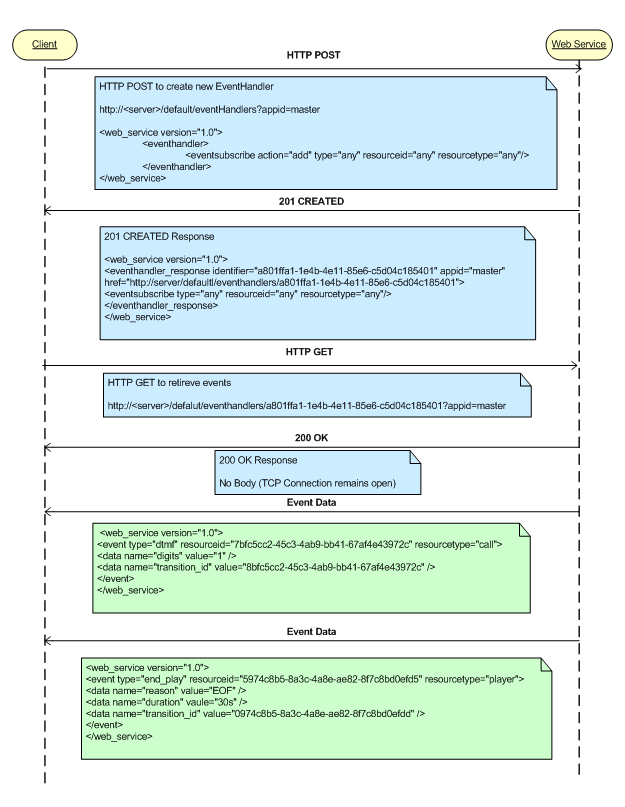
While most RESTful applications fit well into the HTTP request/response model, telephony applications must be able to handle unsolicited events such as digit detection and play completion. This concept is called Comet or HTTP event streaming. In a normal HTTP interaction, the client sends a request to the server, which processes it and sends the HTTP response. The connection between the client and server is then closed. This process will take place continuously as long as the web service is running; however, with HTTP event/data streaming, a reliable TCP connection remains open after the response is sent from the server, allowing the server to continue to send raw data to the client without notice.
For PowerMedia XMS, HTTP event streaming is implemented in the eventhandler resource. When the client wishes to receive asynchronous events, it uses an HTTP POST to create an eventhandler and subscribe to specific event types. The client then performs an HTTP GET on the newly created eventhandler and the PowerMedia XMS RESTful API responds with a 200 OK; however, the TCP connection remains open. Any event data related to resources and event types are pushed to the client until the Eventhandler is deleted by the client.
The following diagram provides an example scenario where a client creates an eventhandler and receives digit detection and play completion events: