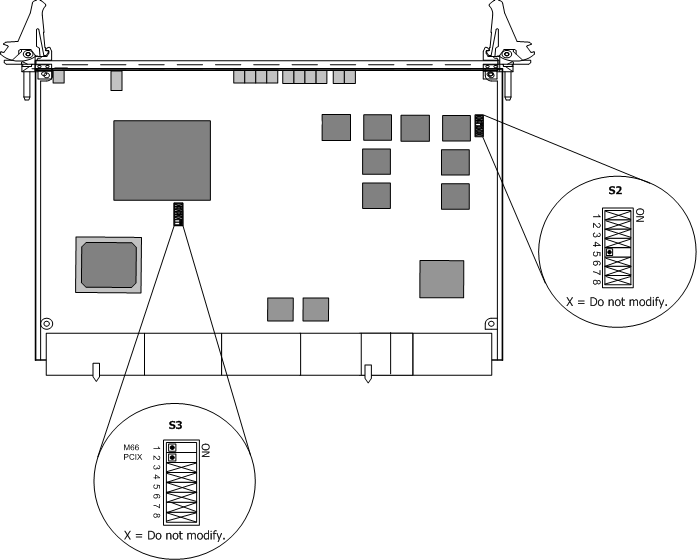
The CG 6060C DIP switches are located on the board and, in most cases, do not need to be modified. The following illustration shows the DIP switches that can be changed and those that cannot.
Modifiable DIP switches are shown at their default settings (OFF). DIP switches that cannot be modified are marked with an X.
The following table provides a description of the CG 6060C DIP switches:
DIP switch |
Description |
||
S2 |
Switch 5 in the S2 DIP switch allows you to control whether the board LEDs can be off or on. This is known as the dark office feature. By default, switch 5 is set to OFF (all LEDs can be on). Setting switch 5 to ON turns off all LEDs on the board unless there is an error. Note: It is important to leave all S2 DIP switch settings at their default. The only switch that can be modified on DIP switch S2 is switch 5. Do not modify this setting unless you are using the dark office feature. Other than switch 5, do not modify any of the switch settings on the S2 DIP switch. |
||
S3 |
DIP switch S3 enables you to hot swap the CG 6060C into an older CompactPCI chassis. By default, the eight switches of DIP switch S3 are set to the OFF position allowing the board to be compliant with the CompactPCI Hot Swap Specification PICMG 2.1 R2.0. The board polls M66EN# and PCIXCAP# signals on the backplane during a hot swap insertion. To hot swap the CG 6060C board into an older CompactPCI chassis that does not comply with the CompactPCI Hot Swap Specification PICMG 2.1 R2.0 requirements for PCIXCAP# and M66EN#, change switch 1 (M66) and switch 2 (PCIX) to the ON position. Some older CompactPCI chassis do not have M66EN# and PCIXCAP# implemented correctly causing these signals to be high, even though the bus is not running PCI-X at 66 MHz. When switch 1 (M66) and switch 2 (PCIX) are in the ON position, the board ignores M66EN# and PCIXCAP#. The board then boots, regardless of the state of the bus.
|