Warning:

Important safety notes for telephony connections
Use a channel service unit (CSU) to isolate the cables attached to this product before the cables leave the building.
Before you connect a CG 6060C board to a T1 network, ensure that the T1 interface is configured as described in Configuring the T1 or E1 interface.
Caution: |
Before connecting a CG 6060C board configured as T1 to the public network you must complete all required performance tests, and the appropriate regulatory authority in the target country must grant a type approval certificate. |
Warning: |
Important safety notes for telephony connections Use a channel service unit (CSU) to isolate the cables attached to this product before the cables leave the building. |
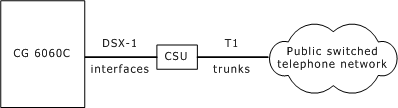
CG 6060C boards configured as T1 have up to sixteen DSX-1 trunk interfaces. For typical T1 communications, each trunk interface connects to a channel service unit (CSU) that is connected to a T1 trunk line. The CSU provides a DSX-1 interface to the T1 line and also contains circuitry that enables the central office to perform diagnostic tests remotely.
The following illustration shows a CG 6060C trunk interface with a CSU:
Note: Trunks synchronize when the OAM API boots the board.
You can purchase or lease the CSU from the telephone company or other vendor. The CSU must be compatible with DSX-1 specifications, particularly in maintaining the pulse amplitude level between 2.3 and 4.2 volts.
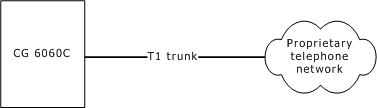
You can also connect the board directly to the T1 line without a CSU. This setup is most common in applications where the T1 line is proprietary and is not connected directly to the public network.
The following illustration shows a CG 6060C trunk interface without a CSU:
To avoid causing T1 service provider alarms, make sure the board always sends a valid signal, either by looping back at the CSU or by connecting the CSU to a functioning CG 6060C board configured as T1. The best way to provide a loopback is to unplug the cable from the CSU. The modular connector on most CSUs loops back the transmit signal to the receive signal when nothing is plugged in.