Dialogic® Diva® softIP for SIP Software
With the licensed-based Diva softIP for SIP module, the Diva System Release software offers a middleware that enables existing voice Media Boarda in that it provides functions such as voice and fax transmission, DTMF tones and supplementary services as well as conferencing between ISDN and fax applications to be fully integrated into Voice over IP networks using any standard Ethernet adapter. Technically speaking, the Diva softIP is comparable to a Diva Media Board in that it provides functions such as voice and fax transmission, DTMF tones and supplementary services as well as conferencing between ISDN and VoIP connections, as shown in the graphic.
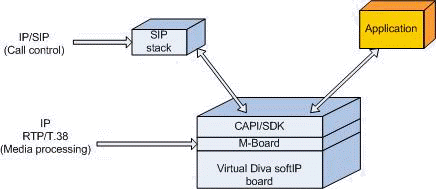
If the Diva softIP software and a Diva Media Board are combined in one system, they can concurrently be connected to TDM and IP systems and they can serve as basis for PSTN-IP gateway applications. See also Using Dialogic® Diva® Media Boards as DSP Resource Boards with Dialogic® Diva softIP for SIP Software.
To use the Diva softIP, you need to purchase the required number of licenses with your Diva Media Board vendor and activate them in the Dialogic® Diva® Configuration Manager. See License Activation for more information. There are two types of licences: Telephony (for voice applications) and Telephony+Fax (for voice and T.38 fax applications).
Features
General features
On 64-bit systems up to approximately 480 channels with host-based low bit-rate modems and approximately 600 channels voice (depends purely on the host performance) are supported. Host-based low bit-rate modems licenses are included in regular softIP voice licenses.
Support for various V.23 modems without the need of purchasing a license when Diva softIP for SIP is used as standalone product:
Support for the following virtualized environment: VMware® ESX 3.5
IP only configuration, software only (Host Media Processing)
Support for mixed installation, i.e., Dialogic® Diva® hardware and Diva softIP software in one PC
Support for up to 120 channels
Basic Call origination, termination, and Supplementary Services
Diva API (SDK) support
TAPI support
CAPI 2.0 support
TTY driver support
Mapping between phone numbers and SIP URLs
Licensing per PC fingerprint or USB dongle
Support for M-Board (The M-Board abstracts the underlying Diva Media Board based channel segmentation into one media board towards the application interfaces (APIs), e.g., from 4 x 30 channels to 1 x 120 channels.)
Automatic Resource Management using the M-Board
Calls that are initiated without the need to allocate hardware DSP resources (e.g., voice) are preferably routed via the Diva softIP software.
The call characteristic may change during a call and therefore require a switchover from the Diva softIP board to the Diva Media Board or vice versa. In this case, the M-Board reroutes internally the call using the required resources.
- Internal Service CAPI interface
VoIP/CAPI/Diva API (Diva SDK) support
Calling Party Number (inbound/outbound calls), including International Numbering Plan according to E.164 mapped to "+"
Called Party Number (inbound/outbound calls), including International Numbering Plan according to E.164 mapped to "+"
Redirecting Number, SIP Diversion Header (according draft-levy-sip-diversion-06.txt) mapped to Redirecting Number including International Numbering Plan according to E.164 mapped to "+"
B-channel protocols, 64 kbps bit-transparent, Transparent, T.30*
Fax support (T.30)*, MH, MR, MMR, ECM
DTMF recognition and generation (inband and out of band according to RFC 2833)
Line Interconnect
Conferencing using Line Interconnect
Note: Line Interconnect is not available for the Diva softIP grouped in an M-Board.
Call Transfer without consultation call (also known as Blind Transfer, Call Deflection, or Single Step Call Transfer in active state).
Explicit Call Transfer with consultation call with primary call on hold.
Explicit Call Transfer with consultation call with primary call not on hold.
TAPI support
Line Interconnect
Conferencing
VoIP Call Control
Session Initiation Protocol (SIP) according to RFC 3261
Further SIP Methods: NOTIFY (RFC 3265), REFER (RFC 3515), SUBSCRIBE (RFC 3265), REGISTER (RFC 3261) with Digest Authentication, OPTIONS (RFC 3261)
Session Description Protocol (SDP) according to RFC 2327
SIP side Call Transfer (known as ECT) as transfer target (C-party) and as call initiator (A-party).
Support of the SIP Register feature including HTTP Digest Authentication. This scheme is using a simple challenge/response mechanism and a shared secret between the two servers.
SIP Diversion Header (according draft-levy-sip-diversion-06.txt)
Proxy Authentication 407, Invite Authentication
Proxy and Registrar address can be configured differently. REGISTER request can be sent to Registrar and INVITE to Proxy.
SIP Signaling Proxy support if a Registrar is behind a Proxy
Support of the SIP side Explicit Call Transfer
Allow to have the port numbers (SIP and Media) configurable (also as a range of port numbers).
For more information about Proxy and Registrar configuration, see the Diva softIP Online Help file.
Fax services
T.38* for real-time fax over IP
T.30* Fax Group 3 using T.38, up to 33.6 kbps (SuperG3 Fax).
Note: The availability of the line speed depends also on the gateway or the remote IP Fax terminal.
Fax* compression MH, MR, MMR
Error Correction Mode (ECM)*
* Based on T.38 without own Soft Fax stack, feature depends on VoIP Gateway/Terminal.
For more information about fax modes, see Using Dialogic® Diva® Media Boards as DSP Resource Boards with Dialogic® Diva® softIP Software.
Media Streaming
PSTN standard codec, G.711, 64 kbps a-law / µ-law
RTP/G.711 Clear Channel Fax to CAPI/SDK SFF Fax (incl. all existing T.30 and error correction features)
Tone handling
Inband DTMF generation and detection (clear channel)
DTMF generation and detection via RTP event (RFC 2833)
Basic call origination and termination
Supplementary Services support
Numbering Services (Called Party Number, Calling Party Number, Redirecting Number supporting also International E.164 format)
Call HolCall Hold/Retrieve
Call Transfer without consultation call, in active call state (also known as Blind Transfer/Call Deflection in active state or Single Step Call Transfer)
SIP side Call Transfer (known as ECT) as transfer target (C-party) and as call initiator (A-party)
Conference using Line Interconnect (see VoIP/CAPI/Diva API (Diva SDK) Support)
Message Waiting Activation/Deactivation (to activate/deactivate MWI lamps on remote phones, e.g., connected via a gateway or on IP phones)d/Retrieve
Supported VoIP and FoIP software
Diva softIP for SIP software (virtual media board for IP)
Virtual Diva softIP v2.2 board