Use the redundancy feature to enable the system to detect and recover from the failure of signaling links on a TX board, the failure of a signaling node, or the failure of the TX board itself.
In a redundant configuration, each pair of TX boards is connected through a private Ethernet connection. If other devices are connected to the private Ethernet link, avoid overloading the link. Packets can be lost between the redundant TX boards if the connection is overloaded.
Both TX boards of a redundant pair must be the same type of board (TX 4000 should be paired with another TX 4000; TX 5000 Series board should be paired with the same type of TX 5000 Series board).
This topic describes dual-node redundant signaling and single-node redundant signaling for the following types of configurations:
To connect a TX board to its redundant mate in a TDM configuration, use a Category 5 shielded twisted pair (STP) crossover cable. To connect two TX 5000 Series boards, use a crossover cable to connect Ethernet 3 on the primary board to Ethernet 3 on the backup board. To connect two TX 4000 boards, use a crossover cable, connect Ethernet 1 on the primary board to Ethernet 1 on the backup board.
You must create the IP interface using the ifcreate command in the txconfig utility. You must also specify the IP address of the TX board’s redundant mate using the mate command in the txconfig utility. For more information, refer to the Dialogic® NaturalAccess™ Signaling Software Configuration Manual.
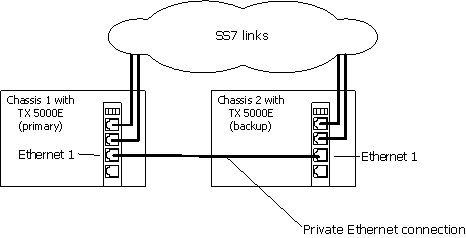
The following illustrations show how to set up two TX 5000E boards based on a dual-node redundant signaling server in a TDM configuration. The boards are located in two separate chassis to ensure board-level and system-level redundancy.
The following illustration shows a dual-node redundant signaling server for TX 5000E boards in a TDM configuration:
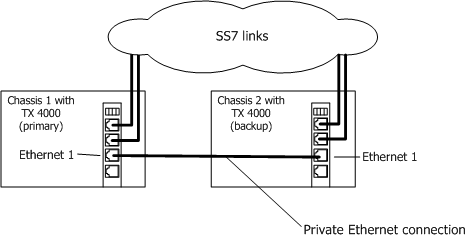
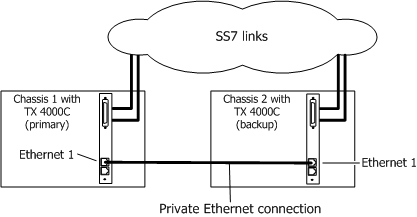
The following illustrations show how to set up two TX 4000 or TX 4000C boards based on a dual-node redundant signaling server in a TDM configuration. The boards are located in two separate chassis to ensure board-level and system-level redundancy.
The following illustration shows a dual-node redundant signaling server for TX 4000 boards:
The following illustration shows a dual-node redundant signaling server for TX 4000C boards:
The following illustrations show how to set up two TX 5000E boards based on the single-node signaling server in a TDM configuration. The boards are located in the same chassis to ensure board-level redundancy.
The following illustration shows a single-node redundant signaling server for TX 5000E boards in a TDM configuration:
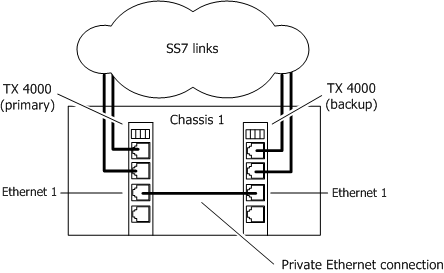
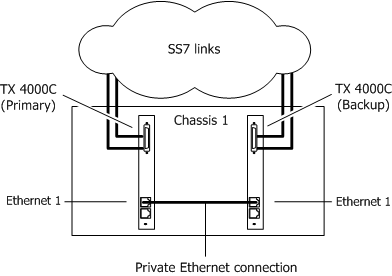
The following illustrations show how to set up two TX 4000 or TX 4000C boards based on the single-node signaling server in a TDM configuration. The boards are located in the same chassis to ensure board-level redundancy.
The following illustration shows a single-node redundant signaling server for TX 4000 boards:
The following illustration shows a single-node redundant signaling server for TX 4000C boards:
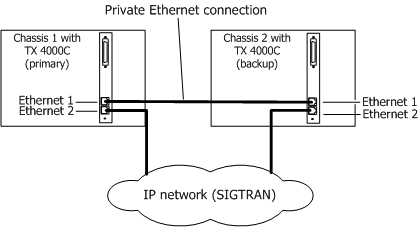
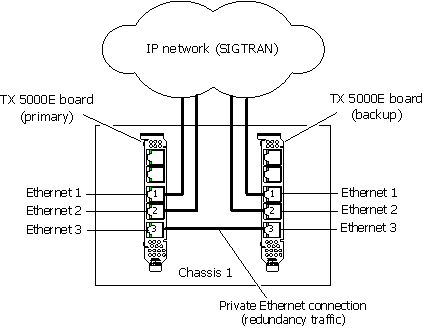
To connect a TX board to its redundant mate in an IP network configuration, use a Category 5 shielded twisted pair (STP) crossover cable. To connect two TX 5000E boards for redundancy, use the crossover cable to connect Ethernet 3 on the primary board to Ethernet 3 on the backup board. To connect two TX 4000 boards for redundancy, use the crossover cable to connect Ethernet 1 on the primary board to Ethernet 1 on the backup board.
Using standard Ethernet cables, connect the remaining Ethernet connectors on both boards to the IP network. For a TX 5000E board, each board provides two Ethernet connectors that can be dedicated to SIGTRAN network access (Ethernet 1 and Ethernet 2). For a TX 4000 board, each board provides a single Ethernet connector for SIGTRAN network access (Ethernet 2, since Ethernet 1 is used for redundancy).
Use a private Ethernet link to connect the redundant boards to avoid loss or delay of vital checkpoint messages. Since TX 5000E boards provide three physical Ethernet connectors, it is possible to have a dedicated redundancy connection while still having redundant physical pathways from each board to the SIGTRAN network. TX 4000 boards provide two Ethernet connectors so if each board in the redundant pair requires multi-homing, you can use Ethernet 1 for both the redundant pathway and for SIGTRAN network access. In this configuration, the Ethernet 1 on each board is connected to what is shown as an IP network cloud in the illustrations that follow (just as the Ethernet 2 connectors are). Be aware that this greatly increases the chance of lost or delayed checkpoint messages which can result in the backup having outdated information.
You must create the IP interface using the ifcreate command in the txconfig utility. You must also specify the IP address of the TX board’s redundant mate using the mate command in the txconfig utility. For more information, refer to the Dialogic® NaturalAccess™ Signaling Software Configuration Manual.
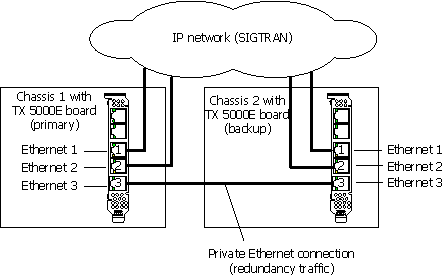
The following illustrations show how to set up two TX 5000E boards based on a dual-node redundant signaling server in an IP network configuration. The boards are located in two separate chassis to ensure board-level and system-level redundancy.
The following illustration shows a dual-node redundant signaling server for TX 5000E boards in an IP configuration:
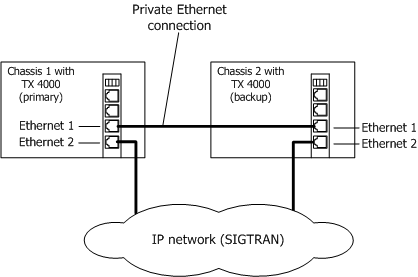
The following illustrations show how to set up two TX 4000 or TX 4000C boards based on a dual-node redundant signaling server in an IP network configuration. The boards are located in two separate chassis to ensure board-level and system-level redundancy.
The following illustration shows a dual-node redundant signaling server for TX 4000 boards:
The following illustration shows a dual-node redundant signaling server for TX 4000C boards:
The following illustration shows how to set up two TX 5000E boards based on a single-node signaling server in an IP network configuration. The boards are located in the same chassis to ensure board-level redundancy.
The following illustration shows a single-node redundant signaling server for TX 5000E boards in an IP configuration:
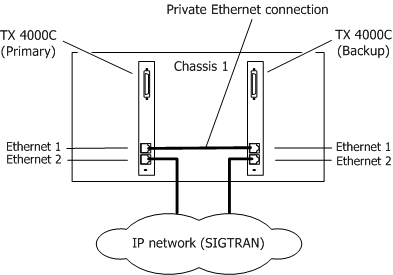
The following illustration shows how to set up two TX 4000 or TX 4000C boards based on a single-node signaling server in an IP network configuration. The boards are located in the same chassis to ensure board-level redundancy.
The following illustration shows a single-node redundant signaling server for TX 4000 boards:
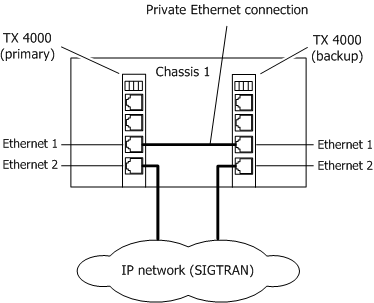
The following illustration shows a single-node redundant signaling server for TX 4000C boards: