A sample board keyword file is installed with Natural Access. This board keyword file is used to select the ISDN protocol variant:
|
File |
Description |
|---|---|
|
agpi2bri.cfg |
AG 2000-BRI default configuration. |
Board keyword files have many keywords in common. The differences in these files are related to the protocols, whose names appear as part of the name of the file. For more information about board keyword files, refer to the NMS OAM System User's Manual.
This topic presents:
Sample board keyword files are located in the ag\cfg subdirectory under the Natural Access installation directory. agpi2bri.cfg shows the set of board keywords necessary to configure and start an AG 2000-BRI board.
The following sample board keyword file (agpi2bri.cfg) describes one AG 2000-BRI board:
#
# AG Plug-in Config File for AG 2000 BRI
#
# TCP files are shipped with the NMS CAS sub-package of Natural Access.
# Be sure that you installed the protocols that are specified below before
# trying to start a board with this configuration file.
TCPFiles[0] = nocc.tcp # "no trunk control" protocol
TCPFiles[1] = isd0.tcp # ISDN protocol
# DSP (.m54) files to link in
DSP.C5x[0..3].Files = callp.m54 dtmf.m54 mf.m54 ptf.m54 signal.m54 tone.m54 voice.m54
DLMFiles[0] = gtp.leo
DLMFiles[1] = voice.leo
DLMFiles[2] = svc.leo
DLMFiles[3] = brietsi.leo # ISDN protocol with ETSI variant
XLaw = A-LAW # A-Law silence, idle signaling bit code
# Embedded system file
RunFile = ag2bri.cor
# Clocking configuration for one board in a system
Clocking.HBus.ClockSource = NETWORK
Clocking.HBus.ClockMode = STANDALONE
The following example assumes a system configuration in which four AG 2000-BRI boards reside in a single chassis. The boards are configured in the following way using keywords:
|
Board |
Configuration |
|---|---|
|
Board 0 |
System primary bus master (driving the A clock) |
|
Board 1 |
Clock slave |
|
Board 2 |
Clock slave |
|
Board 3 |
Clock slave |
The following table shows keywords used to configure the boards as described in the preceeding table:
|
Board |
Role |
Clocking keyword settings |
|---|---|---|
|
0 |
Primary clock master |
Clocking.HBus.ClockMode = MASTER_A Clocking.HBus.ClockSource = NETWORK Clocking.HBus.BriRef = YES |
|
1 |
Clock slave |
Clocking.HBus.ClockMode = SLAVE Clocking.HBus.ClockSource = NETWORK Clocking.HBus.BriRef = YES |
|
2 |
Clock slave |
Clocking.HBus.ClockMode = SLAVE Clocking.HBus.ClockSource = NETWORK Clocking.HBus.BriRef = YES |
|
3 |
Slave driving NETREF |
Clocking.HBus.ClockMode = SLAVE Clocking.HBus.ClockSource = NETWORK Clocking.HBus.BriRef = YES |
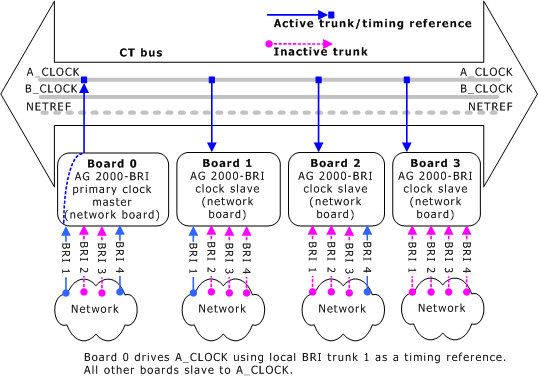
In this configuration, Board 0 is the primary clock master and drives A_CLOCK. All slave boards on the system use A_CLOCK as their timing reference. The Clocking.HBus.BriRef keyword is set to YES for Board 0, so Board 0 can use any of its local trunks interchangeably as a timing reference. In the following illustration, Board 0 is using local trunk 1:
Sample board clocking configuration
When trunk 1 no longer provides a timing signal (for example, if no calls exist on the trunk) Board 0 switches to another currently active local trunk. In the following illustration, this trunk is local trunk 4:
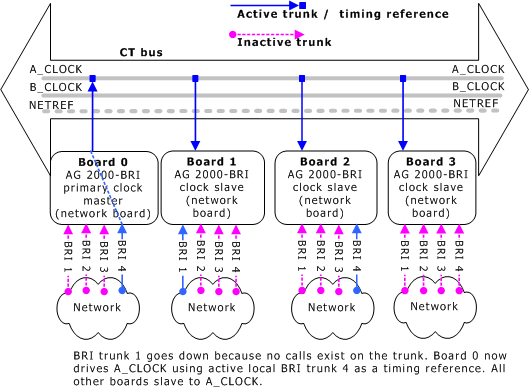
New local trunk timing reference
If no local trunk provides a timing signal, the clock fallback manager finds another AG 2000-BRI board with the Clocking.HBus.BriRef keyword set to YES that has an active BRI trunk. It causes this board to drive NETREF based upon the timing signal on the active trunk. The primary master now drives the clock using NETREF as the timing reference.
In the following illustration, Board 0, trunk 4 has gone down. Since there are no local trunks available, the clock fallback manager directs Board 1 to drive NETREF using its local trunk 1 as a timing reference. Board 0 continues to drive A_CLOCK using NETREF as the timing reference:
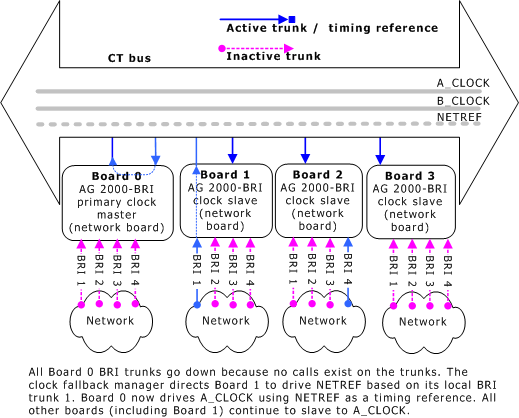
Primary master drives clock based on NETREF
The clock fallback manager continues to poll each board to determine the status of its trunks. If the trunk driving NETREF goes down, the clock fallback manager picks another trunk on the same board or on another board. For example, in the following illustration, the trunk driving NETREF (Board 1, local trunk 1) has gone down. NETREF is now being driven by Board 2, trunk 4:
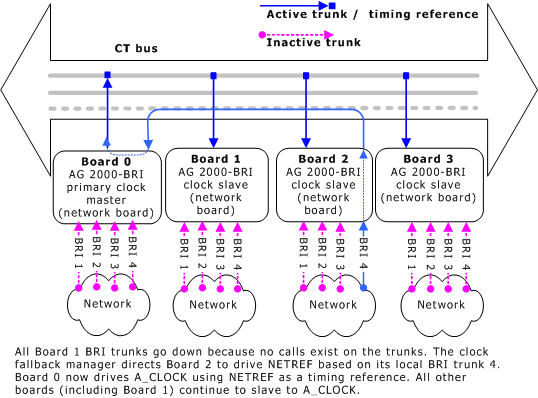
New NETREF configuration