The most convenient way to program playing and recording applications is to use the Voice Message service since it provides disk management with the playing and recording functionality. The Voice Message service uses the ADI service device level record and play functions. To use the Voice Message service with the ADI service playing and recording functions, open both services on the same context.
When using the Voice Message service, you do not call the ADI playing and recording functions directly. The Voice Message service calls the functions when needed. For more information, refer to the Dialogic® NaturalAccess™ Voice Control Element API Developer's Manual.
To create an application using your own disk management functions, call the ADI functions directly.
This topic presents:
When recording or playing speech files, you must select an encoding format. The primary issue to consider when selecting a format is the compression ratio and the fidelity. More aggressive compression requires less disk space and reduces host-to-board loading, but uses more DSP resources.
Each encoding format has a minimum data block size, called a frame. Frames vary in size and duration depending upon the encoding format. For AG and CG Series boards, a frame corresponds to 10 or 20 milliseconds of speech, depending on the encoding format.
AG and CG boards support the following encoding formats:
NMS Communications ADPCM 16, 24, 32 kbit/s and PCM framed 64 kbit/s
G.726-compliant ADPCM
G.723.1 5.3 kbit/s and 6.3 kbit/s (CG boards only)
G.729A 8 kbit/s (CG boards only)
OKI ADPCM (24 and 32 kbit/s)
A-law and mu-law PCM
8-bit and 16-bit linear PCM at 11 kilo-samples per second
16-bit linear PCM at 8 kilo-samples per second
IMA ADPCM (24 and 32 kbit/s)
Microsoft GSM full rate
The encodings refer to the data going to and from the host, typically stored in a voice file. With the exception of ADI_ENCODE_NMS_64, host encoding is independent of line encoding, which is always either mu-law or A-law depending on how the board is configured when it is initialized.
EVRC full rate, 1/2 rate and 1/8 rate
The following table lists the ADI encoding formats:
|
Encoding format |
Description |
Sample size (bits) |
Sample rate (Hz) |
Frame size (bytes) |
Frame time (ms) |
Data rate (bytes/sec) |
|---|---|---|---|---|---|---|
|
ADI_ENCODE_NMS_16 |
NMS Communications ADPCM |
2 |
8000 |
42 |
20 |
2100 |
|
ADI_ENCODE_NMS_24 |
NMS Communications ADPCM |
3 |
8000 |
62 |
20 |
3100 |
|
ADI_ENCODE_NMS_32 |
NMS Communications ADPCM |
4 |
8000 |
82 |
20 |
4100 |
|
ADI_ENCODE_NMS_64 |
Framed PCM |
8 |
8000 |
162 |
20 |
8100 |
|
ADI_ENCODE_MULAW |
mu-law |
8 |
8000 |
80 |
10 |
8000 |
|
ADI_ENCODE_ALAW |
A-law 64 kbit/s |
8 |
8000 |
80 |
10 |
8000 |
|
ADI_ENCODE_EDTX_MULAW |
mu-law |
8 |
8000 |
82 |
10 |
8000 |
|
ADI_ENCODE_EDTX_ALAW |
A-law |
8 |
8000 |
82 |
10 |
8000 |
|
ADI_ENCODE_PCM8M16 |
PCM 8 kss |
16 |
8000 |
160 |
10 |
16000 |
|
ADI_ENCODE_OKI_24 |
OKI ADPCM |
4 |
6000 |
30 |
10 |
3000 |
|
ADI_ENCODE_OKI_32 |
OKI ADPCM |
4 |
8000 |
40 |
10 |
4000 |
|
ADI_ENCODE_PCM11M8 |
PCM 11 kss |
8 |
11000 |
110 |
10 |
11000 |
|
ADI_ENCODE_PCM11M16 |
PCM 11 kss |
16 |
11000 |
220 |
10 |
22000 |
|
ADI_ENCODE_G723_5 |
ITU G.723.1 |
N/A |
8000 |
20 |
30 |
667 |
|
ADI_ENCODE_G723_6 |
ITU G.723.1 |
N/A |
8000 |
24 |
30 |
800 |
|
ADI_ENCODE_EDTX_G723_5 |
ITU G.723.1 |
N/A |
8000 |
22 |
30 |
667 |
|
ADI_ENCODE_EDTX_G723_6 |
ITU G.723.1 |
N/A |
8000 |
26 |
30 |
800 |
|
ADI_ENCODE_EDTX_G723 |
ITU G.723.1 |
N/A |
8000 |
26 |
30 |
800 |
|
ADI_ENCODE_G726 |
ITU G.726 ADPCM |
4 |
8000 |
40 |
10 |
4000 |
|
ADI_ENCODE_EDTX_G726 |
ITU G.726 ADPCM |
4 |
8000 |
42 |
10 |
4000 |
|
ADI_ENCODE_G726_16 |
ITU G.726 ADPCM |
2 |
8000 |
Variable |
Variable |
2000 |
|
ADI_ENCODE_G726_24 |
ITU G.726 ADPCM |
3 |
8000 |
Variable |
Variable |
3000 |
|
ADI_ENCODE_G726_32 |
ITU G.726 ADPCM |
4 |
8000 |
Variable |
Variable |
4000 |
|
ADI_ENCODE_G726_40 |
ITU G.726 ADPCM |
5 |
8000 |
Variable |
Variable |
5000 |
|
ADI_ENCODE_G729A |
ITU G.729A |
N/A |
8000 |
10 |
10 |
1000 |
|
ADI_ENCODE_EDTX_G729A |
ITU G.729A |
N/A |
8000 |
12 |
10 |
1000 |
|
ADI_ENCODE_IMA_24 |
IMA ADPCM |
4 |
6000 |
36 |
10 |
3600 |
|
ADI_ENCODE_IMA_32 |
IMA ADPCM |
4 |
8000 |
46 |
10 |
4600 |
|
ADI_ENCODE_VOX_32 |
VOX ADPCM |
4 |
8000 |
40 |
10 |
4000 |
|
ADI_ENCODE_GSM |
MS-GSM |
N/A |
8000 |
130 |
80 |
1625 |
|
ADI_ENCODE_EVRC_FR |
EVRC Header free |
8 |
8000 |
22 |
20 |
1100 |
|
ADI_ENCODE_EDTX_EVRC_FR_HDR_FREE |
EVRC Header free |
8 |
8000 |
24 |
20 |
1100 |
Note: The Voice Message service has equivalent encoding formats with names that begin with VCE_.
When recording or playing speech files on AG boards, a specific DSP file must be loaded for each encoding type.
When recording or playing speech files on CG boards, a specific DSP file must be loaded for each encoding type except when using the native play and record feature. The native play and record feature combines an ADI port with an MSPP endpoint and plays or records speech data directly to or from an IP endpoint with no transcoding. Native play and record supports:
Playing media files recorded from streams that contain SID frames, silence, RFC 2833 frames, and lost frame markers.
Silence and DTMF detection and reporting while recording RTP streams.
For information on the native play and record feature, refer to Performing NMS native play and record.
The previous table lists the ADI_ENCODE_EDTX encoding formats to use for native recording. For native playing, use either the ADI_ENCODE_EDTX or ADI_ENCODE encoding formats. adiSetNativeInfo sets play and record parameters.
The table lists the DSP files that must be loaded on the AG and CG boards.
Except for buffers that contain speech data recorded in one of the ADI_ENCODE_EDTX encoding formats, all buffers submitted to the ADI service play functions must be large enough to contain an integral number of frames for the selected encoding format. For example, if you select ADI_ENCODE_NMS_24, the buffer size must be a multiple of 62 bytes. Failure to submit a buffer meeting this size requirement causes the play function to terminate with CTAERR_BAD_SIZE. For ADI_ENCODE formatted data without EDTX headers that meet the multiple frame size requirement, buffers submitted to the ADI service can be any size.
Use the ADI_ENCODE_EDTX encoding formats to record speech data directly from an IP endpoint. Buffers recorded from encoded RTP codec streams can contain variable size frames and must contain marker frames representing silence and discontinuous transmission (DTX) periods. These characteristics do not guarantee that any given buffer size will contain an integer multiple of codec frames, marker frames, or both. Therefore, buffers containing ADI_ENCODE_EDTX formatted data submitted to the ADI service can be any size.
Each board has a physical buffer size that is both board and encoding dependent. If you submit a buffer larger than the physical size, the ADI service divides the buffer into physical segments and submits those segments to the board. To eliminate fractional buffers and to reduce the board-to-host interactions, the optimum user buffer will be a multiple of the physical buffer size. This size is retrieved with adiGetEncodingInfo.
The ADI service employs a double-buffering scheme when recording and playing voice files. When the board finishes processing a buffer, the application must already have allocated and submitted the subsequent buffer to the ADI service.
On heavily loaded systems, the throughput requirements between the host and the board can cause gaps in the voice record or playback. This is called an underrun condition. Failure to maintain pace with the board can also cause underruns in the voice record or playback. Greater file compression may be necessary to eliminate the problem.
The ADI service counts the number of underruns that occur, but not the duration. Call adiGetRecordStatus and adiGetPlayStatus to retrieve the underrun count.
Note: Do not submit small buffers (buffers that hold less than one second of data). Small buffers can also cause underruns. Derive the data throughput for a given encoding method from the adiGetEncodingInfo return values.
The ADI service provides three methods by which the application can transfer speech data to and from the board:
|
Method |
Description |
|---|---|
|
Single memory transaction |
The application submits a single data buffer to the ADI service. |
|
Asynchronous transfer |
The application serially submits multiple buffers by exchanging commands and events with the ADI service. |
|
Callback transfer |
The ADI service manages the buffers and invokes an application callback function to retrieve or store data. |
The functions used to initiate play or record depend upon the data transfer method selected, as shown in the following table:
|
Operation |
Single memory |
Asynchronous |
Callback |
|---|---|---|---|
|
Play |
|||
|
Record |
adiStartPlaying and adiStartRecording are not supported when Natural Access is running in client/server mode. For more information, refer to the Dialogic® NaturalAccess™ Software Developer’s Manual.
If the application invokes adiPlayFromMemory or adiRecordToMemory, it supplies a single buffer that is retained by the ADI service for the duration of the function. The ADI service divides the application buffer into physical segments and performs all handshaking with the board.
Note: A buffer submitted for playing can be shared by multiple instances of the play function (within the same process) but the buffer submitted for recording must be unique for each active recording instance.
When the ADI service delivers ADIEVN_PLAY_DONE or ADIEVN_RECORD_DONE to the application, the buffer is then available for reuse or disposal.
In summary:
Single memory transaction is relatively simple and minimizes application interaction.
Single memory transaction consumes a large virtual address space for large voice files. An application may experience latency reading or writing large files to and from storage.
The asynchronous transfer method gives you maximum latitude with buffer address, size, and submission. When the play or record function is started with adiPlayAsync or adiRecordAsync, an initial buffer is submitted. Whenever the board starts a new buffer, an event is generated. The application must submit a new buffer (using adiSubmitPlayBuffer or adiSubmitRecordBuffer) before the board finishes the current buffer.
In summary:
The programmer can control buffer addresses and sizes with asynchronous transfer, and have asynchronous access to a storage medium.
Asynchronous transfer is more complicated to program.
The callback transfer method balances simplicity in programming and resource consumption. The ADI service allocates the buffers and invokes an application-specified callback function whenever a buffer needs to be filled (during a play function) or when a buffer needs to be emptied (during a record function). Within the callback routine, the application synchronously accesses the storage medium before returning.
In summary:
Callback transfer minimizes virtual memory consumption and is simple to implement.
The application cannot control the buffer addresses or sizes with callback transfer, and it requires synchronous access to a storage medium.
By default, the board terminates play and record when any DTMF key is entered. You can specify which DTMF keys terminate the function using the DTMFabort mask in ADI_PLAY_PARMS or ADI_RECORD_PARMS.
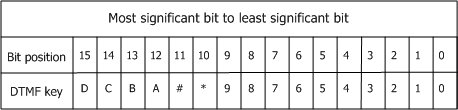
The DTMFabort mask is a 16-bit entity in which each bit corresponds to a specific key on the telephone keypad. Setting a bit in the mask terminates the voice function if that particular key is entered. The DTMFabort mask corresponds to the DTMF telephone keys as shown:
For example, if the abort mask is set to 0x03FF, the play or record function terminates if the remote party enters any digit from 0 through 9. The adidef.h include file contains #defines (ADI_DTMF_xxx) for each digit and for certain digit groups.
Note: The DTMFabort mask has no effect on digit collection.
If any digits are queued in the ADI service when a play or record voice operation is started, and the voice operation is to terminate on those specific touchtones, the voice operation terminates immediately. To prevent this from happening, use adiFlushDigitQueue or adiGetDigit to remove the escape key from the queue.
The digit queue is automatically flushed when a call is released.
The ADI_RECORD_PARMS structure contains the record function parameters.
The ADI service provides three functions to initiate voice record. The function used depends upon the data transfer method.
|
Use this function... |
When... |
|---|---|
|
The application submits a single buffer to the ADI service. |
|
|
The ADI service invokes an application-specified callback function when a buffer is full. The application must store the data before returning. Note: Applications running in client/server mode do not support adiStartRecording. |
|
|
The ADI service generates a buffer full event when each buffer is full. The application asynchronously stores the data and submits empty buffers in response. |
The ADI service returns SUCCESS if the recording function successfully started.
The record function terminates when the ADI service delivers ADIEVN_RECORD_DONE, regardless of the transfer method. The event value field contains one of the following termination reasons:
|
If... |
Then play ends with... |
|---|---|
|
The call was released by either party |
CTA_REASON_RELEASED |
|
A DTMF digit specified in the abort mask was entered by the remote party |
CTA_REASON_DIGIT |
|
The application aborted recording with adiStopRecording |
CTA_REASON_STOPPED |
|
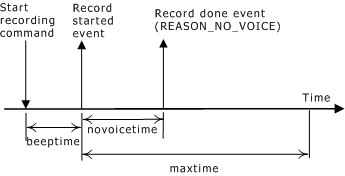
The remote party never spoke (see the no voice illustration) |
CTA_REASON_NO_VOICE |
|
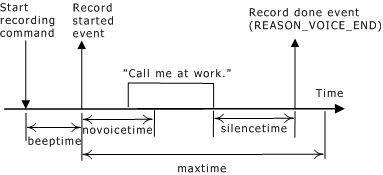
The remote party stopped speaking for the voice end time period (see the voice end illustration) |
CTA_REASON_VOICE_END |
|
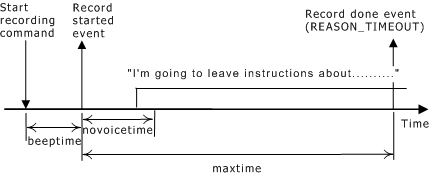
The remote party spoke longer than the maximum duration (see the timeout illustration) |
CTA_REASON_TIMEOUT |
The following illustration shows record termination - no voice:
The following illustration shows record termination - voice end:
The following illustration shows record termination - timeout:
Three timer parameters terminate the record function:
|
Parameter |
Description |
|---|---|
|
novoicetime |
Time, in milliseconds, that the remote party has after the beep-sync prompt to start speaking. novoicetime is stored in the ADI_RECORD_PARMS structure. |
|
silencetime |
Maximum silence duration, in milliseconds, after the remote caller has stopped speaking. silencetime is stored in the ADI_RECORD_PARMS structure. |
|
maxtime |
Record function time limit, in milliseconds. The remote caller has maxtime milliseconds after the beep to completely record a message. maxtime is a function argument specified when initiating the record function. |
In record callback mode, the ADI service allocates two record buffers when the record function initiates. The ADI service invokes the application-specified callback routine whenever a record buffer is filled. You specify the callback function when you initiate record with adiStartRecording.
When the ADI service fills a record buffer, it invokes the record callback function and passes it the buffer pointer and the buffer size. The callback routine writes the data to a storage medium such as a disk and returns.
In asynchronous mode, the application transfers voice data from the board to the host by cooperatively exchanging commands and events with the ADI service, as shown in the following illustration:
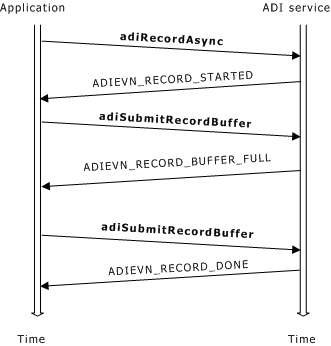
Transferring voice data during record follows this process:
The application initiates recording in asynchronous mode by invoking adiRecordAsync.
The ADI service generates ADIEVN_RECORD_STARTED to inform the application to submit the second buffer.
The application submits the buffer by invoking adiSubmitRecordBuffer.
The ADI service sends ADIEVN_RECORD_BUFFER_FULL to the application when a record buffer has been filled. The buffer address and size are provided.
If the ADI_RECORD_BUFFER_REQ bit is set in the value field in ADIEVN_RECORD_BUFFER_FULL, the ADI service needs another record buffer. In response, the application invokes adiSubmitRecordBuffer.
Steps 2 - 5 are repeated until recording completes and the ADI service generates ADIEVN_RECORD_DONE.
The following illustration shows the complete life cycle for record using asynchronous data transfer:
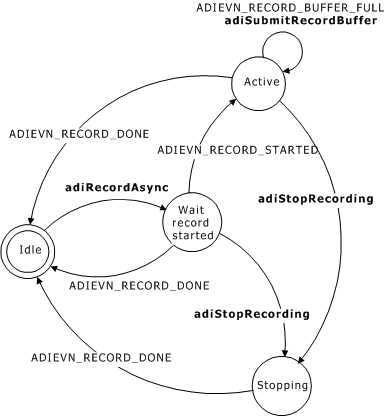
The states for asynchronous record transfer are as follows:
|
State |
Description |
|
Idle |
The function is not active. |
|
Wait record started |
The record function enters this state when the application invokes adiRecordAsync. The ADI service sends the initial buffer to the board. The board responds with ADIEVN_RECORD_STARTED at which time, the board is actively recording. The application must submit the second required record buffer if the ADI_RECORD_BUFFER_REQ bit is set in the event's value field. |
|
Active |
The record function enters the active state after receiving ADIEVN_RECORD_STARTED. The record function remains active until one of the terminating conditions described in Terminating record occurs. The ADI service and the application exchange buffer full events and submit buffer commands while in this state as described:
|
|
Stopped |
The application can immediately abort the record function by invoking adiStopRecording. The ADI service does not execute any more record functions from the application while in the stopping state. Any record functions invoked by the application result in the ADI service returning CTAERR_INVALID_SEQUENCE. When ADIEVN_RECORD_DONE is delivered to the application, the record state returns to idle. |
By default, AGC is disabled and the record gain is determined only by the gain parameter. To enable AGC, set AGCenable in ADI_RECORD_PARMS to 1.
The following illustration shows the automatic gain control (AGC) record parameters:

AGCtargetampl, AGCsilenceampl, AGCattacktime, and AGCdecaytime control the behavior of the AGC. The default values for these parameters are appropriate for most applications. Refer to ADI_RECORD_PARMS for a description of each of the AGC parameters.
Note: When AGC is enabled, the gain parameter in ADI_RECORD_PARMS determines the gain applied when record begins. AGC must be disabled if you are using voice activity detection.
Playing follows this process:
The application invokes a function to initiate playing.
The ADI service prompts the application for data.
The application provides data to the ADI service and can instruct the ADI service to automatically stop playing after the buffer plays (by setting the ADI_LASTBUFFER_SUBMITTED flag).
Steps 2 and 3 are typically performed multiple times.
The ADI service terminates play upon delivering ADIEVN_PLAY_DONE. Refer to Terminating play for termination reasons that can be included as part of the event.
The ADI_PLAY_PARMS structure contains the play function parameters.
The ADI service provides three functions to initiate playing speech. The function used depends upon the data transfer method selected:
|
Use this function... |
When the... |
|---|---|
|
Application submits a single memory buffer to the ADI service. |
|
|
ADI service invokes application callback when data is needed. Note: Applications running in client/server mode do not support adiStartPlaying. |
|
|
ADI service generates a buffer request event when more data is needed. The application asynchronously submits play buffers in response. |
The ADI service returns SUCCESS if the start playing command is successfully sent to the board.
The play function terminates when the ADI service delivers ADIEVN_PLAY_DONE, regardless of the transfer method selected. The event value field contains the termination reason, as follows:
|
If... |
Then play ends with... |
|---|---|
|
The application submitted a buffer with the ADI_LASTBUFFER_SUBMITTED flag and the buffer finished playing |
CTA_REASON_FINISHED |
|
The call was released by either party |
CTA_REASON_RELEASED |
|
A DTMF digit specified in the abort mask was entered by the remote party |
CTA_REASON_DIGIT |
|
The application aborted play by calling adiStopPlaying |
CTA_REASON_STOPPED |
|
The play was aborted by the speech recognizer |
CTA_REASON_RECOGNITION |
In callback mode, the ADI service allocates a buffer and invokes an application-specified function to play voice data into it. You specify the callback function when play is initiated with adiStartPlaying.
When the ADI service requires data, it invokes the callback function, passing it a buffer to fill and the buffer size. The application's callback routine reads data from a storage medium (for example, a disk) into the buffer. The callback returns the amount of data read and a flag indicating whether to terminate the playing session after the buffer is played.
Playing voice data using callback mode follows this process:
The application invokes adiStartPlaying.
The ADI service invokes the callback function from within the adiStartPlaying context to retrieve the initial buffer (before adiStartPlaying returns).
The ADI service invokes the application's callback function when a play buffer needs to be filled with voice data.
The application's callback function fills the buffer before returning.
At this point, if the application indicates that this is the last buffer (using the ADI_LASTBUFFER_SUBMITTED flag) or if a termination condition occurs, the play operation may terminate.
Steps 2 and 3 are repeated until the ADI service generates ADIEVN_PLAY_DONE.
The application cannot invoke ADI service functions while the callback is executing.
Delaying the callback function could interfere with event processing for any context opened on the same queue.
In asynchronous mode, the application transfers voice data from the host to the board by cooperatively exchanging commands and events with the ADI service, as shown:
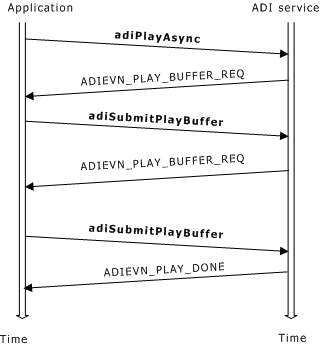
Transferring voice data asynchronously during play follows this process:
The application invokes adiPlayAsync.
The ADI service sends ADIEVN_PLAY_BUFFER_REQ whenever the board starts a new buffer.
The application invokes adiSubmitPlayBuffer in response to ADIEVN_PLAY_BUFFER_REQ.
Steps 2 and 3 are repeated until play completes and the ADI service generates ADIEVN_PLAY_DONE.
The following illustration shows the life-cycle for play in asynchronous transfer mode:

The three states for asynchronous play transfer are:
|
State |
Description |
|
Idle |
Play is not active. |
|
Active |
When the application invokes adiPlayAsync, the ADI service sends the initial buffer to the board and transits to the active state. The play state remains active until one of the terminating conditions described in Terminating play occurs. The ADI service sends events and the application submits buffers while in this state as described:
The application cannot invoke adiSubmitPlayBuffer unless the ADI service has given it ADIEVN_PLAY_BUFFER_REQ. The ADI service returns ADIERR_TOO_MANY_BUFFERS when adiSubmitPlayBuffer is invoked without first receiving a buffer request event. |
|
Stopping |
The application can abort play by invoking adiStopPlaying. The ADI service does not accept more play commands from the application while in the stopping state. Any play functions invoked by the application prompt the ADI service to return CTAERR_INVALID_SEQUENCE. When ADIEVN_PLAY_DONE is delivered to the application, the play state returns to idle. |
Adjust the play volume at play initiation by changing the default value of the play gain parameter stored in ADI_PLAY_PARMS. You can also modify volume at any time while the play function is active by calling adiModifyPlayGain. The default value of the gain is 0 dB (no gain). Gain can be set to any value in the range of -54 dB to +24 dB.
The playing speed can also be adjusted for some encodings. To modify the play speed, call adiModifyPlaySpeed during a currently active play. Speed control is available for the following encoding formats:
ADI_ENCODE_NMS_16
ADI_ENCODE_NMS_24
ADI_ENCODE_NMS_32
ADI_ENCODE_NMS_64
ADI_ENCODE_OKI_24
ADI_ENCODE_OKI_32
If you invoke adiModifyPlaySpeed for a play operation with data in any other encoding format, the play operation continues at its original speed.
To enable speed control, increase the maxspeed play parameter stored in ADI_PLAY_PARMS from its default value of 100.
When play is started with a higher value of maxspeed, the necessary DSP resources are allocated to support increased speed. You can start play with a fast speed (up to maxspeed) by changing the value of the speed parameter in the function call. For the AG boards and the CG boards, slow down up to 50 percent of normal speed is supported.
Note: Starting play with maxspeed greater than 100 requires additional DSP resources beyond that required for playing at normal speed. To determine whether your boards and configuration can support speed up, refer to the Dialogic® NaturalAccess™ OAM System Developer’s Manual.
Consider the following system restrictions when using voice record and playback:
Only one function can drive the output to the telephone line; therefore, the following functions are mutually exclusive:
Voice recording with beep enabled (since the record beep prompt drives the output)
Voice play
Tone generation
FSK sending
If the DTMF detector is disabled, voice functions cannot terminate when digits are entered.
The following functions are typically configured to share the same group of task processors:
Call progress
Voice record
Voice play
Tone generation
MF detection
For the typical configuration, DSP capacity is allotted under the assumption that every context is running no more than one of these functions at any given time. There is nothing preventing the application from concurrently executing some combinations of these functions on some contexts. If, however, multiple contexts concurrently execute a combination of these functions, the DSP capacity may be exhausted.
AG and CG Series boards support DSP functions using a variety of data block sizes. As a consequence, the delays in data processing depend on the data block size of the specific DSP function. In addition, command and event processing to and from the DSPs on these boards occurs at a rate faster than 10 ms.
To use simultaneous play and record with an AG board, add the following line to the board section in the board keyword file:
Buffers[0].Num=n
where n = 4 times the number of ports on your board. For example, an AG 2000 board contains 8 ports, so n would be 32.
You must disable the beep when recording. If you do not, the record function tries to seize the output and generates CTAERR_OUTPUT_ACTIVE. To disable the beep, set the record parameter beepfreq or beeptime to 0.