This topic provides procedures for:
For more information about the products available for connecting and terminating boards, refer to the Dialogic® Hardware Connectivity Reference Manual.
Before connecting a CG 6565 board to an E1 network, ensure that you have:
Specified NetworkInterface.T1E1[x].Type = E1 for the keyword value in the board keyword file.
Specified NetworkInterface.T1E1[x].Impedance = G703_75_OHM, G703_120_OHM, or HIGH_IMPEDANCE for the keyword value in the board keyword file.
Specified the appropriate keyword values in the board keyword file for the following keywords:
NetworkInterface.T1E1[x].FrameType
NetworkInterface.T1E1[x].LineCode
NetworkInterface.T1E1[x].SignalingType
For more information, refer to Configuring the T1 or E1 interface.
Caution: |
Dialogic obtains board-level approvals certificates for supported countries. Some countries require that you obtain system-level approvals before connecting to the public network. To learn what approvals you require, contact the appropriate regulatory authority in the target country. |
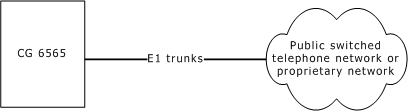
The CG 6565 board up to eight CEPT E1 interfaces. For typical E1 communications, each E1 interface connects directly to an E1 trunk, as shown in the following illustration:
Trunks synchronize when OAM boots the board.
Use a shielded RJ-48C cable to connect a four-trunk CG 6565 board configured as 120 ohm to an E1 trunk. If connecting Trunk 2 or Trunk 3, connect a dual T1/E1 120 ohm adapter cable to one or both MD1 RJ-45 interfaces on the board. Connect shielded RJ-48C cables to the trunk connectors on the splitter cables.
Configure the board as 75 ohm and use an MD1 RJ-45 to BNC adapter cable to connect a four-trunk CG 6565 board.
Configure the board as E1 120 ohm and use a shielded 50-pin Telco cable to connect an eight-trunk CG 6565 board. Connect the Telco cable to either a signal entry panel (SEP) or a punchdown block. Failure to use a shielded cable may negate your regulatory approval.
In EU countries, you can connect the board to either an Integrated Services Digital Network (ISDN), Primary Rate Interface (PRI), or a 2048 kbit/s digital structured or unstructured leased line.
Configure the board as E1 120 ohm and connect a shielded 50-pin Telco cable to a punchdown block. Then connect each RJ48C interface on the punchdown block to a 75 ohm BNC balun to convert the impedance from 120 ohm to 75 ohm.