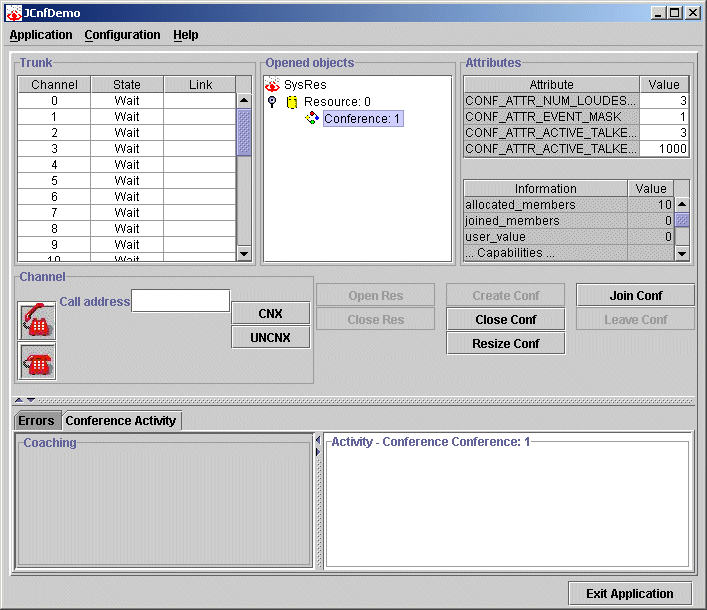
Perform the following steps to create a conference:
Complete the steps for opening a resource.
On the JCnfDemo window, select the resource from the Opened Objects list.
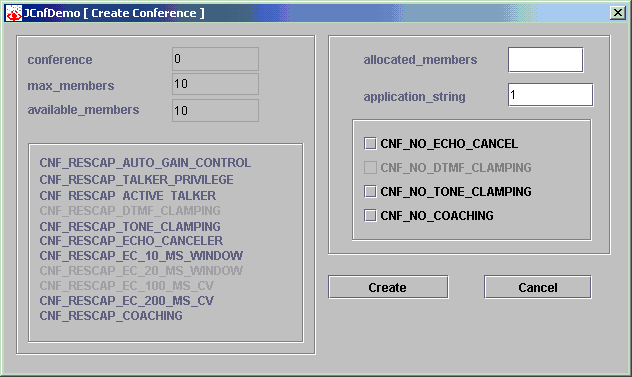
Click Create Conf. The Create Conference dialog box displays:
The Resource section lists the number of conferences running on the resource, the maximum number of members the resource supports, the number of available members, and the resource capabilities.
To enter information for the new conference, complete the fields as described in the following table:
|
Field |
Description |
|---|---|
|
allocated_members |
Enter the number of members to allocate to the conference. |
|
application_string |
Enter a user-defined name for this conference; for example, Conf 1. This name displays in the Opened Objects list on the JCnfdemo main window. |
|
flags |
Lists the capabilities you can disable for this conference. Select a capability to disable it. |
Click Create to create the new conference. The new conference displays in the Opened Objects list on the JCnfDemo window. The conference attributes and information displays in the Attribute and Information boxes.