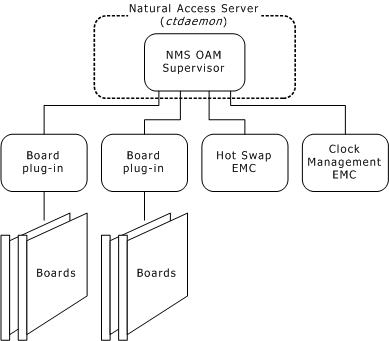
The NMS OAM software includes the following components:
The following illustration shows these components:
The Supervisor provides the main NMS OAM logic. It performs the following tasks:
Loads all board plug-ins and extended management components (EMCs) when it starts up.
Coordinates the activities of the managed components.
Manages a database containing configuration information for the managed components (described in Configuration database).
The NMS OAM Supervisor is an integral part of the Natural Access Server (ctdaemon). To use NMS OAM, Natural Access must be installed on your system and ctdaemon must be running. To learn how to start ctdaemon, refer to the NMS OAM System User's Manual.
NMS OAM communicates with boards through software extensions called board plug-ins, one for each board family. The NMS OAM board plug-ins support the AG, CG, CX, and QX PCI and CompactPCI board models. The board plug-ins do not support TX boards.
When the Supervisor starts up, it loads all plug-ins that it finds on the system. The Supervisor looks for these modules in the nms\bin directory (/opt/nms/lib under UNIX). Plug-in files have the .bpi extension.
EMCs are software modules that add functionality to NMS OAM. NMS OAM provides the following EMCs:
The Hot Swap EMC enables you to insert and extract Hot Swap-compatible CompactPCI boards without powering down the system. Hot Swap capability improves system availability by reducing downtime due to routine configuration changes and board replacements.
The Clock Management EMC configures and manages H.100 and H.110 bus clocking.
When the Supervisor starts up, it loads all EMCs that it finds on the system. The Supervisor looks for these modules in the \nms\bin directory (/opt/nms/lib under UNIX). EMC files have the .emc extension.