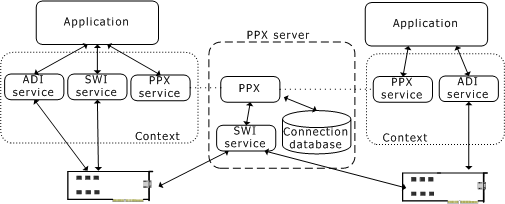
Since the same telephony bus can be used in separate Natural Access applications, the PPX service must be able to manage the bus streams and timeslots across multiple applications. Each instance of the PPX service that is opened on a context runs as a client to a PPX server. The PPX server (ppxserv) manages an internal connection database to determine which timeslots are available on the telephony bus and what connections have been made in the system.
As shown in the following illustration, each application creates a context containing the PPX service, the ADI service, and the SWI service. Opening the PPX service on the context creates an instance of a client to the PPX server. Each PPX client can be a separate process, but it is not required. A unique PPX client can be associated with each thread running in a single process.
All commands sent by the applications to the PPX service are sent by the clients to the PPX server. The PPX server sends the commands to the board using the SWI service functions. Each application does not have to open the SWI service on a context. The PPX server automatically opens an instance of the SWI service.
Before you start up the PPX server:
Start the Natural Access daemon (ctdaemon).
Ensure that the boards are booted (run oamsys).
Ensure that the system switching topology (switch fabric) is defined in the PPX configuration file (ppx.cfg). Refer to Switch configuration overview for details on creating ppx.cfg.
The PPX server must be running while any application using the PPX service is running.
This topic presents information on:
During system development and debugging of ppx.cfg, control the PPX server manually so it can be restarted as needed.
To start the PPX server from the command line, enter:
start ppxserv [options]
where options are:
|
Option |
Description |
Default |
|---|---|---|
|
-f filename |
Specifies the configuration file name. |
\nms\ctacess\cfg\ppx.cfg |
|
-e filename |
Specifies the error log file name. |
\nms\ctaccess\pxerror.log |
|
-d filename |
Specifies the database output file name. |
\nms\ctaccess\ppxdb.log |
|
-l |
Turns on the SWI command logging process. |
OFF |
|
-w number |
Specifies the line number at which the SWI log file will wrap to start. |
2000 |
|
-s filename |
Specifies the SWI command log file name. |
\nms\ctaccess\ppxswi.log |
To stop the PPX server from the command line, enter:
ppxstop
Using the ppxstop command allows the server to terminate any connections it has established and to release communication resources.
Once ppx.cfg is verified, install the PPX server as a Windows service using the ppxservicecfg utility.
Once the PPX server is installed in the Windows registry, run it as follows:
|
Step |
Action |
|
1 |
Select Services from the Control Panel. |
|
2 |
Highlight Point-to-Point Telephony Switching. |
|
3 |
Select Start or Stop to manually start or stop the PPX server. |
|
4 |
Select Startup/Automatic as the startup option to automatically start the PPX server when the system reboots. |
You can control the PPX server from the command line after you install it as a Windows service. Before stopping the PPX server, shut down all client applications to break all switch connections created by the PPX clients.
To start the PPX server from the command line enter:
net start ppx
To stop the PPX server from the command line enter:
ppxstop
To remove the PPX server from Windows services and reset the Windows registry, enter:
ppxservicecfg -remove
Before starting the PPX server, make sure a valid ppx.cfg exists.
Complete the following steps to start the PPX server:
|
Step |
Action | ||||||||||||||||||||||||
|
1 |
Log on as root. | ||||||||||||||||||||||||
|
2 |
Enter the following command: /opt/nms/bin/ppxserv [options] where options are:
|
Before stopping the PPX server, shut down all client applications so that all switch connections created by the PPX clients are automatically broken by the PPX server.
Run the ppxstop utility to terminate any connections the server has established and to release communication resources.
When initialized, the PPX server creates an error log file that records initialization errors and problems associated with the interpretation of ppx.cfg. By default, this error file is located as follows:
|
Operating system |
Directory |
|
Windows |
\nms\ctaccess\ppxerror.log |
|
UNIX |
/var/opt/nms/ctaccess/ppxerror.log |
If the PPX server terminates abnormally, all switch connections it established at that time remain in place. Restarting the PPX server does not clear these underlying switch connections. Use the swish utility to reset the switches.
For example, for an AG 2000 board, start up swish and enter the following command:
openswitch s0 = agsw 0
resetswitch s0
Natural Access applications use the Point-to-Point Switching service to communicate with the PPX server. The communications mechanism is socket based, and the default port number is 1110. If you see PPXERR_COMM_FAILURE in the PPX error log when you start up your Natural Access application, change the port number to an unused port number.
Complete the following steps to change the port number:
|
Step |
Action |
|
1 |
Review your system configuration and determine a new port number to use. |
|
2 |
Set the NMS_PPX_COMM environment variable to the new port number by using the appropriate mechanism for your operating system and shell. |
|
3 |
Restart the PPX server and all applications. |
The Point-to-Point Switching service is a layer of software built on top of the Switching (SWI) service. It uses the following SWI service functions:
swiOpenSwitch
swiMakeConnection
swiDisableOutput
swiSendPattern
swiCloseSwitch
The PPX service can log all SWI service function calls to a PPX log file if you pass an optional parameter (-l) when you start the PPX server. The log includes an error indicator (*) when necessary. The actual value from the SWI service is at the end of the line.
The PPX/SWI log file is located and named as follows:
|
Operating system |
Directory |
|
Windows |
\nms\ctaccess\ppxswi.log |
|
UNIX |
/var/opt/nms/ctaccess/ppxswi.log |
The log file is circular, which prevents excessive use of disk space. By default, the log file contains the last 2000 SWI service calls made by the PPX server. The SWI service calls are time stamped so you can track starting and ending points.
To start the PPX server and enable SWI service logging, start the PPX server from the command line with the argument -l.
To change the default number of SWI log entries stored in the log, start the PPX server from the command line with the following arguments:
-l -w new_value
For example:
To restrict SWI logging to 10,000 entries on a Windows system, enter the following command:
start \nms\bin\ppxserv -l -w 10000
To perform the same modification on a UNIX system:
|
Step |
Action |
|
1 |
Log on as root. |
|
2 |
Start the PPX server in the background by entering: /opt/nms/bin/ppxserv -l -w 10000 -b |
Note: When you restart the PPX server with logging enabled, it overwrites any existing PPX/SWI log files on the system. If you need to preserve your data, save the log file under a different file name before you restart the PPX server.
This section provides an excerpt from a ppxswi.log file. The PPX server internally shares open switch handles among all client instances.
Note: The ret: value that appears on the line marked by an asterisk is the error return value from the Switching service.
Because the log file is circular, the date stamp and the time stamp of each issued command are recorded so you can identify the most recent entries after the file reaches its maximum capacity.
[Fri Jan 22 10:00:20 1999] Switch 0: Handle Opened 0x1
[Fri Jan 22 10:00:20 1999] swiMakeConnect: hd 0x1 LOCAL:0:2 TO LOCAL:5:2
[Fri Jan 22 10:00:20 1999] swiMakeConnect: hd 0x1 LOCAL:4:2 TO LOCAL:1:2
[Fri Jan 22 10:00:20 1999] swiMakeConnect: hd 0x1 LOCAL:2:2 TO LOCAL:7:2
[Fri Jan 22 10:00:20 1999] swiMakeConnect: hd 0x1 LOCAL:6:2 TO LOCAL:3:2
[Fri Jan 22 10:00:20 1999] swiMakeConnect: hd 0x1 LOCAL:0:4 TO LOCAL:5:4
[Fri Jan 22 10:00:20 1999] swiMakeConnect: hd 0x1 LOCAL:4:4 TO LOCAL:1:4
[Fri Jan 22 10:02:44 1999] swiMakeConnect: hd 0x1 LOCAL:0:6 TO LOCAL:5:6
[Fri Jan 22 10:03:09 1999] Switch 1: Handle Opened 0x10002
[Fri Jan 22 10:03:09 1999] swiMakeConnect: hd 0x10002 CTBUS:0:31 TO LOCAL:1:6
[Fri Jan 22 10:03:09 1999] swiMakeConnect: hd 0x1 LOCAL:0:6 TO CTBUS:0:31
[Fri Jan 22 10:03:14 1999] swiMakeConnect: hd 0x10002 CTBUS:0:31 TO LOCAL:1:4
[Fri Jan 22 10:07:47 1999] swiMakeConnect: hd 0x10002 LOCAL:0:0 TO CTBUS:5:0
[Fri Jan 22 10:53:24 1999] swiDisableOutput: hd 0x10002 CTBUS:5:0
[Fri Jan 22 10:54:03 1999] * swiMakeConnect: hd 0x1 LOCAL:8:0 TO CTBUS:8:0
ret: 0x40004