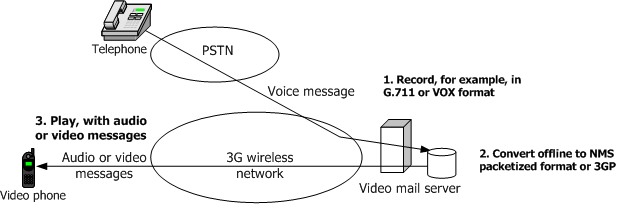
While it is possible to convert between audio formats using the audio transcoding configuration of the Video Messaging Server, it may be necessary to perform offline conversions of pre-recorded audio to 3GP audio. The following illustration shows the offline conversion process:
This topic provides guidelines for using Video Access to complete the following offline conversions:
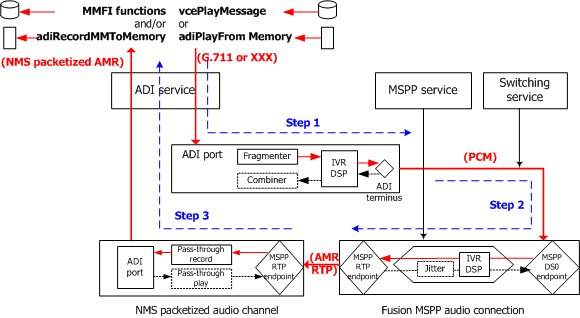
Converting regular voice to 3GP audio uses memory play/record APIs. The following illustration shows these steps:
Step |
Description |
1 |
The voice message is played and decoded with the ADI service or the Voice Message service as if it were played onto a telephone circuit. Assuming the voice message was recorded in an encoding format supported by the ADI service, it can be played back with an ADI service play function (for example, adiPlayFromMemory or adiPlayAsync) or with a Voice Message service play function (for example, vcePlayMessage). In both cases, the play operation is performed on a DSP port of a CG board, which decodes the data and generates a PCM stream. For more information, see the ADI Service Developer's Reference Manual and the Voice Message Service Developer's Reference Manual. |
2 |
The generated PCM stream is re-encoded and packetized into AMR RTP packets with the MSPP service. Instead of switching the output of the decoder onto a T1/E1 timeslot, use the Switching service to switch it to the DS0 endpoint of an MSPP AMR connection (for example, the set of a DS0 endpoint, an AMR channel, and an RTP endpoint). The PCM audio stream is AMR-encoded and RTP-packetized as for a typical Fusion gateway operation. Configure the destination address of the RTP endpoint of that MSPP connection so that packets are sent to the audio RTP endpoint created in Step 3. For more information, see the MSPP Service Developer's Reference Manual and the Switching Service Developer's Reference Manual. |
3 |
The AMR RTP stream is recorded in an NMS packetized format with the ADI service. Create an RTP audio endpoint and configure its source address to receive RTP packets from the MSPP connection previously created. For more information, see Video enhancements to the MSPP service. Record the received AMR RTP stream in the NMS packetized format with adiRecordMMToMemory or adiRecordMMAsync. Use Multimedia File library functions to store the recorded message into a 3GP file. |
Converting 3GP audio to regular voice uses the same path, but in the reverse direction:
Step |
Description |
1 |
The 3GP audio message is played in the NMS packetized format with adiPlayMMFromMemory or adiPlayMMAsync (preceded with calls to Multimedia File library functions, if the message was originally stored in a 3GP file). An AMR RTP stream is generated out of an RTP audio endpoint whose destination IP address is that of the receiving RTP endpoint in Step 2. |
2 |
The AMR RTP stream is received by an MSPP RTP endpoint, decoded through an MSPP AMR channel, and turned into a PCM audio stream out of an MSPP DS0 endpoint. |
3 |
The PCM stream is switched to a DSP port and recorded with an ADI service function or a Voice Message service function using the desired encoding format. |